

If you have ever had the opportunity to learn C or C++, you must be very comfortable with the concepts of Linked List. C# goes further and provides you with a data structure called List. The list data structure is one of the most used data structures in any programming language and it is evident from the fact that every modern language, let it be Java, Python, etc ... supports the List Data Structure. Hence, having the concepts of List in your bag will make you an even ore complete Programmer. There will be various situations where you will love to use lists. Some of them may be:
- Making a Playlist when you make a Media Player Application.
- Making a list of Recipes if you are making a Cooking Application.
- Showing the rows fetched from a Database in the form of a list.
- Showing the products in a list if you make an E-Commerce Application.
- And at many countless places ...
In short, a list is an Abstract Data Type that represents an ordered sequence of values. Some of the operations that you can directly perform on a list in C# are:
- To check whether the list is empty or not.
- To add an item to the list.
- To count the number of items in the list.
- To remove an item from the list at any index (first , last , middle, at any index).
- To sort the items in the list.
- To search for an element in the list.
- To find the average of values/items in the list.
- To remove all the elements of list at once.
- To find the maximum value in a list.
- To find the minimum value of a list.
- To set the capacity of the list (i.e. the number of items it can hold).
- And many other operations (Thanks to C# :) ) .
Let us directly jump to the implementation of the list.
Step 1: Open Visual Studio Professional 2015,

Step 2: Click on New Project, select Console Application and give desired name to the application,
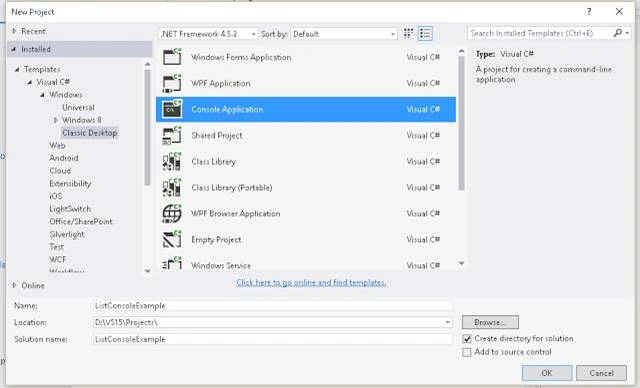
Step 3: Click OK and you will get the following screenshot,
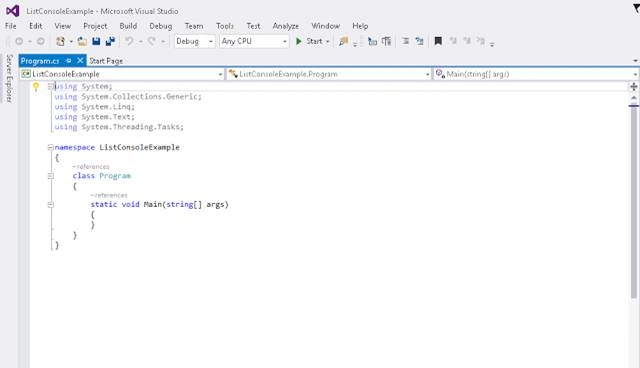
Step 4: The overall implementation or the code should look like the following.
- using System;
- using System.Collections.Generic;
- using System.Linq;
- using System.Text;
- using System.Threading.Tasks;
- namespace ListConsoleExample
- {
- class Program
- {
- static void Main(string[] args)
- {
- // Main Method
- // In this example we will see basic implementation of Data Structure:List
- // using the language C#.
- //Declaring a List of integers
- //(You can make List of other Data Types as you want e.g string,etc..)
- List < int > testList = new List < int > ();
- //Adding elements to the end of List
- Console.WriteLine("Adding elements to the end of list");
- for (int i = 0; i < 6; i++)
- {
- testList.Add(i + 1);
- }
- Console.WriteLine("Adding of Elements to the List is finished");
- // Accessing any element from the list using the index
- Console.WriteLine("Element in List at index 5 is : " + testList[5]);
- Console.WriteLine("Iterating through the List and printing the value");
- for (int i = 0; i < 6; i++)
- {
- Console.WriteLine("Element in List at index " + i + " is : " + testList[i]);
- }
- Console.WriteLine("Iterating through the List is finished");
- // Removing any element from the list using index
- Console.WriteLine("Removing element 3 from the List");
- testList.RemoveAt(3);
- Console.WriteLine("Element at index 3 removed from the List");
- testList.Add(0);
- Console.WriteLine("Before Sorting :");
- foreach(int item in testList)
- {
- Console.WriteLine("The item is : " + item);
- }
- //Sorting the list
- testList.Sort();
- Console.WriteLine("After Sorting :");
- foreach(int item in testList)
- {
- Console.WriteLine("The item is : " + item);
- }
- // Waiting for enter to be pressed by user to prevent the Console Screen from
- // closing automatically
- Console.ReadLine();
- }
- }
- }
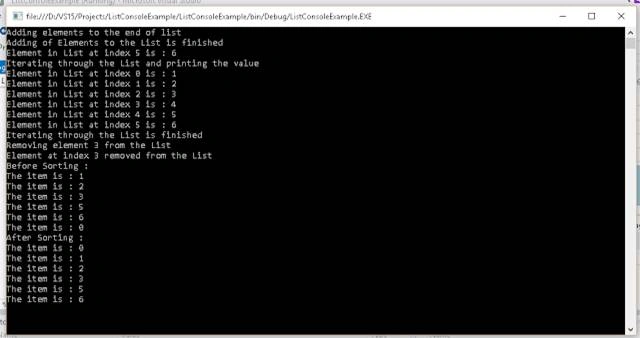
Step 5: The output for the above code should be like the following:
Santhakumar MunuswamyPosted Jan 19, 2016, 3:17 PM
Welcome
Santhakumar MunuswamyPosted Jan 19, 2016, 3:17 PM
Good Start
Saillesh PawarPosted Jan 19, 2016, 10:15 AM
nice explantation
Vipul MalhotraPosted Jan 19, 2016, 8:50 AM
nice
Jaipal ReddyPosted Jan 19, 2016, 1:19 AM
Welcome to csharpcorner . .
Gowtham KPosted Jan 18, 2016, 11:04 AM
Good One
Maruthi PalllamalliPosted Jan 18, 2016, 11:03 AM
Sorry to say this Saurabh, This is not a linked list. List is kind of collection to provide contigous memory allocation. We dont have any nodes to this list.
Pankaj Kumar ChoudharyPosted Jan 18, 2016, 10:15 AM
Nice Start ...........
Mohammed IbrahimPosted Jan 18, 2016, 8:58 AM
nice
Raja TPosted Jan 18, 2016, 7:03 AM
Nice,Thanks for sharing
Ehsan SajjadPosted Jan 18, 2016, 5:35 AM
Good for beginners
Debasis SahaPosted Jan 18, 2016, 4:09 AM
Nice One..
Ankur MistryPosted Jan 18, 2016, 1:31 AM
Good start, thanks for sharing