

Hi Everyone, Today, we will understand the concept of Rate limiting. To Follow the REST Standard guidelines for API development, check out this blog REST API Standards for Effective API Development in .NET.
Introduction
Rate limiting is a crucial technique in web development to control the number of requests a client can make to an API within a specified time frame. This helps prevent abuse, ensure fair usage, and protect server resources. In this article, we'll explore how to implement rate limiting in a REST API using .NET 8 Web API.
Rate limiting helps manage traffic and ensure that no single client can overwhelm the server. It can be implemented in various ways.
- Per-IP Rate Limiting: Limits the number of requests from a single IP address.
- Per-User Rate Limiting: Limits the number of requests per authenticated user.
- Global Rate Limiting: Limits the total number of requests to the API, regardless of the client.
Not. In this article, we will focus on Per- per-IP rate Limiting implementation.
Setting up a .NET 8 Web API Project
First, create a new .NET 8 Web API project.
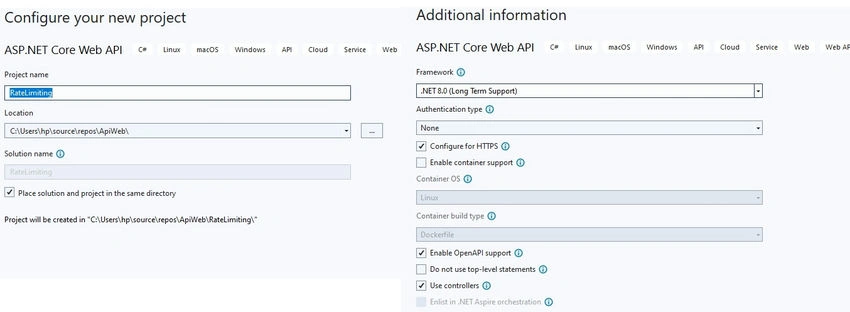
Adding Rate Limiting Middleware
To implement rate limiting, we'll create a custom middleware. Middleware in ASP.NET Core allows us to inspect and modify requests and responses.
Creating the Middleware: Create a new class called RateLimitingMiddleware.cs
using Microsoft.AspNetCore.Http;
using System.Collections.Concurrent;
using System.Threading.Tasks;
namespace RateLimiting
{
    public class RateLimitingMiddleware
    {
        private readonly RequestDelegate _next;
        private static readonly ConcurrentDictionary<string, RequestLog> _requestLogs = new();
        public RateLimitingMiddleware(RequestDelegate next)
        {
            _next = next;
        }
        public async Task InvokeAsync(HttpContext context)
        {
            var ipAddress = context.Connection.RemoteIpAddress.ToString();
            var now = DateTime.UtcNow;
            var requestLog = _requestLogs.GetOrAdd(ipAddress, new RequestLog());
            lock (requestLog)
            {
                requestLog.Requests.Enqueue(now);
                while (requestLog.Requests.Count > 0 && (now - requestLog.Requests.Peek()).TotalSeconds > 60)
                {
                    requestLog.Requests.Dequeue();
                }
                if (requestLog.Requests.Count > 10)
                {
                    context.Response.StatusCode = StatusCodes.Status429TooManyRequests;
                    context.Response.WriteAsync("Rate limit exceeded");
                    return;
                }
            }
            await _next(context);
        }
    }
    public class RequestLog
    {
        public Queue<DateTime> Requests { get; } = new();
    }

}
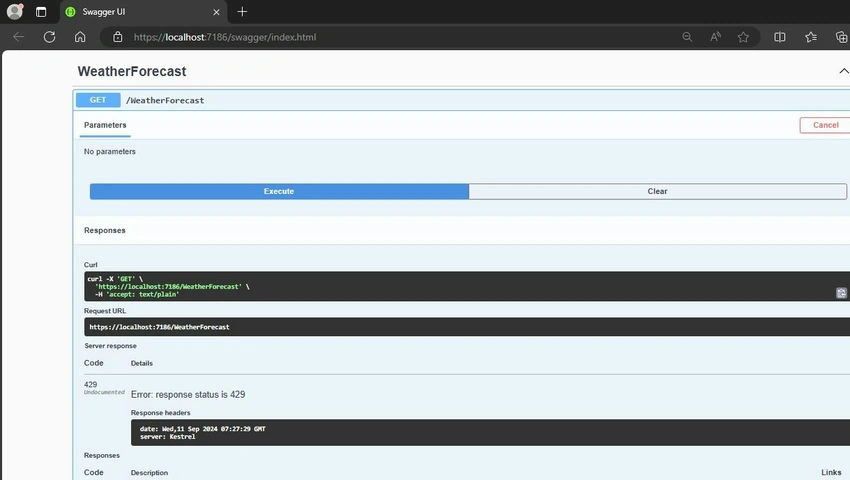
In this middleware, we keep track of each IP address’s request history using a queue. We enforce a limit of 10 requests per minute per IP address.
Registering the Middleware: In the Program.cs file, add the middleware to the pipeline.
using RateLimiting;
var builder = WebApplication.CreateBuilder(args);

// Add services to the container.
builder.Services.AddControllers();
// Learn more about configuring Swagger/OpenAPI at https://aka.ms/aspnetcore/swashbuckle
builder.Services.AddEndpointsApiExplorer();
builder.Services.AddSwaggerGen();
var app = builder.Build();
// Configure the HTTP request pipeline.
if (app.Environment.IsDevelopment())
{
    app.UseSwagger();
    app.UseSwaggerUI();
}
app.UseMiddleware<RateLimitingMiddleware>();
app.UseHttpsRedirection();
app.UseAuthorization();
app.MapControllers();
app.Run();
Join the conversation! Your thoughts help the community grow.