

Introduction
These days we are creating many WCF services in our project. The main purpose of WCF is to provide network-distributed services. It can access the outside world, anybody can use our service.
Online identity theft, fraud and privacy concerns are rising. So we need to make our WCF service secure. Let's explain some security components in WCF before we implement.
Security modes in a WCF service
In security mode WCF makes a secure communication channel, encrypting messages when communicating with clients. The following are the security modes.
Message security mode: In this mode the message will be encrypted and pass over a non-secure channel so that nobody can read the message.
Transport security mode: In this mode the communication channel will be encrypted and also provide integrity, privacy and so on.
Mixed transfer security mode: This mode provides transport security for message privacy and it uses message security for secure credentials.
Both security mode: This mode uses both transport and message security. So the message will be encrypted using message security and will pass over a secure channel using transport security. It provides more security than others but it degrades performance.
Authentications in WCF service: In authentication process WCF verifies the caller (who calls the services) and checks whether they are authorized or not to get the service.
Windows authentication: In this mode the caller must provide his/her Windows credential for authentication.
Username/Password: In this mode the caller must provide username and password for authentication.
X509 certificates: In this mode the caller must send certificate information and the service will check whether the certificate is valid.
Custom mechanism: In this mode the user must use their own protocol and credentials type instead of built-in authentication.
Issue token: In this mode both the caller and the service rely on a secure token service to issue the client a token for the service identity. It uses a Windows card space.
No authentication: WCF service doesn't implement any authentication in this mode.
This article explains username/password authentication with mixed security mode. Please use the following procedure.
Step 1
First create a WCF service library in Visual Studio.
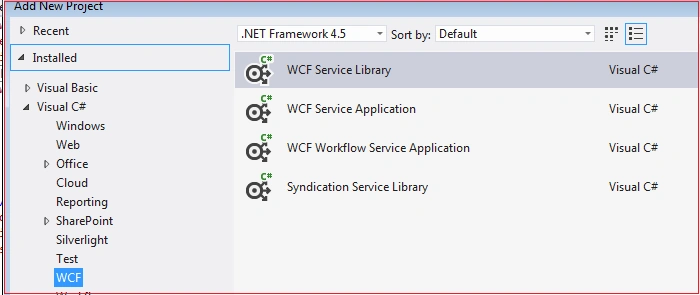
Figure 1: Create a WCF Service
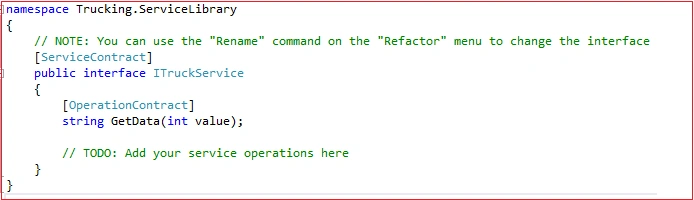
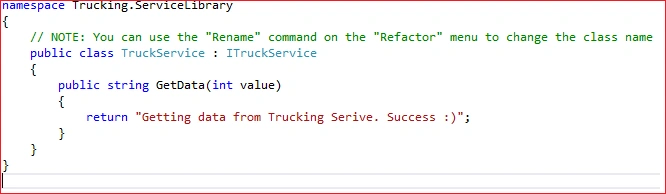
Add two class files, one for interface (ITruckService.cs) and another one (TruckService.cs) for implementing the interface. See the following image.
Code for Interface



Arjun DhilodPosted Sep 8, 2021, 2:48 PM
This is correct command as per per today system makecert.exe -ir CurrentUser -ss My -a sha1 -h CN=KSO.WCFService -sky exchange
Arjun DhilodPosted Sep 8, 2021, 2:37 PM
Makecert.exe -sr CurrentUser -ss My -a shal -n CN=KSO.WCFService -sky exchange -pe this command is not working
Mouni KumarPosted Jun 7, 2019, 1:37 AM
ThanQ bro.. this article made me a beginner in WCF.
masoud FPosted Apr 5, 2019, 2:50 PM
Thanks for your tutorial, I do same as your article and then host my service in IIS and enable Basic Authentication and disable Anonymous Authentication. but when I brows my service URL from browser Username Password dialog appears but when I enter correct user/pass nothing happened and User/Pass dialog appears again and again. what is the problem? thanks...
Ashish ShuklaPosted Jan 9, 2019, 5:27 AM
Same solution is not working? Does it require the certificate details?
Elvis MesiasPosted Jul 21, 2018, 1:45 AM
Very good.
ahmad ahsanPosted May 24, 2018, 2:51 AM
Hi, Great Article. Can we use ntlm authentication? can you please any example code for this approach also? thanks.
MalaPosted Dec 11, 2017, 9:46 PM
Hi , I am getting error while browsing the svc in browser : Could not find a base address that matches scheme https for the endpoint with binding WSHttpBinding. Registered base address schemes are [http].
Rohit JayakumarPosted Sep 1, 2017, 2:08 AM
Very useful article and thanks
vito baccaroPosted Dec 3, 2016, 3:03 PM
Useless article written in half
Muneer JaniPosted Aug 16, 2016, 1:58 PM
Could you please provide the source code
Praveen KPosted Aug 4, 2016, 5:13 AM
Add the below tag in the config file <serviceCertificate findValue="tempCert" storeLocation="LocalMachine" x509FindType="FindBySubjectName" storeName="My"/> U can generate the certificate as mentioned in the link - https://msdn.microsoft.com/en-us/library/ff647171.aspx
Praveen KPosted Aug 4, 2016, 5:12 AM
Need to add the Certificate details since we are using "<message clientCredentialType="UserName"/>" Otherwise it throws "Channel dispather error"
Joginder BangerPosted Aug 1, 2016, 6:55 AM
Good job sir
ritesh guptaPosted Apr 22, 2016, 2:55 AM
not working .giving the error as : The HTTP request is unauthorized with client authentication scheme 'Anonymous'. The authentication header received from the server was 'Negotiate,NTLM'.
Sonu ChaudharyPosted Apr 4, 2016, 12:52 PM
good one share
zr.roman zr.romanPosted Feb 4, 2016, 8:37 AM
In "Edit Bindings...". port 80 (plain HTTP) exists, but it is the only one there. "SSL Settings" feature is disabled at all, IIS says: "The site does not have a secure binding (HTTPS) and cannot accept SSL connections".
Manas MohapatraPosted Feb 4, 2016, 6:45 AM
It looks like it is in as SSL(https). Right click the web site instance and choose "Edit Bindings...". you will see port 80 (plain HTTP) listed there? Also check the "SSL Settings" feature to make sure the "Always require" option is not turned on.
zr.roman zr.romanPosted Feb 4, 2016, 5:43 AM
Coud you please help, I configured Web.config file as described in article, but got an error: "could not find a base address that matches scheme https for the endpoint with binding WSHttpBinding" What reason can be for that?
Akash MalhotraPosted Dec 7, 2015, 5:57 AM
Nice article
SharadPosted Jul 22, 2015, 5:52 AM
good one
Santhakumar MunuswamyPosted Jul 11, 2015, 3:03 AM
Nice article! Thanks for sharing
Narasimha Reddy ChennupalliPosted Jul 10, 2015, 9:55 AM
Nice one..
Gowtham RajamanickamPosted Jul 10, 2015, 5:04 AM
Good one..
Debasis SahaPosted Jul 10, 2015, 4:56 AM
Good One..
Sibeesh VenuPosted Jul 10, 2015, 4:50 AM
God one.
Manas MohapatraPosted Jul 10, 2015, 3:27 AM
Pranay, I used username/password authentication mode. Then I implement own logic to validate username and password which is ServiceAuthenticator.cs in Figure4.
Pranay RanaPosted Jul 10, 2015, 3:21 AM
Thanks for information ...so Your making use of Custom authentication mode ..am I correct ?
Nilesh JadavPosted Jul 10, 2015, 12:05 AM
Nice article sir