

It's important to understand the concept of Equals() in C# to get the desired output. When I started programming, sometimes when I tried to check whether or not two objects are equal, surprisingly I used to get the wrong output. Then I spent a little time on the concept and finally got to understand why I had reviously gotten the wrong output.
Let's say we have the following two strings:
- string first = "Arun";
- string second = "Arun";
- Console.WriteLine(first == second);
- Console.WriteLine(first.Equals(second));
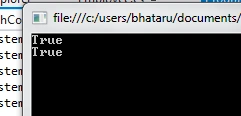
This process is true for all data types like int, double and so on. Now you might ask, where is the problem?
The Problem
The real problem occurs when we do the same operation to check whether two “custom” objects are equal or not. Let's elaborate this with an example. Say, we have an Employee class as follows:
- public class Employee
- {
- public string Name { get; set; }
- public int Age { get; set; }
- public double Salary { get; set; }
- Employee(string name, int age, double sal)
- {
- Name = name;
- Age = age;
- Salary = sal;
- }
- public List<Employee> GetEmployees()
- {
- var employeeList = new List<Employee>();
- employeeList.Add(new Employee("Arunava", 29, 25000));
- employeeList.Add(new Employee("Aamir", 56, 50000));
- employeeList.Add(new Employee("Santanu", 78, 39000));
- employeeList.Add(new Employee("Bubu", 67, 40000));
- return employeeList;
- }
- }
- static void Main(string[] args)
- {
- var employeeList = Employee.GetEmployees();
- var checkEmployee = new Employee("Arunava", 29, 25000);
- Console.WriteLine(employeeList.Contains(checkEmployee));
- Console.ReadLine();
- }
The “checkEmployee” is definitely present there in “employeeList”, but we get the output as:
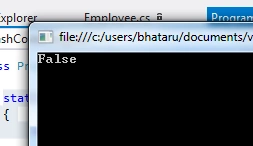
Surprising. Isn't it?
Solution
Nothing is wrong with your assumption. How does the computer (in other words, the complier) know that you meant to determine whether the objects are equal with the Name, Age and Salary are same? What if, somebody says, the objects are equal if their names are the same? Another guy might say, no, I will accept that the objects are equal if the Name and Age are the same. So, C# left it to the user to define the equality condition. And guess what, you can use the Equals() method to define the condition.
Implementing Equals()
There are guidelines to see how to implement the Equals method in MSDN: https://msdn.microsoft.com/en-us/library/ms173147.aspx
Generally, whenever I create a custom class and I know that I need to do an Equality check I implement Equals() and also keep GethashCode() and operator == in sync as well. This is how I implemented my Equality check for the class of this example:
- public override bool Equals(object second)
- {
- return Equals(second as Employee);
- }
- public virtual bool Equals(Employee second)
- {
- if (second == null) { return false; }
- if (object.ReferenceEquals(this, second)) { return true; }
- return ((this.Name == second.Name) && (this.Salary == second.Salary) && (this.Age == second.Age));
- }
- public override int GetHashCode()
- {
- return this.Age;
- }
- public static bool operator ==(Employee item1, Employee item2)
- {
- if (object.ReferenceEquals(item1, item2)) { return true; }
- if ((object)item1 == null || (object)item2 == null) { return false; }
- return ((item1.Name == item2.Name) && (item1.Salary == item2.Salary) && (item1.Age == item2.Age));
- }
- public static bool operator !=(Employee item1, Employee item2)
- {
- return ((item1.Name == item2.Name) && (item1.Salary == item2.Salary) && (item1.Age == item2.Age));
- }
After implementing this, if we run the same code we get our desired output:
- var employeeList = Employee.GetEmployees();
- var checkEmployee = new Employee("Arunava", 29, 25000);
- Console.WriteLine(employeeList.Contains(checkEmployee));
- Console.ReadLine();

So remember, whenever you have a condition to check the Equality between objects, don't forget to correctly implement Equals() and HashCodes(). Why did the Sting at the beginning provide the correct result earlier? Well, those classes have already implemented Equals() and HashCode().
Enjoy coding.
Arunava BhattacharjeePosted Apr 9, 2015, 11:07 PM
Thanks all for your feedbacks :)
Sanjay SinghPosted Apr 9, 2015, 2:24 PM
nice one
Afzaal Ahmad ZeeshanPosted Apr 9, 2015, 11:36 AM
Good one, but missed the most important part. You had to include, and say, that .Equals function returns true if both of the "objects" reference the same address, you can take the example of two strings. They are equal only if they refer to the object at the same location; array of characters. So, this was the most important part of the Equals (or equality check stuff). Secondly, Equals is used in custom objects, because in the primitive objects it is already overloaded with operator ==, so when you use it, it uses the same mechanism and gives you an output of whether both objects refer to same memory location or not. Adding this information would make your article more easy to be understood. I hope you don't take my comment seriously. Thanks.
Santhakumar MunuswamyPosted Apr 9, 2015, 10:11 AM
Very nice
Gowtham RajamanickamPosted Apr 9, 2015, 8:44 AM
keep it up
Gowtham RajamanickamPosted Apr 9, 2015, 8:44 AM
easy to learn
Gowtham RajamanickamPosted Apr 9, 2015, 8:43 AM
good
Arunava BhattacharjeePosted Apr 9, 2015, 8:04 AM
if you know this concept, you will face no hard time with LINQ operations :)
Arunava BhattacharjeePosted Apr 9, 2015, 8:03 AM
thanks manish
manish tiwariPosted Apr 9, 2015, 8:02 AM
good concpt