

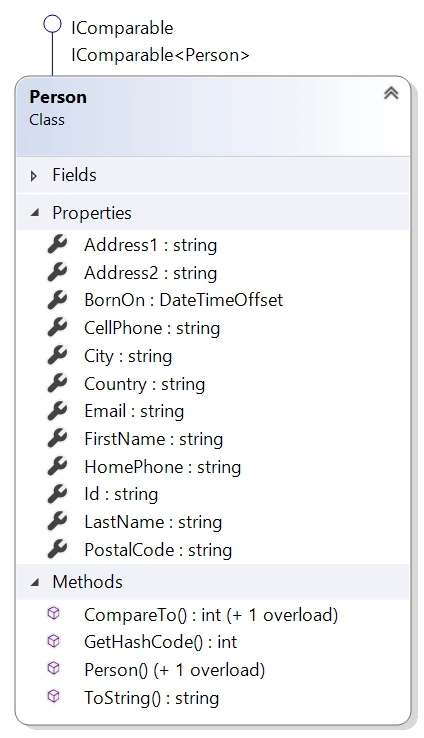
In part 1 of this series, I discussed building model classes properly with Object-Oriented Programming (OOP), specifically encapsulation that must include data validation. In this article, I’m going to show you constructors, interfaces and more that you should implement for your model classes. We will build upon the Person.cs type from part 1 and end up with a new Person type as shown to the right. Some of what I will show can speed up the performance of Person during sorting.
Constructors
Types in .NET require a constructor so that they can be created. When a class is created using Visual Studio, it does not add it (for some reason). If you don’t implement one, then the compiler will add an empty constructor for you during the build process. This is called the “magic constructor”, since it’s added for you. If you want to use a constructor to set data, then that can be done like this.
- public Person(string id, string email)
- {
- Email = email;
- Id = id;
- }
My rule for constructors is that the data being set is required for the type. For Person, I am making Id and Email required. I also use this for other types of classes such as data context classes where the connection string is required.
I’d like to point out that I am using the properties to set the data, not directly setting the private fields. This way the data set in the constructor goes through the same validation as outside code setting the properties.
When you create a constructor like this, the compiler won’t add the “magic constructor” anymore. The empty constructor is required for serialization. You need to add it yourself like this.
- /// <summary>
- /// Initializes a new instance of the
- /// <see cref="T:Article2.Person"/> class.
- /// </summary>
- public Person()
- {}
If this empty constructor is not added, then deserialization for the type will not work. I never add constructors to make it easy for someone to set data. Since we now have object initialization in .NET, there isn’t’ a reason to. Here is an example.
- var person = new Person("ASODIDADLVOD109A", "[email protected]")
- {
- FirstName = "David",
- LastName = "McCarter"
- };
When I design types like this, I want to require users of the type to send in the email address and id and not use the empty constructor. There is a way to hide from Intellisense, the empty constructor like this.
- [EditorBrowsable(EditorBrowsableState.Never)]
- public Person()
- {}
Using the EditorBrowsable attribute will hide the constructor, or any other method, from types outside of the assembly that the model is located in.
By default, when objects are compared in .NET, reflection is used, which can affect the performance of that type. The next three topics will tackle this issue. Make sure to benchmark the performance of your type.
Implementing IComparable & IComparable<>
To make the ordering of object better, it’s recommended to implement the IComparable and IComparable<> interfaces. Now the definition of the type looks like this.
- public class Person : IEquatable<Person>, IComparable,
- IComparable<Person>
For Person, I am implementing the two methods like this.


Sergio TerenasPosted Sep 8, 2019, 7:50 PM
Great tips David, well done!