

This article explains how to use the partial view and AjaxBegin Form to load data without a page reference. I have explained how to insert and list code. See the following procedure.
Step 1
First create the database and create a table depending on you needs.
Step 2
Create an Entity Data Model from the database. This is explained in detail in my previous blog.
Step 3
First you create a controller with the name “InformationController” in the controller folder.
Step 4
In the controller you need to create an Action method. This is the get method.
- public ActionResult AddInformation()
- {
- ViewBag.CountryList = _datacontax.Countries.ToList().Select(s => new SelectListItem { Text=s.CountryName,Value=s.CountryName});
- ViewBag.StateList = _datacontax.States.ToList().Select(s => new SelectListItem {Text=s.StateName,Value=s.StateName });
- ViewBag.CityList = _datacontax.Cities.ToList().Select(s => new SelectListItem {Text=s.CityName,Value=s.CityName});
- return View();
- }
Step 5
Create an "AddInformation.chtml" view. Right-click on the Action method and Add View.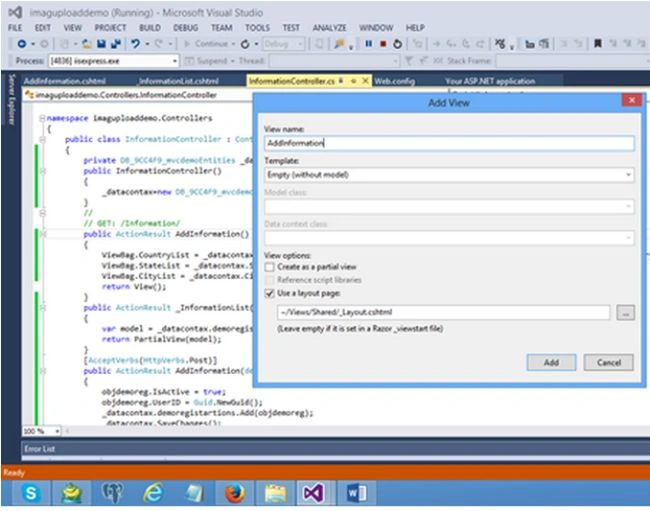
Step 6
Now write the code in the View as in the following. You need to provide the namespace as in the following.
- @model imaguploaddemo.Models.demoregistartion
- @{
- ViewBag.Title = "AddInformation";
- Layout = "~/Views/Shared/_Layout.cshtml";
- }
- @using (Ajax.BeginForm("AddInformation", "Information", new AjaxOptions { UpdateTargetId = "InformationAjaxList", HttpMethod = "POST", InsertionMode = InsertionMode.Replace, OnSuccess = "ClearAll();" }, new { @class = "form-horizontal" }))
- {
- @Html.AntiForgeryToken()
- <h4>Create a new account.</h4>
- <hr />
- @Html.ValidationSummary()
- <div class="form-group">
- @Html.LabelFor(m => m.FirstName, new { @class = "col-md-2 control-label" })
- <div class="col-md-10">
- @Html.TextBoxFor(m => m.FirstName, new { @class = "form-control" })
- @Html.ValidationMessageFor(model => model.FirstName, "", new { @style = "color:red;" })
- </div>
- </div>
- <div class="form-group">
- @Html.LabelFor(m => m.LastName, new { @class = "col-md-2 control-label" })
- <div class="col-md-10">
- @Html.TextBoxFor(m => m.LastName, new { @class = "form-control" })
- </div>
- </div>
- <div class="form-group">
- @Html.LabelFor(m => m.UserName, new { @class = "col-md-2 control-label" })
- <div class="col-md-10">
- @Html.TextBoxFor(m => m.UserName, new { @class = "form-control" })
- @Html.ValidationMessageFor(model => model.FirstName, "", new { @style = "color:red;" })
- </div>
- </div>
- <div class="form-group">
- @Html.LabelFor(m => m.Password, new { @class = "col-md-2 control-label" })
- <div class="col-md-10">
- @Html.PasswordFor(m => m.Password, new { @class = "form-control" })
- @Html.ValidationMessageFor(model => model.FirstName, "", new { @style = "color:red;" })
- </div>
- </div>
- <div class="form-group">
- @Html.LabelFor(m => m.EmailID, new { @class = "col-md-2 control-label" })
- <div class="col-md-10">
- @Html.TextBoxFor(m => m.EmailID, new { @class = "form-control" })
- @Html.ValidationMessageFor(model => model.FirstName, "", new { @style = "color:red;" })
- </div>
- </div>
- <div class="form-group">
- @Html.LabelFor(m => m.Gender, new { @class = "col-md-2 control-label" })
- <div class="col-md-10">
- @Html.RadioButtonFor(model => model.Gender, "Male") Male
- @Html.RadioButtonFor(model => model.Gender, "Female") Female
- @Html.ValidationMessageFor(model => model.Gender, "", new { @style = "color:red;" })
- </div>
- </div>
- <div class="form-group">
- @Html.LabelFor(m => m.Country, new { @class = "col-md-2 control-label" })
- <div class="col-md-10">
- @Html.DropDownListFor(m => m.Country, (IEnumerable<SelectListItem>)ViewBag.CountryList, "Select", new { @id = "ddlCountry" })
- @Html.ValidationMessageFor(model => model.Country, "", new { @style = "color:red;" })
- </div>
- </div>
- <div class="form-group">
- @Html.LabelFor(m => m.State, new { @class = "col-md-2 control-label" })
- <div class="col-md-10">
- @Html.DropDownListFor(m => m.State, (IEnumerable<SelectListItem>)ViewBag.StateList, "Select", new { @id = "ddlState" })
- @Html.ValidationMessageFor(model => model.State, "", new { @style = "color:red;" })
- </div>
- </div>
- <div class="form-group">
- @Html.LabelFor(m => m.City, new { @class = "col-md-2 control-label" })
- <div class="col-md-10">
- @Html.DropDownListFor(m => m.City, (IEnumerable<SelectListItem>)ViewBag.CityList, "Select", new { @id = "ddlCity" })
- @Html.ValidationMessageFor(model => model.City, "", new { @style = "color:red;" })
- </div>
- </div>
- <div class="form-group">
- @Html.LabelFor(m => m.Hobby, new { @class = "col-md-2 control-label" })
- <div class="col-md-10">
- @Html.TextBoxFor(m => m.Hobby, new { @class = "form-control" })
- @Html.ValidationMessageFor(model => model.Hobby, "", new { @style = "color:red;" })
- </div>
- </div>
- <div class="form-group">
- <div class="col-md-offset-2 col-md-10">
- <input type="submit" class="btn btn-default" value="Register" />
- </div>
- </div>
- }
- <div id="InformationAjaxList">
- @Html.Action("_InformationList")
- </div>
- @section Scripts {
- <script src="~/Scripts/jquery.unobtrusive-ajax.js"></script>
- @Scripts.Render("~/bundles/jqueryval")
- <script>
- function ClearAll()
- {
- $("#FirstName").val('')
- $("#LastName").val('')
- $("#UserName").val('')
- $("#Password").val('')
- $("#EmailID").val('')
- $("#Gender").val('')
- $("#Country").val('')
- $("#State").val('')
- $("#City").val('')
- $("#Hobby").val('')
- }
- </script>
- }
The following code is for the partial view. You need to create a partial view. Before creating the partial view you need to write an action method as in the following:
- public ActionResult _InformationList()
- {
- var model = _datacontax.demoregistartions.ToList();
- return PartialView(model);
- }
I have the following code in "AddInformation.cshtml".
- public ActionResult _InformationList()
- {
- var model = _datacontax.demoregistartions.ToList();
- return PartialView(model);
- }
Write the following code in the Partial view. This is for the listing information.
- @model IEnumerable<imaguploaddemo.Models.demoregistartion>
- <div class="panel-body">
- <div>
- <a href="/FormInformation/FormInformation">Add Form Detail</a>
- </div>
- <table class=" table-bordered table-responsive">
- <tr>
- <th>First Name</th>
- <th>Last Name</th>
- <th>Email ID</th>
- </tr>
- @foreach (var v in Model)
- {
- <tr>
- <td>@v.FirstName</td>
- <td>@v.LastName</td>
- <td>@v.EmailID</td>
- <td>
- <a href="/Registration/[email protected]">Edit</a>
- <a href="/Registration/[email protected]">Delete</a>
- </td>
- </tr>
- }
- </table>
- </div>
Write the Action method for the post.
- [AcceptVerbs(HttpVerbs.Post)]
- public ActionResult AddInformation(demoregistartion objdemoreg)
- {
- objdemoreg.IsActive = true;
- objdemoreg.UserID = Guid.NewGuid();
- _datacontax.demoregistartions.Add(objdemoreg);
- _datacontax.SaveChanges();
- return RedirectToAction("_InformationList");
- }
The following is the full code of the controller.
- using System;
- using System.Collections.Generic;
- using System.Linq;
- using System.Web;
- using System.Web.Mvc;
- using imaguploaddemo.Models;
- namespace imaguploaddemo.Controllers
- {
- public class InformationController : Controller
- {
- private DB_9CC4F9_mvcdemoEntities _datacontax;
- public InformationController()
- {
- _datacontax=new DB_9CC4F9_mvcdemoEntities();
- }
- //
- // GET: /Information/
- public ActionResult AddInformation()
- {
- ViewBag.CountryList = _datacontax.Countries.ToList().Select(s => new SelectListItem { Text=s.CountryName,Value=s.CountryName});
- ViewBag.StateList = _datacontax.States.ToList().Select(s => new SelectListItem {Text=s.StateName,Value=s.StateName });
- ViewBag.CityList = _datacontax.Cities.ToList().Select(s => new SelectListItem {Text=s.CityName,Value=s.CityName});
- return View();
- }
- public ActionResult _InformationList()
- {
- var model = _datacontax.demoregistartions.ToList();
- return PartialView(model);
- }
- [AcceptVerbs(HttpVerbs.Post)]
- public ActionResult AddInformation(demoregistartion objdemoreg)
- {
- objdemoreg.IsActive = true;
- objdemoreg.UserID = Guid.NewGuid();
- _datacontax.demoregistartions.Add(objdemoreg);
- _datacontax.SaveChanges();
- return RedirectToAction("_InformationList");
- }
- }
- }
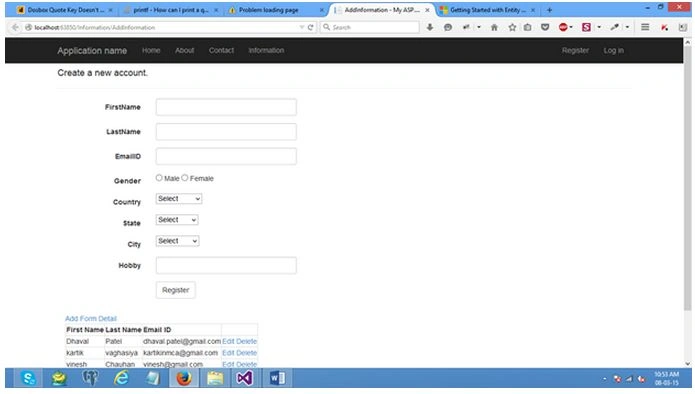
Run the code. The following page displays.
RakeshPosted Aug 4, 2015, 2:14 PM
Good one
Rajeesh MenothPosted Aug 4, 2015, 5:30 AM
Good One
Sibeesh VenuPosted Aug 4, 2015, 1:39 AM
Nice Share...
Atul RawatPosted Aug 4, 2015, 1:35 AM
nice article sir
Gopi ChandPosted Aug 4, 2015, 1:09 AM
Nice work
Debasis SahaPosted Aug 4, 2015, 12:52 AM
Good One...
Kartik VaghasiyaPosted Aug 4, 2015, 12:41 AM
Always welcome guys....
Nilesh JadavPosted Aug 4, 2015, 12:12 AM
Nice one sir
Chervine BhiwooPosted Aug 3, 2015, 11:21 PM
Nice. Thanks!
Pankaj Kumar ChoudharyPosted Aug 3, 2015, 9:20 PM
Again a nice explain Kartik Sir.......