

Introduction
In the previous article you saw how to insert a value from a textbox into a MySQL database in PHP. In this article you will see how to insert a value from a radio button into a MySQL database using PHP.
First of all, we will create a database and table. The code for creating the database and table are as follows:
Create Database
- <?php
- $con = mysql_connect("localhost","root","");
- if (!$con)
- {
- die('Could not connect: ' . mysql_error());
- }
- if (mysql_query("CREATE DATABASE ABC",$con))
- {
- echo "Your Database created !!";
- }
- else
- {
- echo "Error creating database: " . mysql_error();
- }
- mysql_close($con);
- ?>
- <?php
- $con = mysql_connect ("localhost","root","");
- if (!$con)
- {
- die ('Could not connect: ' . mysql_error());
- }
- mysql_select_db ("ABC", $con);
- $sql = "CREATE TABLE employee
- (
- name VARCHAR( 50 ) ,
- sex VARCHAR( 50 ) ,
- )";
- mysql_query($sql,$con);
- echo "Your Table Created !!";
- mysql_close($con);
- ?>
Code
- <?php
- $con = mysql_connect("localhost","root","");
- mysql_select_db("ABC", $con);
- @$a=$_POST['name'];
- @$b=$_POST['sex'];
- if(@$_POST['submit'])
- {
- echo $s="insert into employee(name,sex) values('$a','$b')";
- echo "Your Data Inserted";
- mysql_query($s);
- }
- ?>
- <html>
- <body bgcolor="pink">
- <center>
- <form method="post">
- <table border="1" bgcolor="#00CCFF">
- <tr><td>Name</td>
- <td><input type="text" name="name"/></td>
- </tr>
- <tr><td rowspan="2">Sex</td>
- <td><input type="radio" name="sex" value="Male"/>Male</td>
- <tr>
- <td><input type="radio" name="sex" value="Female"/>Female</td></tr>
- </tr>
- <tr><td><input type="submit" name="submit" value="Submit"/></td></tr>
- </table>
- </form>
- </center>
- </body>
- </html>
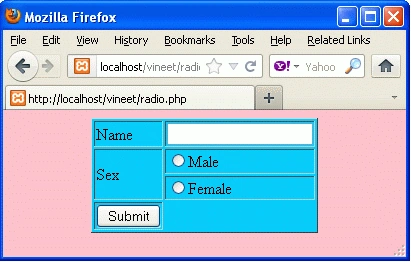


When you click on the submit button then the value of the name and sex fields will be in the MySQL database. As in the following image.

Conclusion
So in this article, you saw how to insert a value from a radio button into a MySQL database using PHP. Using this article one can easily understand the use of radio buttons in PHP.
Some Helpful Resources
Viral JoshiPosted Jun 4, 2019, 2:27 PM
Is value property needed in radio button while storing the data in database php myadmin and what should be the type we can define while creating the table in database PHP MySQL
Luis MuzquizeditedPosted Oct 15, 2012, 11:05 PMEdited Oct 15, 2012, 11:09 PM
This was exactly what i needed. Following your example i have done this: http://capricciosas.espritwebdesign.com/970/encuesta1.php Very cool Only one thing: The form Its allready working but now i have the issue that if i click the submit button and did not checked all radio buttons the results are sent anyway. Which i dont want to happen. I want the results to be sent to the mysql database ONLY if every single radio button is checked. Do you know how to do that using javascript? Thanks you very much for your help!!!