
The GridView was not designed to insert new rows, but there is a way to accomplish this with very little code.
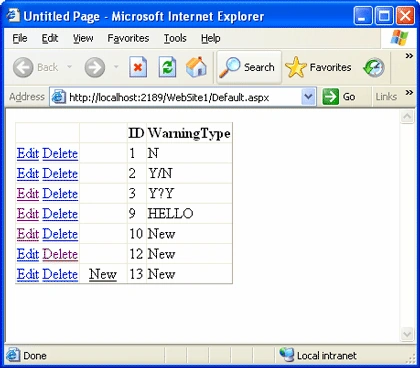
- The first step is to add your data source and the DataView Grid. Ensure that your SqlDataSource statements or stored procedures in the:
- Select Command
- Insert Command
- My stored procedure just adds a new row and initializes to new or zero
- Update Command
- Delete Command
- Bind the DataView Grid to the SqlDataSource
- Edit the fields adding the following
- CommandField, enable the Edit and Delete, and disable the insert
- TemplateField
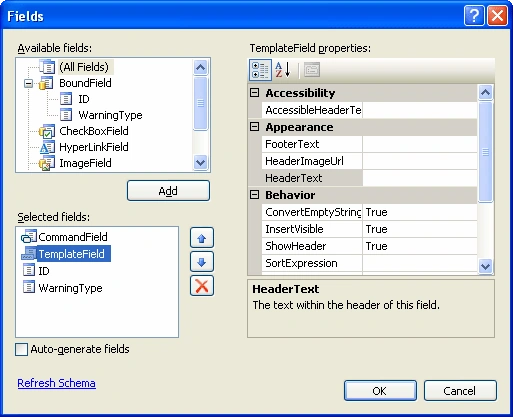
- In the UI source code, I inserted the Item Template as follows:
- <ItemTemplate>
- <asp:LinkButton ID="lblNew" runat="server" CausesValidation="false"
- CommandName="Insert"
- Text="New" style="vertical-align: middle; text-align:
- center" Font-Bold="False" ForeColor="Black"
- Height="3px" Width="49px"
- OnClick="GridViewInsert">
- </asp:LinkButton>
- </ItemTemplate>
-
Format the text as required, leaving the rest alone.
- Text="New" style="vertical-align: middle; text-align:
- center" Font-Bold="False" ForeColor="Black"
- Height="3px" Width="49px"
-
Now your control looks as follows in design mode
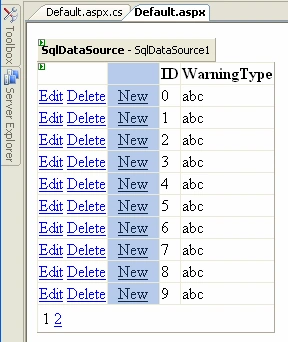
-
The next step is to add a few lines of code so that there is only one New, when the web page is running
-
In the page where the control is running, insert the following code and change the names as required:
- protected void GridViewInsert(object sender, EventArgs e)
- {
- SqlDataSource1.Insert();
- }
- protected void GridView1_PreRender(object sender, EventArgs e)
- {
- for (int index = 0; index < GridView1.Rows.Count - 1; index++)
- {
- GridView1.Rows[index].Cells[1].Controls[1].Visible = false;
- }
- }
-
Test and change the Cells[x] and Controls[x] as required
-
There will be training for the users, the User Sequence is:
- The user presses the New button
- The stored procedure inserts New or zero into each field
- The user now sees a new row at the bottom with New
- The user edits this new row, changing the values as required.
- The user presses the Update
- The user presses the New button
The user pressed the Edit button
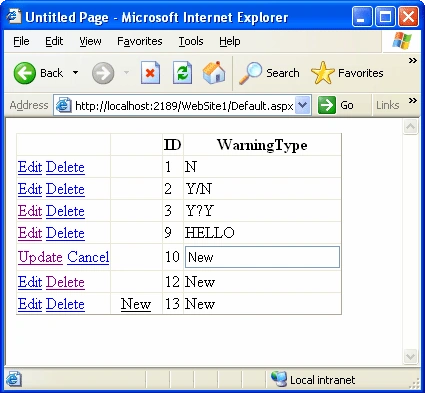
The user entered data and pressed the Update button
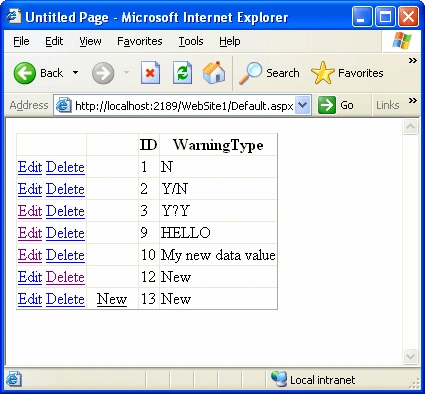
So how did this work, well in step 4 above, the OnClick="GridViewInsert" above calls the GridViewInsert(object sender, EventArgs e) code and executes the SqlDataSource1.Insert();, which inserts the data. Getting rid of all of the News in the DataView (except for the last one), happened in the GridView1_PreRender code.
Shashank GuptaPosted Apr 11, 2011, 12:47 AM
I hav 2 droup down list and 3 text boxes and on clicking a button i want that a new roe inserted in grid view.
UydurukPosted Dec 14, 2010, 5:01 AM
This does not work with empty data source as there are no rows to be displayed and new link is not visible.
pari dazzPosted Apr 23, 2010, 5:28 AM
If it is stored procedure then how it will work?ur method is easy n good but plz describe this function?
Keith HarmanPosted Feb 13, 2008, 9:21 AM
I think you have missed a line of code in the article. Need to directly appoint an Event Handler for GridView1_PreRender : this.GridView1.PreRender += this.GridView1_PreRender; and put this in the Page_Load Event Handler
Keith HarmanPosted Feb 13, 2008, 9:21 AM
I think you have missed a line of code in the article. Need to directly appoint an Event Handler for GridView1_PreRender : this.GridView1.PreRender += this.GridView1_PreRender; and put this in the Page_Load Event Handler
Bhaskar PimpalshendePosted Jan 15, 2008, 4:57 AM
Hello friends I wan to add Adding Dynamic Row in GridView in C# and ASP.Net so please reply me Thanks Bhaskar
ambrish yadavPosted Jan 13, 2008, 6:59 AM
how to edit,delete recorde in grideview
ravikanth tallamPosted Dec 10, 2007, 6:23 AM
I want a get a new row created when user clicks addnew button that is wityh out binding to data source. To be clear when user see the page Grid view must contain only columns and by adding button a new row should get created and after entring values and clicking on Update button Grid view should get updated with new row. Please help me regarding this