

Background
Sometimes there is a need to insert, select, update and delete records from a table using a single Stored Procedure instead of creating separate Stored Procedures for each operation.
Suppose I have one .aspx web page in which I need a to insert, select, update and delete records. To do that instead of creating four Stored Procedures to perform these tasks I will create a single Stored Procedure to satisfy my requirements and I will access it in code behind according to the action performed by the end user on a button click.
I have written this article specially focusing on newcomers and anyone new to SQL Stored Procedures, so let us start with a basic introduction.
What is a Stored Procedure?
A Stored Procedure is a group of logical SQL statements to perform a specific
task, such as insert, select, update and delete operations on a table and so on
which is stored in a SQL database.
Types Of Stored Procedures
The following are the types of Stored Procedures:
- User Defined Stored procedure: The user defined stored procedures are created by users and stored in the current database
- System Stored Procedure: The system stored procedure have names prefixed with sp_. Its manage SQL Server through administrative tasks. Which databases store system stored procedures are master and msdb database
- Temporary Stored procedures: The temporary stored procedures have names prefixed with the # symbol. Temporary stored procedures stored in the tempdb databases. These procedures are automatically dropped when the connection terminates between client and server
- Remote Stored Procedures: The remote stored procedures are procedures that are created and stored in databases on remote servers. These remote procedures can be accessed from various servers, provided the users have the appropriate permission
- Extended Stored Procedures: These are Dynamic-link libraries (DLL's) that are executed outside the SQL Server environment. They are identified by the prefix xp_
Advantages Of Stored Procedure
Stored Procedures have the following advantages:
- Can reduce network traffic and latency, boosting application performance.
- Execution plans can be reused, staying cached in SQL Server's memory, reducing server overhead.
- Help promote code reuse.
- Can encapsulate logic. You can change stored procedure code without affecting clients.
- Provides better security to your data.
Note
We can up to 2100 parameters in one Stored Procedure.
Creating a Stored Procedure
Before creating a Stored Procedure, we will create one table named employee in the SQL database which looks as in the following image.
I have set the primary key on the id column for the Identy specification.
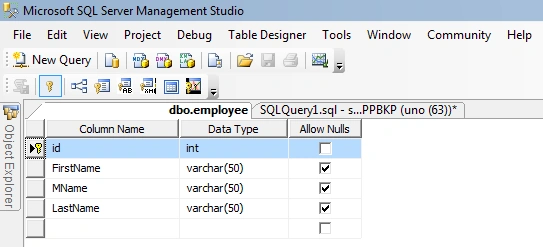
Now we have a table to perform these operations. Now let us start to create the Stored Procedure.
The Stored Procedure is created using the keyword "Create Procedure" followed by the procedure name. Let us create the Stored Prcedure named "EmpEntry" as given below.
create Procedure EmpEntry
(
--variable declareations
@Action Varchar (10), --to perform operation according to string ed to this varible such as Insert,update,delete,select
@id int=null, --id to perform specific task
@Fname Varchar (50)=null, -- for FirstName
@MName Varchar (50)=null, -- for MName
@Lname Varchar (50)=null -- for LastName
)
----------------------------------------------------------------------------------------------------
---exec EmpEntry @Action='delete' ,@Fname='S',@MName='R',@Lname='M',@id='13' --added by vithal wadje on 18-10-2012 for Csharp contribution
----------------------------------------------------------------------------------------------------
as
Begin
SET NOCOUNT ON;
If @Action='Insert' --used to insert records
Begin
Insert Into employee (FirstName,MName,LastName)values(@Fname,@MName,@Lname)
End
Sridhar YelagandhulaPosted Jan 2, 2020, 10:10 AM
Very useful article
santosh BakalePosted Jan 11, 2014, 4:04 AM
Its Very Nice Article, but in select statement new record inserted with null values & gives result -- EXEC AddRetailer @QryType='Select', @isavailable=0, @isactive=1== isavailable is output parameter, isactive is in where condistion
Vithal WadjePosted Jul 24, 2013, 3:19 PM
thanks priya mdm
priya talolePosted Jul 23, 2013, 6:27 AM
Its very nice article also reduce code complexity thank u sir.
Vithal WadjePosted Apr 13, 2013, 2:54 AM
thanks a lot Lajapathy sir
Vithal WadjePosted Apr 13, 2013, 2:54 AM
thanks yogesh sir
Yogesh BajpaiPosted Apr 12, 2013, 3:34 PM
nice article.its reduce lot of code complexcity..
Lajapathy AruneditedPosted Apr 12, 2013, 9:32 AMEdited Apr 12, 2013, 9:32 AM
nice boss, Nice effort
Vithal WadjePosted Apr 11, 2013, 3:02 PM
thanks
Mr TuePosted Apr 9, 2013, 9:49 PM
thank you sir
Vithal WadjePosted Dec 19, 2012, 12:45 AM
thank you Grabsi Amine sir
Vithal WadjePosted Dec 19, 2012, 12:43 AM
thank you sudhakar sir
Grabsi AminePosted Dec 18, 2012, 1:00 AM
Welcome , you're the best ^^
Vithal WadjePosted Dec 17, 2012, 7:02 AM
thank you Grabsi Amine sir
Grabsi AminePosted Dec 16, 2012, 11:48 AM
Amazing Work
Vithal WadjePosted Nov 16, 2012, 10:07 PM
thank you Andrej Juhas
Vithal WadjePosted Nov 16, 2012, 10:06 PM
thanks a lot Rajshri Madam,its my pleasure that my article helps you,for more code refer my all articles and blogs which are published
Andrej JuhasPosted Nov 13, 2012, 7:31 AM
Very inspiriting.
Rajshri ShitolePosted Nov 10, 2012, 3:37 AM
may be sir u write, but its lots benefit to me. from last 1 year i m doing difficult code for search , insert, delete and diffent 3 form making but its combine in 1 and time saving also. thanks if u hv any more code for basic coding plz give me.
Vithal WadjePosted Nov 1, 2012, 2:29 AM
thank you Rajshri Madam, but their is no mistake in any syntax you need to read it carefully and your query in comment is fully wrong , i cant know where you see my mistake even every thing is ok. take your time to read carefully
Rajshri ShitolePosted Nov 1, 2012, 1:46 AM
good article but some mistak in insert query - put like this - Insert Into employee (id,FirstName,MName,LastName)values(@id,@Fname,@MName,@Lname) and for select query - do this- exec EmpEntry 'Select','','','',''
Rajshri ShitolePosted Nov 1, 2012, 1:46 AM
good article but some mistak in insert query - put like this - Insert Into employee (id,FirstName,MName,LastName)values(@id,@Fname,@MName,@Lname) and for select query - do this- exec EmpEntry 'Select','','','',''
Vithal WadjePosted Nov 1, 2012, 12:22 AM
thanks reza
reza parmarPosted Oct 31, 2012, 7:02 AM
Thank you for submitting a complete education.
Vithal WadjePosted Oct 24, 2012, 7:26 AM
dear mohan sir,if you have a knowldge about asp.net then you can eaisly implement on your own logic,its a very basic and small concept. If you want source code then wait for my next article
mohan kumarPosted Oct 24, 2012, 1:26 AM
Can i get the source code? I need C# design page (.aspx) and Code behind page to see how you have implemented this Stored Procedure.
Vithal WadjeeditedPosted Oct 19, 2012, 12:21 AMEdited Oct 19, 2012, 12:23 AM
thanks Anshika Mittal and dipali goel, and its my pleasure that my articles helps all of you. and my intension in future is that to write the articles for students and freshers so they can not be got the difficulties on interview time. and remove the fear of interview from their mind
Anshika MittalPosted Oct 18, 2012, 11:27 PM
Nice article Vithal your article is very helpful for all the fresher level students and others also...
dipali goelPosted Oct 18, 2012, 11:10 PM
wow thanx for sharing with us i'll try it definetly