

Introduction
Artificial Intelligence (AI) has transformed many industries by rendering capabilities that were previously held to be futuristic a present reality. OpenAI offers the Assistant API, so developers can easily integrate AI-based conversational agents into the applications. The Assistant API that OpenAI offers is based on powerful natural language processing capabilities to be integrated into.NET. This article will guide the reader through the process for setting up and using Assistant API in a.NET environment, using C#.
Prerequisites
Before we begin, ensure you have the following.
- Visual Studio (or any .NET IDE)
- .NET SDK installed
- OpenAI API key (sign up at OpenAI's website if you haven't already)
Step 1. Setting up your .NET Project
Create a new .NET project in Visual Studio
- Open Visual Studio and select Create a new project.
- Choose the appropriate project template (e.g., Console Application).
- Name your project and click Create.
Install the OpenAI package
- Open the NuGet Package Manager Console (Tools -> NuGet Package Manager -> Package Manager Console).
- Run the following command to install the OpenAI package: Install-Package OpenAI.API.
Step 2. Configuring API Credentials
Retrieve your OpenAI API key
- Log in to your OpenAI account and navigate to your API settings.
- Copy your API key.
Retrieve your Assistant ID
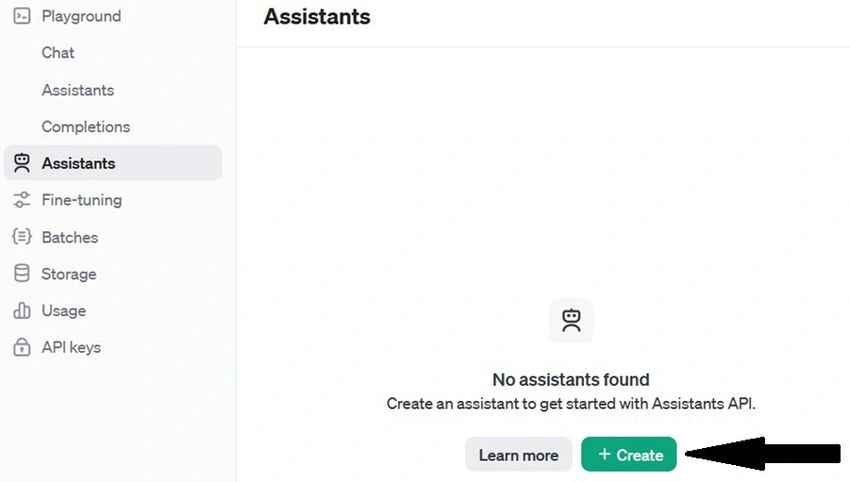
- Log in to your OpenAI account and navigate to Assistants from the left panel. Then click on Create Assistant.
- Now fill out the details for the assistant, who will be a weather agent.
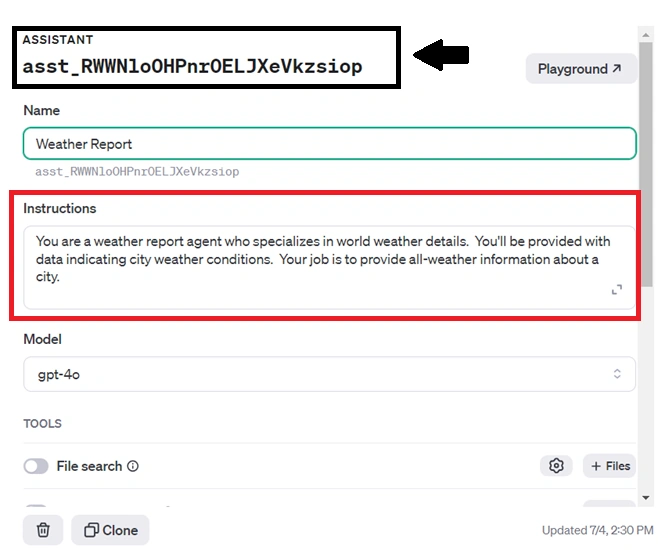
After your assistant successfully creates, it will be assigned an assistant ID. We will use this assistant programmatically in the future, so grab the ID.
Store your API key and Assistant ID securely.
For demonstration purposes, we'll store the API key and Assistant ID in an environment variable or a secure configuration file. Ensure it's not hard-coded in your source code.
Step 3. Implementing API Integration
Create a class named OpenAiAssistantHandler in your project and add the below code.
using Newtonsoft.Json;
using Newtonsoft.Json.Linq;
using RestSharp;
using System;
using System.Net.Http;
using System.Text;
using System.Threading.Tasks;
namespace YourNamespace
{
    public class OpenAiAssistantHandler
    {
        private static readonly HttpClient httpClient = new HttpClient();
        private static readonly string OPEN_AI_BASE_URL = "https://api.openai.com/v1";

        public static async Task<string> CreateThreadAsync(string apiKey)
        {
            string createThreadUrl = $"{OPEN_AI_BASE_URL}/threads";
            var requestBody = new { /* Include any necessary data for creating a thread */ };

            try
            {
                var httpRequestMessage = new HttpRequestMessage(HttpMethod.Post, createThreadUrl);
                httpRequestMessage.Headers.Add("Authorization", $"Bearer {apiKey}");
                httpRequestMessage.Headers.Add("OpenAI-Beta", "assistants=v2");
                httpRequestMessage.Content = new StringContent(JsonConvert.SerializeObject(requestBody), Encoding.UTF8, "application/json");
                using (var httpResponseMessage = await httpClient.SendAsync(httpRequestMessage))
                {
                    if (httpResponseMessage.IsSuccessStatusCode)
                    {
                        string jsonResponse = await httpResponseMessage.Content.ReadAsStringAsync();
                        JObject threadData = JObject.Parse(jsonResponse);
                        return threadData["id"]?.ToString();
                    }
                    else
                    {
                        Console.WriteLine($"Error: {httpResponseMessage.ReasonPhrase}");
                        return null;
                    }
                }
            }
            catch (Exception ex)
            {
                Console.WriteLine($"Exception occurred: {ex.Message}");
                return null;
            }
        }
        public static async Task<string> CallAssistantAsync(string apiKey, string assistantId, string threadId, string userPrompt)
        {
            try
            {
                if (string.IsNullOrEmpty(threadId) || string.IsNullOrEmpty(userPrompt))
                    throw new ArgumentException("Thread ID and user prompt must not be null or empty.");

                string messageId = await AddMessageToThreadAsync(apiKey, userPrompt, threadId);
                string runId = await RunMessageThreadAsync(apiKey, assistantId, threadId);
                if (string.IsNullOrEmpty(runId))
                    throw new InvalidOperationException("Failed to start assistant on the thread.");

                string assistantResponse = await GetAssistantResponseAsync(apiKey, threadId, messageId);
                return assistantResponse ?? "Seems to be a delay in response. Please try again, or try back later.";
            }
            catch (Exception ex)
            {
                // Handle exceptions or log errors here
                Console.WriteLine($"Error: {ex.Message}");
                return null;
            }
        }

        private static async Task<string> AddMessageToThreadAsync(string apiKey, string userPrompt, string threadId)
        {
            string url = $"{OPEN_AI_BASE_URL}/threads/{threadId}/messages";
            var requestBody = new { role = "user", content = userPrompt };

            var response = await SendPostRequestAsync(url, apiKey, requestBody);
            return response?.GetValue("id")?.ToString();
        }
        private static async Task<string> RunMessageThreadAsync(string apiKey, string assistantId, string threadId)
        {
            string url = $"{OPEN_AI_BASE_URL}/threads/{threadId}/runs";
            var requestBody = new { assistant_id = assistantId };

            var response = await SendPostRequestAsync(url, apiKey, requestBody);
            return response?.GetValue("id")?.ToString();
        }
        private static async Task<string> GetAssistantResponseAsync(string apiKey, string threadId, string messageId)
        {
            int maxAttempts = 5;
            int attempts = 0;
            string assistantResponse = null;

            while (attempts < maxAttempts)
            {
                await Task.Delay(4000); // Wait for 4 seconds before checking for a response

                string url = $"{OPEN_AI_BASE_URL}/threads/{threadId}/messages";
                var response = await SendGetRequestAsync(url, apiKey);

                var messages = response?.GetValue("data") as JArray;
                if (messages != null)
                {
                    foreach (var message in messages)
                    {
                        if (message.Value<string>("role") == "assistant")
                        {
                            assistantResponse = message["content"]?.FirstOrDefault()?["text"]?["value"]?.ToString();
                            break;
                        }
                    }
                }
                if (!string.IsNullOrEmpty(assistantResponse))
                    break;

                attempts++;
            }
            return assistantResponse;
        }
        private static async Task<JObject> SendPostRequestAsync(string url, string apiKey, object requestBody)
        {
            var httpRequestMessage = new HttpRequestMessage(HttpMethod.Post, url);
            httpRequestMessage.Headers.Add("Authorization", $"Bearer {apiKey}");
            httpRequestMessage.Headers.Add("OpenAI-Beta", "assistants=v2");
            httpRequestMessage.Content = new StringContent(JsonConvert.SerializeObject(requestBody), Encoding.UTF8, "application/json");
            using (var httpResponseMessage = await httpClient.SendAsync(httpRequestMessage))
            {
                if (httpResponseMessage.IsSuccessStatusCode)
                {
                    string jsonResponse = await httpResponseMessage.Content.ReadAsStringAsync();
                    return JsonConvert.DeserializeObject<JObject>(jsonResponse);
                }
                else
                {
                    Console.WriteLine($"Error: {httpResponseMessage.ReasonPhrase}");
                    return null;
                }
            }
        }
        private static async Task<JObject> SendGetRequestAsync(string url, string apiKey)
        {
            var httpRequestMessage = new HttpRequestMessage(HttpMethod.Get, url);
            httpRequestMessage.Headers.Add("Authorization", $"Bearer {apiKey}");
            httpRequestMessage.Headers.Add("OpenAI-Beta", "assistants=v2");
            using (var httpResponseMessage = await httpClient.SendAsync(httpRequestMessage))
            {
                if (httpResponseMessage.IsSuccessStatusCode)
                {
                    string jsonResponse = await httpResponseMessage.Content.ReadAsStringAsync();
                    return JsonConvert.DeserializeObject<JObject>(jsonResponse);
                }
                else
                {
                    Console.WriteLine($"Error: {httpResponseMessage.ReasonPhrase}");
                    return null;
                }
            }
        }
    }
}
Key Components
- CreateThreadAsync: Initiates a new conversation thread with OpenAI's Assistant API.
- CallAssistantAsync: Sends a user prompt to the assistant and retrieves the response.
- AddMessageToThreadAsync: Adds a user message to an existing conversation thread.
- RunMessageThreadAsync: Starts the assistant on the specified thread to process messages.
- GetAssistantResponseAsync: Retrieves the assistant's response to the user's message from the thread.
- SendPostRequestAsync and SendGetRequestAsync: Helper methods for making HTTP POST and GET requests to the OpenAI API.
Example Usage in .NET Application
Here’s an example of how you can utilize the OpenAiAssistantHandler class in your .NET application to interact with the OpenAI Assistant API.
static async Task Main(string[] args)
{
    string apiKey = "sk-rJ8BuIrPaXUff0tHM3RnT3BlbkFUF2IFuzQuGYGKTkfm4UsHTA";
    string threadId = await OpenAiAssistantHandler.CreateThreadAsync(apiKey);
    Console.WriteLine($"Thread Id: {threadId}");
    string assistantId = "asst_QTYWvU4cQnom29CbLof21gP5";
    string prompt = "Hey! what is the weather condition in Hyderabad";
    string assistantResponse = await OpenAiAssistantHandler.CallAssistantAsync(apiKey, assistantId, threadId, prompt);
    Console.WriteLine(assistantResponse);
}
Code explanation
API Key Declaration
string apiKey = "sk-rJ8BuIrPaXUff0tHM3RnT3BlbkFUF2IFuzQuGYGKTkfm4UsHTA";
Initializes the API key required to authenticate requests to the OpenAI API.
Creating a Thread
string threadId = await OpenAiAssistantHandler.CreateThreadAsync(apiKey);
Console.WriteLine($"Thread Id: {threadId}");
Creates a new conversation thread using CreateThreadAsync and prints the returned thread ID to the console.
Assistant ID and Prompt Declaration
string assistantId = "asst_QTYWvU4cQnom29CbLof21gP5";
string prompt = "Hey! what is the weather condition in Hyderabad";
Defines the assistant ID and the message prompt to be sent to the assistant.
Calling the Assistant
string assistantResponse = await OpenAiAssistantHandler.CallAssistantAsync(apiKey, assistantId, threadId, prompt);
Console.WriteLine(assistantResponse);
Sends the prompt to the assistant within the context of the created thread using CallAssistantAsync and prints the assistant's response to the console.
Conclusion
Integrating OpenAI's Assistant API into .NET applications provides a powerful toolset for implementing natural language understanding and generation. By following the steps outlined in this article, you can harness the capabilities of OpenAI's AI models within your own .NET projects effectively.
Noorulla khan KhanPosted Dec 10, 2024, 9:47 AM
Hi Amit, It is an incredible post that I was looking out for, Well, I followed your steps & facing while issue while getting response from Getting response form GetAssistantResponseAsync {[ { "id": "msg_m33lq04EGQeMV3n6FwtTqsEX", "object": "thread.message", "created_at": 1733820735, "assistant_id": null, "thread_id": "thread_Yh4SaZX4QMDBJm8C1TcJNuGc", "run_id": null, "role": "user", "content": [ { "type": "text", "text": { "value": "No explanantion,provide only code to add two numbers in C#", "annotations": [] } } ], "attachments": [], "metadata": {} } ]} Hence, complier is not getting into foreach (var message in messages) { if (message.Value<string>("role") == "assistant") { assistantResponse = message["content"]?.FirstOrDefault()?["text"]?["value"]?.ToString(); break; } } the piece of code, where I found is "role": "user", and also "assistant_id": null, in the response hence this piece if code not working . Let me know if you have any debugg here