

Overview
In this article, I am going to explore the integration of Google reCAPTCHA V2 with ASP.NET applications as well as how to customize the reCAPTCHA widget.
What is reCAPTCHA
Google reCAPTCHA is a free service that protects your website from spam and abuse. reCAPTCHA uses an advanced risk analysis engine and adaptive CAPTCHAs to keep automated software from engaging in abusive activities on your site. It does this while letting your valid users pass through with ease.
reCAPTCHA offers more than just spam protection. Every time our CAPTCHAs are solved, that human effort helps digitize text, annotate images, and build machine learning datasets. This, in turn, helps preserve books, improve maps, and solve hard AI problems.

Google reCAPTCHA
Google reCAPTCHA
Prerequisites
Here, I will create a sample ASP.NET website to integrate Google reCAPTCHA. So, the following are the prerequisites for this article.
- We should have a Google account where we can register our sites for reCAPTCHA
- Visual Studio [ optional ]
Here, I am using Visual Studio 2015 for creating an ASP.NET application but it's not mandatory. We may use either the latest version or any older if we want to validate reCAPTCHA at the server-side as well.
Site Registration for reCAPTCHA
reCAPTCHA API's sitekey and secretkey are required.
So, first, we need to register our site/domain with Google reCAPTHCA v2 API to get the site key and secret key. So now, I am going to register our domains (localhost, programcafe.in) where I will use these keys for reCAPTCHA integration. Click here for domain registration.
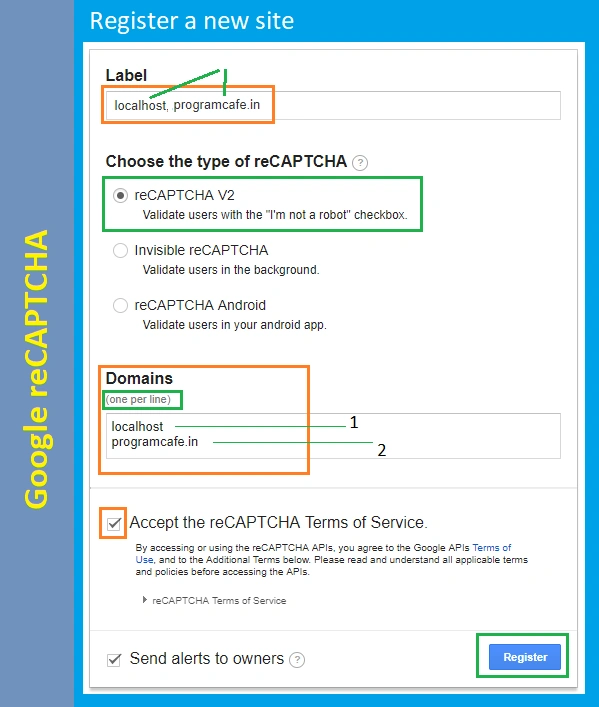
In the above image, we can see, there are three types of reCAPTCHA, i.e.,
- reCAPTCHA v2
- Invisible reCAPTCHA
- reCAPTCHA Android
But I have checked first one that is reCAPTCHA v2 and typed two domains localhost and programcafe.in . Now, click on the "Register" button after accepting its terms and conditions.
Note
We can mention multiple domains along with localhost. After clicking on Register button, the following screen will appear which contains reCAPTCHA Site key and Secret key.
We can mention multiple domains along with localhost. After clicking on Register button, the following screen will appear which contains reCAPTCHA Site key and Secret key.

On this screen, we have an option for Advanced Settings for security preference. We can customize it according to our requirement.

Now, we have all the things ready to integrate the reCAPTCHA on websites.
For this article, I am going to create an empty website with name reCAPTCHA and after that, I will add a new page named Default.aspx.
reCAPTCHA Auto Rendering
Automatic Rendering Widget
- <body>
- <form id="form1" runat="server">
- <div class="g-recaptcha" data-sitekey="6Lfn8DoUAAAAAEuzI65jbXXNaewCS9BwO_XXXXXXXX"></div>
- </form>
- <script src='https://www.google.com/recaptcha/api.js'></script>
- </body>
This is the easiest way to rendering a reCaptcha on a web page. In the above code snippet, we can see that there is a div element having two attributes class and data-sitekey and both these attributes are mandatory.
- g-recaptcha is mandatory to make render recaptcha widget, we can not use own class name.
- data-sitekey is the key which is provided by Google reCAPTCHA for the domains which are mentioned at the time of reCAPTCHA v2 registration.
Let's execute this page to see how reCAPTCHA is showing.
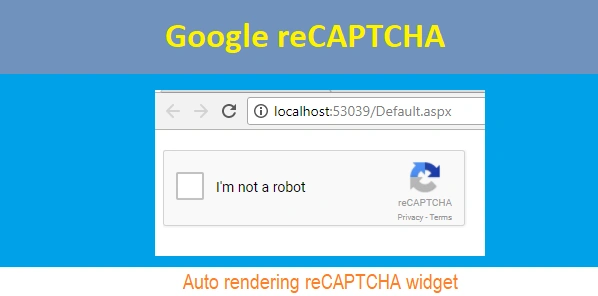
Apart from these two mandatory attributes, Google provides some additionals attributes to customize the reCAPTCHA widget according to our choice/requirement.
Following are the list of some optional attributes which can be used to customize the reCAPTCHA widget.
- data-theme
we can use either light or dark theme. The default theme is light.
eg.
- <div data-theme="light" ></div>
- <div data-theme="dark" ></div>

- data-type
data type for recaptcha challenges edither may be image or audio but the default data-type is image.
- <div class="g-recaptcha" data-type="image" data-sitekey="site_key_value" />
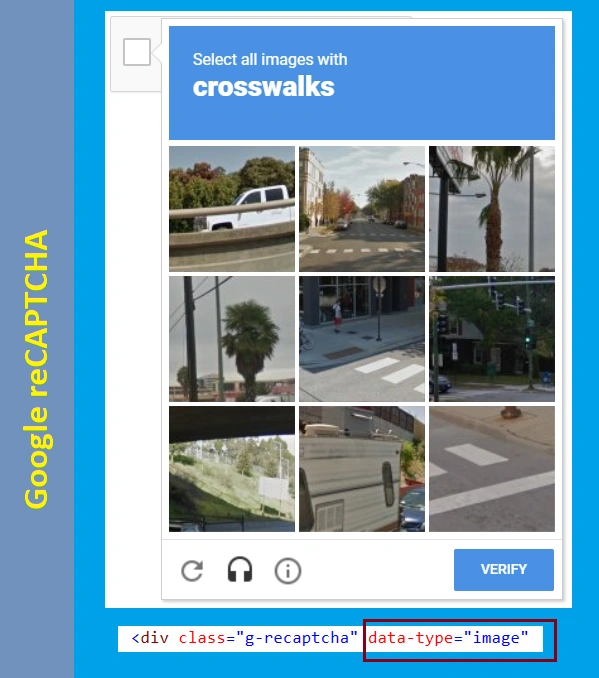
- <div class="g-recaptcha" data-type="audio" data-sitekey="site_key_value" />

- data-size
it can be compact or normal but the default size is normal.
- <div class="g-recaptcha" data-size="normal" data-sitekey="site_key_value" />
- <div class="g-recaptcha" data-size="compact" data-sitekey="site_key_value" />

- data-tabindex
We can set the tabindex to make access easier
Google reCAPTCHA API Parameters
Following are the reCAPTCHA API Parameters and all these parameters are optional.
- calback - The name of your callback function to be executed once all the dependencies have loaded.
- render - Whether to render the widget explicitly. Defaults to onload, which will render the widget in the first g-recaptcha tag it finds.
- hl - Forces the widget to render in a specific language. Auto-detects the user's language if unspecified.
reCAPTCHA Integration With Website
Rendering reCAPTCHA Explicitly
Step 1
Create an empty ASP.NET website and a new page Default.aspx and put the following code snippet inside the body tag.
Default.aspx
- <div id="ReCaptchContainer"></div>
- <label id="lblMessage" runat="server" clientidmode="static"></label>
- <br />
- <button type="button" >Submit</button>
In the above HTML code snippet, I have taken a div tag where recaptha widget will be rendered and there is a label to display validation message for recaptcha on button click.
Step 2
Refer the reCaptcha API script on the page. For this article, I am putting this script at the bottom of the body.
- <!--Refere reCaptcha API-->
- <script src="https://www.google.com/recaptcha/api.js" async defer></script>
In this article, we are going to render the widget explicitly so we need to add onload and render parameters with reCaptcha API script.
Here, the onload parameter's value is renderRecaptcha which is a JavaScript function that renders the reCaptcha widget and the render value is explicit which show that render the widget explicitly by calling the function renderRecaptcha.
- <!--Refere reCaptcha API-->
- <script src="https://www.google.com/recaptcha/api.js?onload=renderRecaptcha&render=explicit" async defer></script>
Now, add the follwing script for reCAPTCHA render and it's callback functions.
- <script src="https://code.jquery.com/jquery-3.2.1.min.js"></script>
- <script type="text/javascript">
- var your_site_key = '<%= ConfigurationManager.AppSettings["SiteKey"]%>';
- var renderRecaptcha = function () {
- grecaptcha.render('ReCaptchContainer', {
- 'sitekey': your_site_key,
- 'callback': reCaptchaCallback,
- theme: 'light', //light or dark
- type: 'image',// image or audio
- size: 'normal'//normal or compact
- });
- };
- var reCaptchaCallback = function (response) {
- if (response !== '') {
- jQuery('#lblMessage').css('color', 'green').html('Success');
- }
- };
- jQuery('button[type="button"]').click(function(e) {
- var message = 'Please checck the checkbox';
- if (typeof (grecaptcha) != 'undefined') {
- var response = grecaptcha.getResponse();
- (response.length === 0) ? (message = 'Captcha verification failed') : (message = 'Success!');
- }
- jQuery('#lblMessage').html(message);
- jQuery('#lblMessage').css('color', (message.toLowerCase() == 'success!') ? "green" : "red");
- });
- </script>
Step 4
Let us run the page to test the reCAPTCHA functionality.

Step 5 Server Side Validation
For server-side validation, we need to call reCaptcha siteverify API along with parameters secretkey and response (recaptcha response after form submit).
Folliwing are the API URL.
https://www.google.com/recaptcha/api/siteverify?secret=<secret-key>&response=<captcha-response>
- public bool IsReCaptchValid()
- {
- var result = false;
- var captchaResponse = Request.Form["g-recaptcha-response"];
- var secretKey = ConfigurationManager.AppSettings["SecretKey"];
- var apiUrl = "https://www.google.com/recaptcha/api/siteverify?secret={0}&response={1}";
- var requestUri = string.Format(apiUrl, secretKey, captchaResponse);
- var request = (HttpWebRequest)WebRequest.Create(requestUri);
- using(WebResponse response = request.GetResponse())
- {
- using (StreamReader stream = new StreamReader(response.GetResponseStream()))
- {
- JObject jResponse = JObject.Parse(stream.ReadToEnd());
- var isSuccess = jResponse.Value<bool>("success");
- result = (isSuccess) ? true : false;
- }
- }
- return result;
- }
Now, call this method on button click to validate the reCaptcha input.
- protected void btnTry_Click(object sender, EventArgs e)
- {
- lblMessage.InnerHtml = (IsReCaptchValid())
- ? "<span style='color:green'>Captcha verification success</span>"
- : "<span style='color:red'>Captcha verification failed</span>";
- }
Now, execute the program to test the server-side validation.

In the above JSON result object, "success: True" indicates that reCAPTCHA challenges validation success.
If anyone wants to see some sites where google reCAPTHCA is used
- Google reCAPTCHA Demo By Google
https://www.google.com/recaptcha/api2/demo
- C# Corner
http://www.c-sharpcorner.com/register
Summary
In this article, we learned what Google reCAPTCHA is, how to register our site for reCAPTHCA, how to integrate reCAPTCHA widget with the web page, how to validate reCAPTCHA challenges on the client side as well as server side in an ASP.NET application.
In an upcoming article, I will share about Invisible reCAPTCHA.
David AndersonPosted Sep 10, 2020, 6:31 AM
Hi Praveen. I have downloaded your code, but it fails with the error "Local variable 'request' cannot be referred to before it is declared" on the line "var captchaResponse = Request.Form["g-recaptcha-response"];" in IsReCapthValid(). Note that I have converted your code to VB.Net using the Telerik Code Converter, which is usually very reliable. Have you any idea what I might have done wrong? The VB.Net version of that line is 'Dim captchaResponse = request.Form("g-recaptcha-response")'. However, when I loaded your original code into a new empty C# ASP.NET website, it all worked fine, so my VB.Net site must contain something that clashes with your code or the conversion from C# is invalid.
A DaleyPosted Apr 22, 2020, 7:43 AM
Thanks for this. I was able to follow the instructions step by step to complete my project. My only minor issue was that my form kept sending even though the authentication failed. A minor fix from ******lblMessage.InnerHtml = (IsReCaptchValid()) ? "<span style='color:green'>Captcha verification success</span>" : "<span style='color:red'>Captcha verification failed</span>"; to this *** if (IsReCaptchValid()) { lblMessage.InnerHtml = "<span style='color:green'>Captcha verification success</span>"; } else { lblMessage.InnerHtml = "<span style='color:red'>Captcha verification failed</span>"; return; }***** solved the issue. I am new to cSharp so not sure if there was a shorter way to achieve that.
Tom RubyPosted Nov 26, 2019, 8:35 AM
DON'T use "/>" to close the div. Only use "</div>".
Guru PatelPosted Jun 11, 2019, 12:10 AM
I need to implement This on Wordpress. What changes do I need to make?
navanit kumarPosted Apr 9, 2019, 4:13 AM
The underlying connection was closed: An unexpected error occurred on a send. I got that error when server side authentication is going .In my local host code has properly working fine .but i deployed my code then server side side code got that error.
Viva MexicPosted Feb 27, 2019, 4:58 PM
Thanks friendGreetings from Mexico. Add using to make it work using System.Net; using System.IO; using System.Linq; using Newtonsoft.Json.Linq; add DDLL to work https://github.com/JamesNK/Newtonsoft.Json/releases https://github.com/JamesNK/Newtonsoft.Json/releases/download/11.0.2/Json110r2.zip Viva mexico cabrones
Viva MexicPosted Feb 27, 2019, 4:57 PM
Thanks friendGreetings from Mexico. Add using to make it work using System.Net; using System.IO; using System.Linq; using Newtonsoft.Json.Linq; add DDLL to work Viva mexico cabrones
Lulu PaulPosted Feb 19, 2019, 9:06 AM
Hi Praveen, my Recaptcha v2 works well on localhost. However after deploying to dev server, i can load the widget and get images but get a socket/timeout exception on POST. Obviously now after a lot of research i enabled/opened the port 80 on my DEV server firewall settings. But still no resolve. I am wondering how come the https://www.google.com/recaptcha/api.js got called in the beginning to render the widget but the POST call https://www.google.com/recaptcha/api/siteverify failed when trying to reach the google API ? ANy clues?
navanit kumarPosted Jan 14, 2019, 5:55 AM
WebResponse response = request.GetResponse() ....i am getting error on this line.........unable to connect remote server
Luka MuthamiPosted Nov 20, 2018, 6:55 AM
Thanks a lot, it works great
Sri SatyaPosted Sep 16, 2018, 8:05 PM
Do you have the code that you can share?
Sri SatyaPosted Sep 16, 2018, 8:04 PM
Hi Praveen, nice article. I have a question about the Invisible recaptha. Now that the invisible recaptha does not need the checkbox. How is the response validated on the server side?
Ajay RoheraPosted Aug 27, 2018, 12:44 PM
Should it show pass/fail if done till step 4? If so, its not doing anything in my case.
Brenda QuinbyPosted Aug 11, 2018, 2:42 AM
I have the reCaptcha in a form that sends an email order form to my client. The G-recaptcha-response: is included in the email. My client does not need to see this. Can I stop it being included?
Shami SheikhPosted Aug 2, 2018, 8:49 AM
Nice post and complete solution of reCaptcha :)
store vastPosted Jul 25, 2018, 4:24 PM
I have tried everything and still get error on capt..i hv reset keys a few times still the same
Denis WeberPosted May 8, 2018, 2:06 PM
Hi, I'm getting the captcha to work but the JScript doesn't print the label success or error, and the login button I have is never disabled so I can skip the captch by just clicking the button directly, any idea?
neeraj ukinkarPosted May 7, 2018, 2:45 AM
Can u PLease help for above error
neeraj ukinkarPosted May 7, 2018, 2:45 AM
ERROR for site owner:Invalid domain for site key
Eduardo MartinsPosted Feb 26, 2018, 9:35 AM
My app returns missing-input-response
Sagar Pandurang KapPosted Dec 6, 2017, 12:16 AM
Can you share how to use it inside web app(ASP)??
Sagar Pandurang KapPosted Dec 6, 2017, 12:14 AM
Nice Post . Keep Sharing.
Rathrola Prem KumarPosted Dec 4, 2017, 1:18 AM
Thanks for sharing :)