

Introduction
While working with Android department for one of my project I came through a problem of writing HTML tags in one string to format email properly. Then an idea came up in my mind to format using views that I am using for that project website and started thinking of integration of WCF and MVC.
Both projects are 100 % complete, just one thing I was confident about was using cshtml I can format my mail for WCF. For other things I need to work more and research. After lot of time, searching got a solution that was pleasing.
Background
To Learn this topic , you should be familiar with WCF and MVC basics.
Using the code
Let us start!
Firstly, create WCF Service Application. You will see some basic service and interface creation. Now Service Application is ready, now we need MVC Environment. For that we will add MVC to project using Nuget Package Tool.
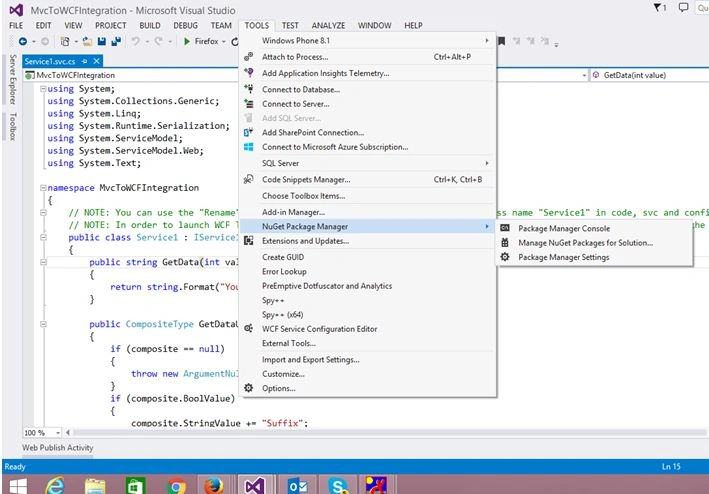
Install-Package Microsoft.AspNet.Mvc -Version 5.2.3
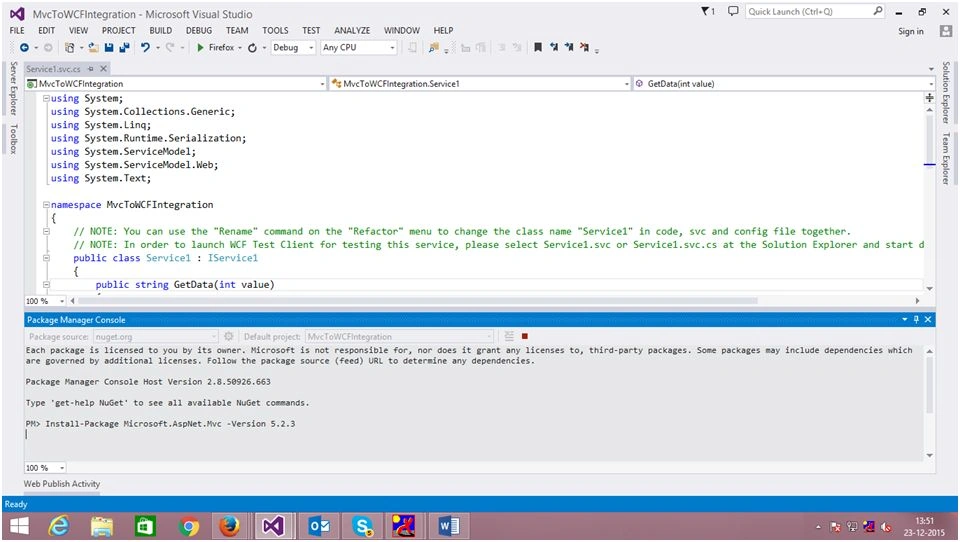
Now MVC and WCF is merged but still to work with MVC these three things are prerequisite: Model ,View and Controller.
Let us start with View.
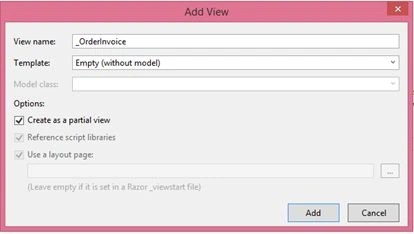
Create folder at root level named "Views". As in this article I am working with Partial View, so as a good practice I am creating "Shared" folder inside that. To add Partial View right click on "Views" folder, select View, name it and check Partial view check box as in the following screenshot,
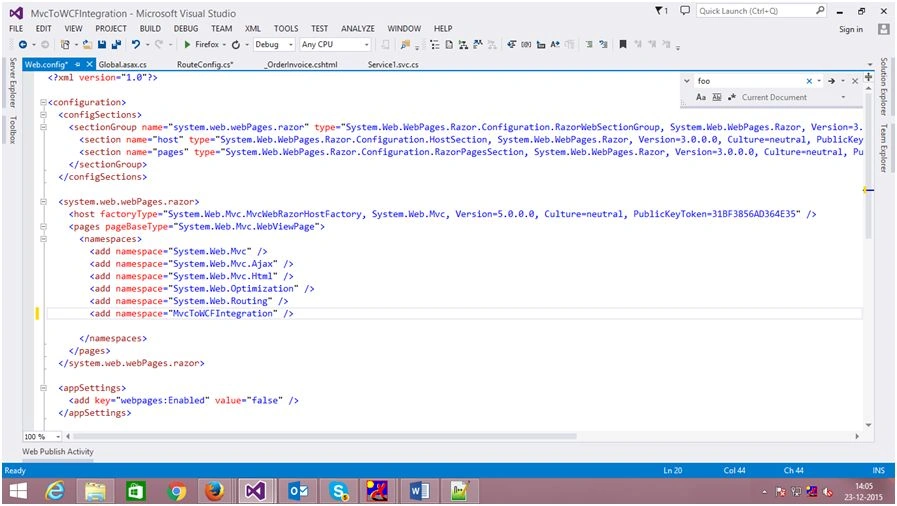
For MVC project 2 web.config files are used one at root level and one inside Views folder.
So now next step is to add web.config file to Views folder. (Copy web.config file from any mvcProject, you can also copy it from mine demo Project, While copying don't forgot to update namespace of your project inside web.config file).
MVC is working with Routing concept and for that it use Route.config file, so MVC structure will add first.
"App_Start" folder at root level. After that add Route.configfile (copy it from any .NET MVcProject and update its namespace as well.)
As we are merging WCF with MVC, Routing must allow svc files. For that we need to ignore route for file with ".svc" extension.
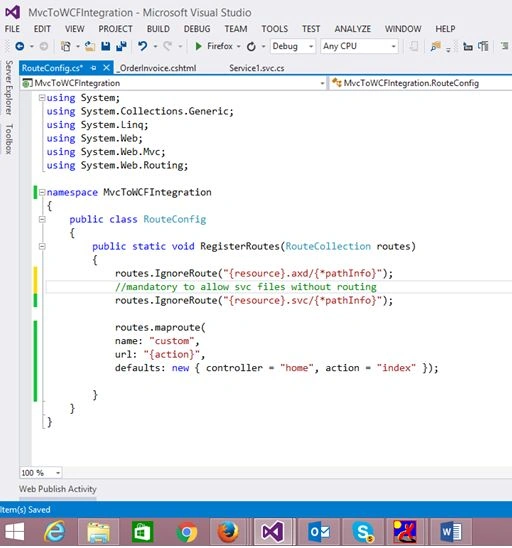
We have added route.config file, but while starting the application we need to register this root. For that we will add Global.asax file to our project by right click and add new file.
In global.asax file there is a function named "Application_Start" where we will add line to register route. First you need to add one namespace "System.Web.Routing;" for RouteTable.
RouteConfig.RegisterRoutes(RouteTable.Routes);
Everything is done to format email, I have taken Partial view but Model is remaining. For that I will add two class files OrderDetail.cs and OrderItem.cs to display order related data.
My Main Motto for this idea was to send mail with formatting without writing tags as a string.
So now I need to add method to format PartialView to String. For that I have added the following Static method,
To Learn this topic , you should be familiar with WCF and MVC basics.
Using the code
Let us start!
Firstly, create WCF Service Application. You will see some basic service and interface creation. Now Service Application is ready, now we need MVC Environment. For that we will add MVC to project using Nuget Package Tool.
Install-Package Microsoft.AspNet.Mvc -Version 5.2.3
Now MVC and WCF is merged but still to work with MVC these three things are prerequisite: Model ,View and Controller.
Let us start with View.
Create folder at root level named "Views". As in this article I am working with Partial View, so as a good practice I am creating "Shared" folder inside that. To add Partial View right click on "Views" folder, select View, name it and check Partial view check box as in the following screenshot,
For MVC project 2 web.config files are used one at root level and one inside Views folder.
So now next step is to add web.config file to Views folder. (Copy web.config file from any mvcProject, you can also copy it from mine demo Project, While copying don't forgot to update namespace of your project inside web.config file).
MVC is working with Routing concept and for that it use Route.config file, so MVC structure will add first.
"App_Start" folder at root level. After that add Route.configfile (copy it from any .NET MVcProject and update its namespace as well.)
As we are merging WCF with MVC, Routing must allow svc files. For that we need to ignore route for file with ".svc" extension.
We have added route.config file, but while starting the application we need to register this root. For that we will add Global.asax file to our project by right click and add new file.
In global.asax file there is a function named "Application_Start" where we will add line to register route. First you need to add one namespace "System.Web.Routing;" for RouteTable.
RouteConfig.RegisterRoutes(RouteTable.Routes);
Everything is done to format email, I have taken Partial view but Model is remaining. For that I will add two class files OrderDetail.cs and OrderItem.cs to display order related data.
My Main Motto for this idea was to send mail with formatting without writing tags as a string.
So now I need to add method to format PartialView to String. For that I have added the following Static method,
Debasis SahaPosted Dec 24, 2015, 4:55 AM
Nice one.
Sibeesh VenuPosted Dec 24, 2015, 3:44 AM
Nice Share
Sridhar SharmaPosted Dec 24, 2015, 3:34 AM
Nice Share
Humayun Kabir MamunPosted Dec 24, 2015, 12:00 AM
Nice...
Santhakumar MunuswamyPosted Dec 23, 2015, 3:40 PM
Thanks for nice article
Ankur MistryPosted Dec 23, 2015, 1:34 PM
Helpful Article. thanks for sharing
Ankit KanojiaPosted Dec 23, 2015, 1:25 PM
Its Really Awesome.. Great Idea.. Thanks