

Background
Today there are many applications developed for finance related tasks. While working on Financial Projects I have completed many tasks according to client and user requirements. I want to share one of them with C# Corner readers to help them. Since they might have the same task,so I have decided to write this article.
So let us start with the basics.
Now create the project as:
- "Start" - "All Programs" - "Microsoft Visual Studio 2010".
- "File" - "New Project" - "C#" - "Empty Project" (to avoid adding a master page).
- Give the project a name, such as "interestratecalculator" or another as you wish and specify the location.
- Then right-click on Solution Explorer - "Add New Item" - "Default.aspx" page.
- Then drag two Textboxes, one Button, and one Label onto the "Default.aspx" page.
Then the <form> section of the Default.aspx page looks as in the following: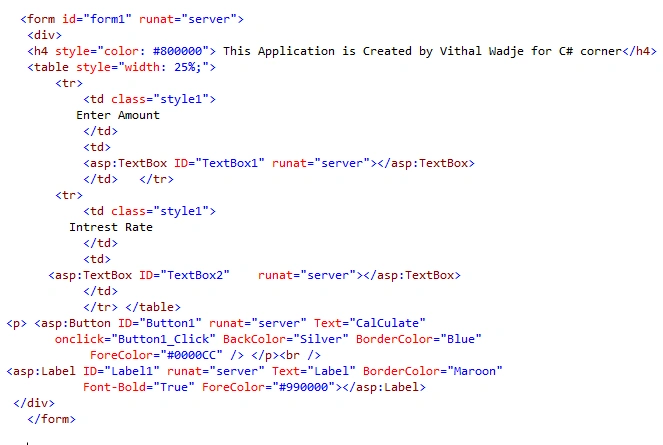
Now switch to design mode and double-click on the calculate button and use the following code to calculate the rate:
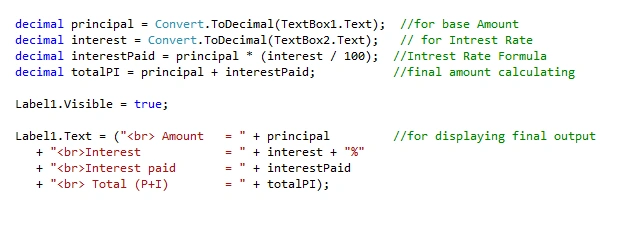
Then run the page which will look as in the following:
From the preceding view I am using one button to Calculate Interest Rate; one textbox for the original amount and one textbox for the interest rate which is applied on the original amount.
Now run the application and click on the Calculate button without entering the values which shows the following error as shown in the following:

Now enter the values and click on the calculate button, which shows the following output after Calculation:
Note
- For detailed code please download the zip file attached above.
Summary
Now we have learned how to Calculate Interest Rate. I hope this article is useful for all students and beginners. If you have any suggestion related to this article please contact me.
LazyDog103 LazyDog103Posted Mar 13, 2018, 11:05 PM
This project is webservice, isn't it ? tell me please. Thank u!
Former memberPosted Jan 6, 2017, 1:12 AM
Its Perfectly Correct The Code I Had Executed The code All Are Correct
Vithal WadjePosted Sep 2, 2013, 1:38 PM
thanks arjun sir i will check it
Arjun DhilodPosted Sep 2, 2013, 2:20 AM
Vithal good artical but pls u check from you end if you add "Start" - "All Programs" - "Microsoft Visual Studio 2010". "File" - "New Project" - "C#" - "Empty Project(Correction:- i thing here need Empty website) " (to avoid adding a master page). Then right-click on Solution Explorer - "Add New Item" - "Default.aspx" page. u rec the same option
Arun kumarPosted Mar 6, 2013, 1:38 AM
k,thank u :)
Vithal WadjePosted Mar 5, 2013, 5:51 AM
same solution that i have told you in my previous article comment that you have created no. of sub folders, just a keep solution as F:\Projects\IntrestRateCalculator
Arun kumarPosted Feb 28, 2013, 5:17 AM
rectify this error sir
Arun kumarPosted Feb 28, 2013, 5:16 AM
Error 1Could not load type'IntrestRateCalculator.Default'. F:\Projects\IntrestRateCalculator\IntrestRateCalculator\Default.aspx 1
Vithal WadjePosted Jan 7, 2013, 2:04 AM
ok,satyapriya sir,i will change it soon, and thanks for your valuable suggestion
Satyapriya NayakPosted Jan 6, 2013, 11:00 AM
Hi Vithal, Nice one It would be better if you change TextBox1.Text == "" && TextBox2.Text == "" to TextBox1.Text == "" || TextBox2.Text == "" Suppose a user enters value for TextBox1 and by mistake left the TextBox2 empty.Then program will show error.And use validation for only numbers in the textboxes. Thanks