In this 17th day of AngularJS article series, we are going to be learning the next key players/concept of AngularJS, understanding the concept of Built in Services of AngularJS. Before moving to key players/concepts of AngularJS, please read my previous articles:
- Introduction to AngularJS – Day 1
- Introduction to AngularJS – Day 2
- Introduction to AngularJS – Day 3
- Introduction to AngularJS – Day 4
- Introduction to AngularJS – Day 5
- Introduction to AngularJS – Day 6
- Introduction to AngularJS – Day 7
- Introduction to AngularJS – Day 8
- Introduction to AngularJS – Day 9
- Introduction to AngularJS – Day 10
- Introduction to AngularJS – Day 11
- Introduction to AngularJS – Day 12
- Introduction to AngularJS – Day 13
- Introduction To AngularJS – Day 14
- Introduction To AngularJS – Day 15
- Introduction To AngularJS – Day 16
AngularJS provides many built in services. For example:
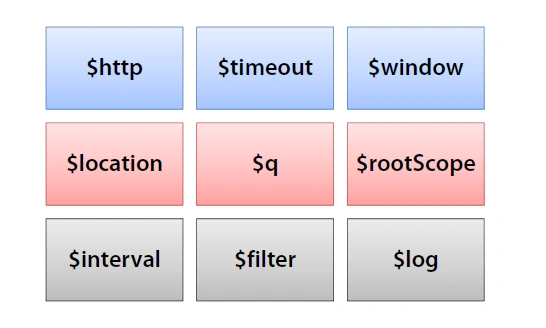
The $http is used to make an Ajax call to get the server data, the $route is used to define the routing information, and so on. The built-in services are always prefixed with ‘$’ symbol.
$location Service
The name defines the functionality of $location service. It does the same function as ‘window.location’. It parses the URL browser address bar and makes used of this in your application. It contains the set and get property. Mostly this ‘$location’ service is used in AngularJS routing to get current path and do action on that path like ‘$routeProvider’. In this ‘$routeProvider’, we used to match the current path and call particular view and controller. It contains URL object, set of the following methods:
- Protocol – get current URL protocol.
- Host – get current host name.
- Port – get current port number.
- Path – get current path.
- Search – get current search keywords.
- Hash – get hash fragment when called without any parameters.
Example:
Now, we are going to learn how to use ‘$location’ service by example and how to use set of methods.
app.js
-
- var app = angular.module("myApp", []);
-
-
- app.controller("myController", function ($scope, $location) {
-
-
-
- $scope._display = false;
-
- $scope.getData = function () {
-
- $scope.absUrl = $location.absUrl();
- $scope.proto = $location.protocol();
- $scope.host = $location.host();
- $scope.port = $location.port();
- $scope.search = $location.search();
- $scope.hash = $location.hash();
- $scope._display = true;
- };
-
- });
- <!DOCTYPE html>
- <html ng-app="myApp">
- <head>
- <title>C# Corner</title>
- <meta charset="utf-8" />
- <script src="app/angular.min.js"></script>
- <script src="app/app.js"></script>
- </head>
- <body ng-controller="myController">
- <h2>AngularJS $location Services</h2>
- <input type="button" ng-click="getData()" value="Get Data" /><br />
- <h3 ng-show="_display">Absolute URL is : {{absUrl}}</h3>
- <h3 ng-show="_display">Protocol is : {{proto}}</h3>
- <h3 ng-show="_display">Host is : {{host}}</h3>
- <h3 ng-show="_display">Port is : {{port}}</h3>
- <h3 ng-show="_display">Serach is : {{search}}</h3>
- <h3 ng-show="_display">Hash is : {{hash}}</h3>
- </body>
- </html>
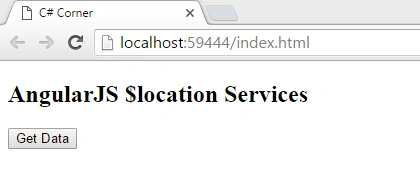
Now, our example is running; just click on ‘Get Data’ button to display the ‘$location’ service properties or methods:
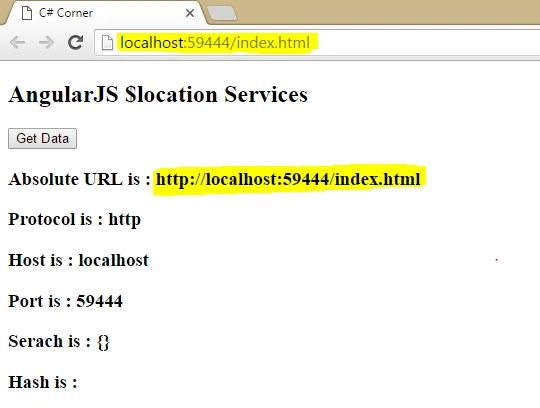
The above screen shot you can see highlighted, it’s nothing but how you can use current running address bar URL in your application.
Great, $location service in AngularJS with example created successfully!
Summary
I hope that beginners as well as students can understand the concept of $location service in AngularJS with example. If you have any suggestionsregarding this article, then please contact me. Stay tuned for other concepts of AngularJS coming soon!
Thanks for reading. Learn it! Share it!
Read more articles on AngularJS:


JASPALPosted Apr 28, 2016, 4:28 AM
"Introduction To AngularJS – Day 16" link is not working
Rahul Kumar SaxenaPosted Apr 27, 2016, 1:27 PM
Good Show
Debasis SahaPosted Apr 27, 2016, 10:15 AM
Good One..
Jeetendra GundPosted Apr 27, 2016, 9:14 AM
Thanks all...
Sonu ChaudharyPosted Apr 27, 2016, 8:04 AM
good one
Saurabh RaiPosted Apr 27, 2016, 3:16 AM
Nice
Bhuvanesh MohankumarPosted Apr 27, 2016, 2:59 AM
Good one
Vivek KumarPosted Apr 27, 2016, 12:56 AM
Nice one
Nishant MittalPosted Apr 26, 2016, 11:12 PM
Good One ...
Kumaresh RajalingamPosted Apr 26, 2016, 9:55 PM
Good one
Kuppurasu NagarajPosted Apr 26, 2016, 2:43 PM
Nice sharing..
Gowtham RajamanickamPosted Apr 26, 2016, 2:24 PM
good article