

The following is the table in design mode.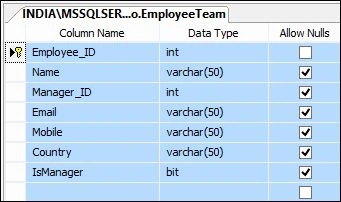
Figure 1
The following is the script of my table:
- CREATE TABLE [dbo].[EmployeeTeam](
- [Employee_ID] [int] IDENTITY(1,1) NOT NULL,
- [Name] [varchar](50) NULL,
- [Manager_ID] [int] NULL,
- [Email] [varchar](50) NULL,
- [Mobile] [varchar](50) NULL,
- [Country] [varchar](50) NULL,
- [IsManager] [bit] NULL,
- CONSTRAINT [PK_EmployeeTeam] PRIMARY KEY CLUSTERED
- (
- [Employee_ID] ASC
- )WITH (PAD_INDEX = OFF, STATISTICS_NORECOMPUTE = OFF, IGNORE_DUP_KEY = OFF, ALLOW_ROW_LOCKS = ON, ALLOW_PAGE_LOCKS = ON) ON [PRIMARY]
- ) ON [PRIMARY]
- GO
- SET ANSI_PADDING OFF
- GO
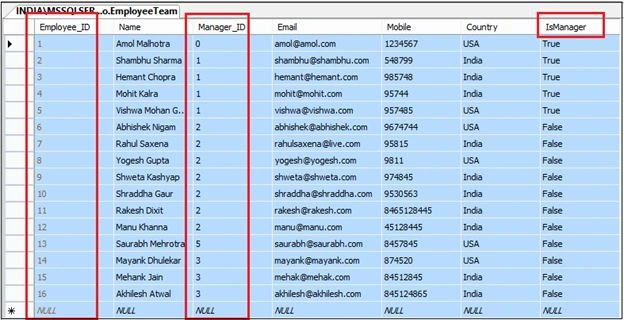
Figure 2.
Here in this you can see I have employee records with its Manager Id. So in the drop down I will see only Manage and on selecting Manager from the drop down I will show their team information in the GridView.
Now create a Visual Studio solution as in the following:
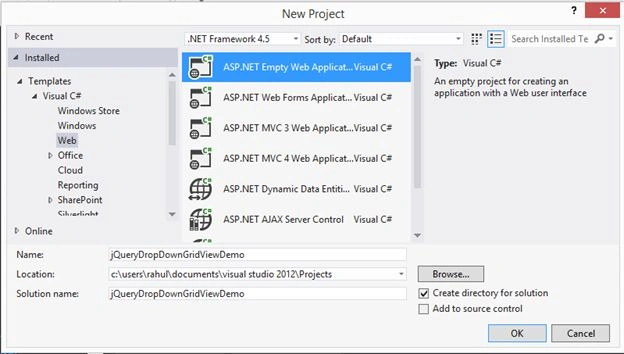
Figure 3
Now add a jQuery reference. For that, right-click on the project in Solution Explorer and click Manage NuGet Packages.
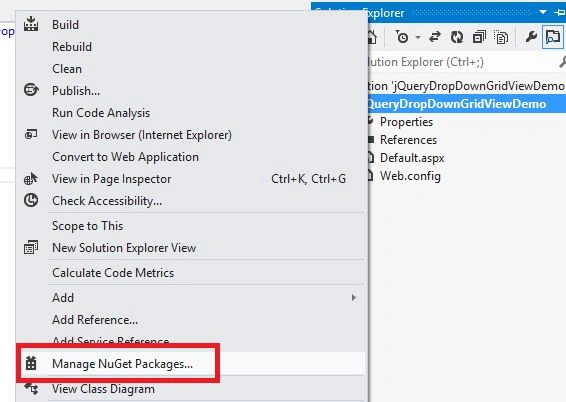
Figure 4
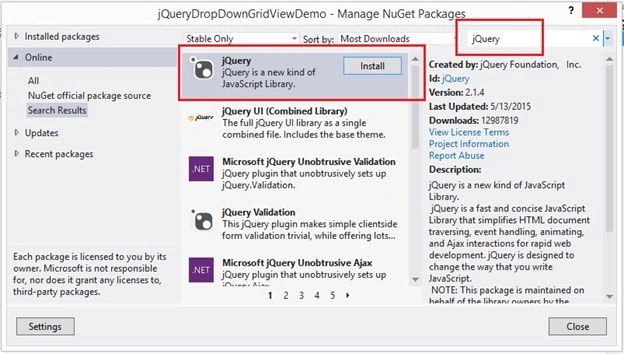
Figure 5
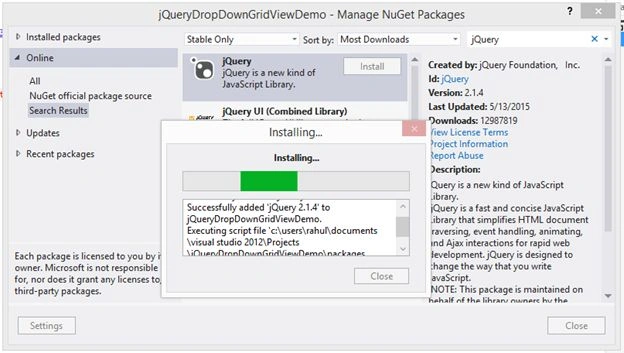
Figure 6
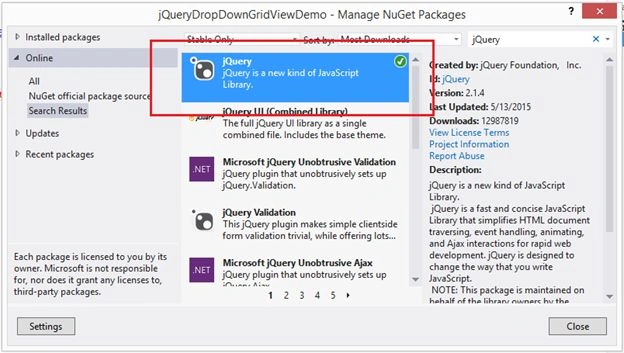
Figure 7
Now add a new class to your project's EmployeeDetails.cs with the following code:
- using System;
- using System.Collections.Generic;
- using System.Linq;
- using System.Web;
- namespace jQueryDropDownGridViewDemo
- {
- public class EmployeeDetails
- {
- public int Employee_ID { get; set; }
- public string Name { get; set; }
- public int Manager_ID { get; set; }
- public string Email { get; set; }
- public string Mobile { get; set; }
- public string Country { get; set; }
- }
- }
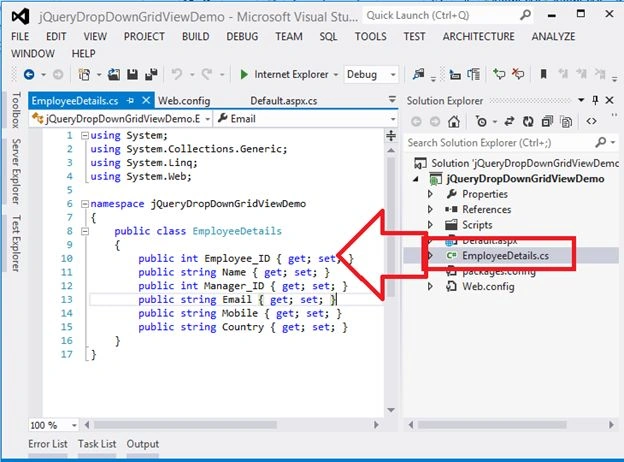
Figure 8
The following is my aspx:
- <%@ Page Language="C#" AutoEventWireup="true" CodeBehind="Default.aspx.cs" Inherits="jQueryDropDownGridViewDemo.Default" %>
- <!DOCTYPE html>
- <html xmlns="http://www.w3.org/1999/xhtml">
- <head runat="server">
- <title></title>
- <script src="Scripts/jquery-2.1.4.min.js"></script>
- <script type="text/javascript">
- $(document).ready(function () {
- $.ajax({
- type: "POST",
- contentType: "application/json; charset=utf-8",
- url: "Default.aspx/BindAllManager",
- data: "{}",
- dataType: "json",
- success: function (data) {
- $("#ddlManager").append($("<option></option>").val('0').html("-- Select Manager --"));
- $.each(data.d, function (key, value) {
- $("#ddlManager").append($("<option></option>").val(value.Employee_ID).html(value.Name));
- });
- },
- error: function (result) {
- alert("Error");
- }
- });
- //Capturing Selection Index change of Manager Drop Down List
- $('#ddlManager').change(function () {
- var SelectedText = $(this).find(":selected").text();
- var SelectedValue = $(this).val();
- if (SelectedValue == "0")
- {
- $('#dvRecords').empty();
- alert("Please Select Manager");
- return false;
- }
- $('#dvRecords').empty();
- var JSONObject = { "ManagerID": SelectedValue };
- var jsonData = JSON.stringify(JSONObject);
- //Filling Grid View
- $.ajax({
- type: 'POST',
- contentType: "application/json; charset=utf-8",
- url: 'Default.aspx/BindManagerEmployee',
- data: jsonData,
- dataType: 'JSON',
- success: function (response) {
- $('#dvRecords').append("<table style='width:100%;'><tr><td></td></tr><tr style='background-color:orange; color:white;'><th style='width:100px; text-align:center;'>Employee ID </th><th style='width:160px; text-align:center;'>Name </th><th style='width:160px; text-align:center;'>Email </th><th style='width:50px; text-align:right; padding-right:70px;'>Mobile </th><th style='width:130px; text-align:left;'>Country </th></tr>")
- for (var i = 0; i < response.d.length; i++) {
- $('#dvRecords').append("<tr style='background-color:yellow; font-family:verdana; font-size:12pt;'><td style='width:140px;'>" + response.d[i].Employee_ID + "</td><td style='width:200px;'>" + response.d[i].Name + "</td><td style='width:220px;'>" + response.d[i].Email + "</td><td style='width:140px; text-align:left;'>" + response.d[i].Mobile + "</td><td style='width:120px; text-align:left;'>" + response.d[i].Country + "</td></tr>")
- }; $('#dvRecords').append("</table>")
- },
- error: function () {
- alert("Error");
- }
- });
- });
- return false;
- });
- </script>
- </head>
- <body>
- <form id="form1" runat="server">
- <table style="width: 100%; background-color: skyblue; border: solid 10px Red; padding: 10px;">
- <tr>
- <td colspan="2" style="height: 40px; background-color: red; color: white; font-family: Verdana; font-size: 17pt; font-weight: bold; text-align: center;">jQuery: Showing Records On Selecting Value From Drop Down List
- </td>
- </tr>
- <tr style="height: 40px; background-color: greenyellow; color: blue; font-family: Verdana; font-size: 14pt; text-align: center;">
- <td>
- <asp:Label ID="lnlManager" runat="server" Text="Select Manager => "></asp:Label></td>
- <td>
- <asp:DropDownList ID="ddlManager" runat="server" Font-Bold="true" Width="200px" Height="30px"></asp:DropDownList>
- </td>
- </tr>
- <tr>
- <td></td>
- </tr>
- <tr>
- <td colspan="2">
- <div id="dvRecords" runat="server"></div>
- </td>
- </tr>
- </table>
- </form>
- </body>
- </html>
- using System;
- using System.Collections.Generic;
- using System.Data;
- using System.Linq;
- using System.Web;
- using System.Web.Services;
- using System.Web.UI;
- using System.Web.UI.WebControls;
- using System.Data.SqlClient;
- using System.Configuration;
- namespace jQueryDropDownGridViewDemo
- {
- public partial class Default : System.Web.UI.Page
- {
- protected void Page_Load(object sender, EventArgs e)
- {
- }
- [WebMethod]
- public static EmployeeDetails[] BindAllManager()
- {
- List<EmployeeDetails> details = new List<EmployeeDetails>();
- DataTable dtManager = new DataTable();
- using (SqlConnection con = new SqlConnection(ConfigurationManager.ConnectionStrings["EMPCON"].ConnectionString))
- {
- SqlCommand cmd = new SqlCommand();
- SqlDataAdapter da = new SqlDataAdapter();
- cmd = new SqlCommand("Select * from EmployeeTeam WHERE IsManager=1", con);
- da.SelectCommand = cmd;
- da.Fill(dtManager);
- }
- foreach (DataRow dtrow in dtManager.Rows)
- {
- EmployeeDetails logs = new EmployeeDetails();
- logs.Employee_ID = Convert.ToInt32(dtrow["Employee_ID"].ToString());
- logs.Name = dtrow["Name"].ToString();
- details.Add(logs);
- }
- return details.ToArray();
- }
- [WebMethod]
- public static List<EmployeeDetails> BindManagerEmployee(int ManagerID)
- {
- List<EmployeeDetails> details = new List<EmployeeDetails>();
- DataTable dtManager = new DataTable();
- using (SqlConnection con = new SqlConnection(ConfigurationManager.ConnectionStrings["EMPCON"].ConnectionString))
- {
- SqlCommand cmd = new SqlCommand();
- SqlDataAdapter da = new SqlDataAdapter();
- cmd = new SqlCommand("Select * from EmployeeTeam WHERE Manager_ID='" + ManagerID + "'", con);
- da.SelectCommand = cmd;
- da.Fill(dtManager);
- }
- foreach (DataRow dtrow in dtManager.Rows)
- {
- EmployeeDetails logs = new EmployeeDetails();
- logs.Employee_ID = Convert.ToInt32(dtrow["Employee_ID"].ToString());
- logs.Name = dtrow["Name"].ToString();
- logs.Email = dtrow["Email"].ToString();
- logs.Mobile = dtrow["Mobile"].ToString();
- logs.Country = dtrow["Country"].ToString();
- details.Add(logs);
- }
- return details;
- }
- }
- }
- <?xml version="1.0"?>
- <!--
- For more information on how to configure your ASP.NET application, please visit
- http://go.microsoft.com/fwlink/?LinkId=169433
- -->
- <configuration>
- <system.web>
- <compilation debug="true" targetFramework="4.5" />
- <httpRuntime targetFramework="4.5" />
- </system.web>
- <connectionStrings>
- <add name="EMPCON" connectionString="Data Source=INDIA\MSSQLServer2k8;Initial Catalog=TestDB;Integrated Security=True"/>
- </connectionStrings>
- </configuration>
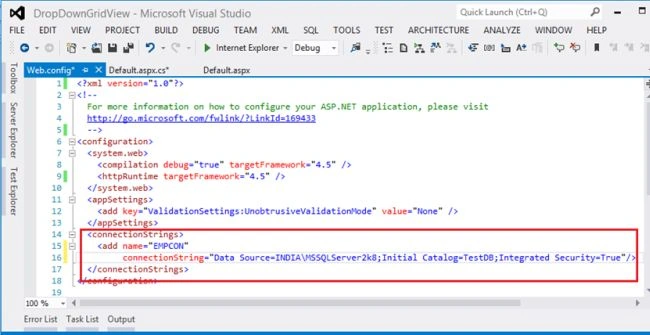
Figure 9
Now run your application:
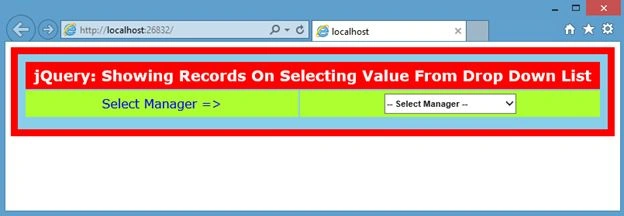
Figure 10
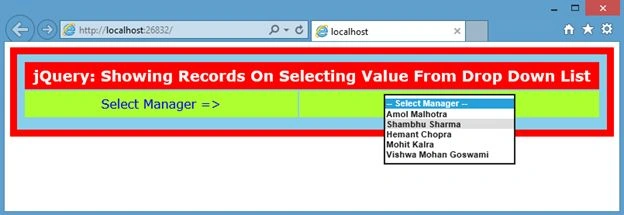
Figure 11
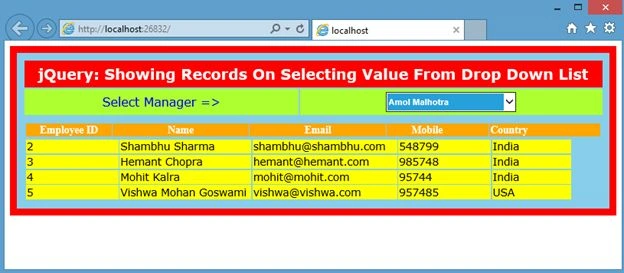
Figure 12
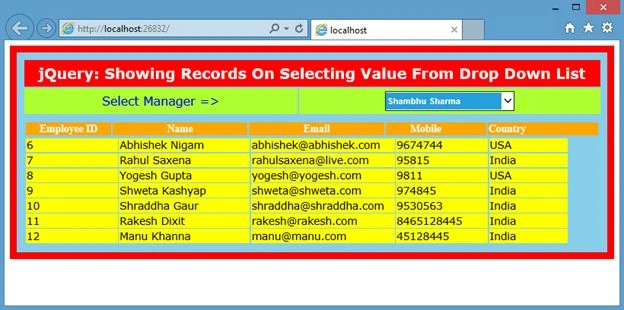
Figure 13
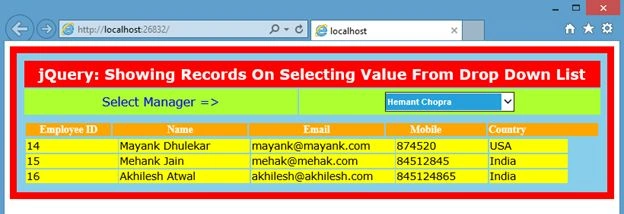
Figure 14
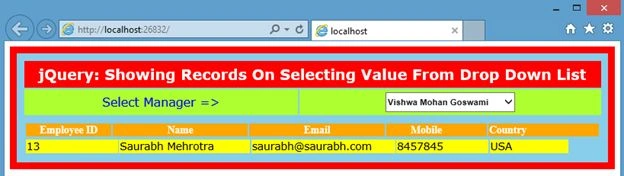
Figure 15
Rahul Kumar SaxenaPosted Jun 12, 2015, 2:40 AM
Thanks Sibeesh Venu
Sibeesh VenuPosted Jun 12, 2015, 1:46 AM
Good One.
Rahul Kumar SaxenaPosted Jun 11, 2015, 10:42 AM
Thanks Dominique Ceja
Dominique CejaPosted Jun 11, 2015, 9:37 AM
Great article!
Rahul Kumar SaxenaPosted Jun 11, 2015, 7:51 AM
Thanks Khan Abrar Ahmed
Rahul Kumar SaxenaPosted Jun 11, 2015, 7:50 AM
Thanks Kailash Chandra Behera
Rahul Kumar SaxenaPosted Jun 11, 2015, 7:50 AM
Thanks Khargesh Rajput
Khan Abrar AhmedPosted Jun 11, 2015, 7:05 AM
Nice one sir
Former memberPosted Jun 11, 2015, 5:28 AM
Nice article
Khargesh RajputPosted Jun 11, 2015, 4:41 AM
nice sir
Rahul Kumar SaxenaPosted Jun 10, 2015, 10:16 PM
welcome Santhakumar Munuswamy...
Rahul Kumar SaxenaPosted Jun 10, 2015, 10:16 PM
Thanks Ankit Bansal
Santhakumar MunuswamyPosted Jun 10, 2015, 3:06 PM
Thanks for good work
Ankit BansalPosted Jun 10, 2015, 12:21 PM
gr8
Rahul Kumar SaxenaPosted Jun 10, 2015, 9:05 AM
Thanks Rakesh Chavda
RakeshPosted Jun 10, 2015, 7:57 AM
Good one