

You can learn from my previous JQuery articles:
Step by step implementation of JQuery UI Accordion.
- Create a new ASP.NET Web Site Project.
Click File, then New Web Site.
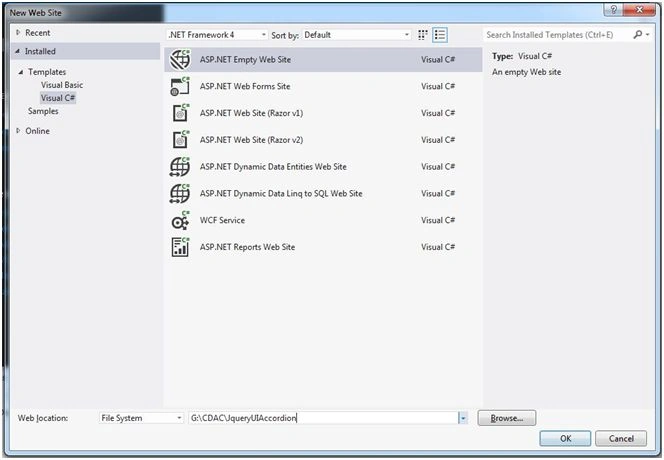
Created a ASP.NET web site project named JqueryUIAccordion.
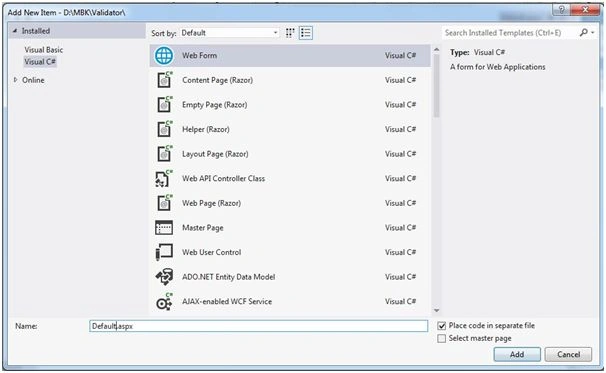
- Right click on project.
Add, Add New Item, then name WebForm as Default.aspx:
- You can download from JQueryUI website, Downloaded Jquery-ui-1.11.4custom.zip file; download zip in your drive.
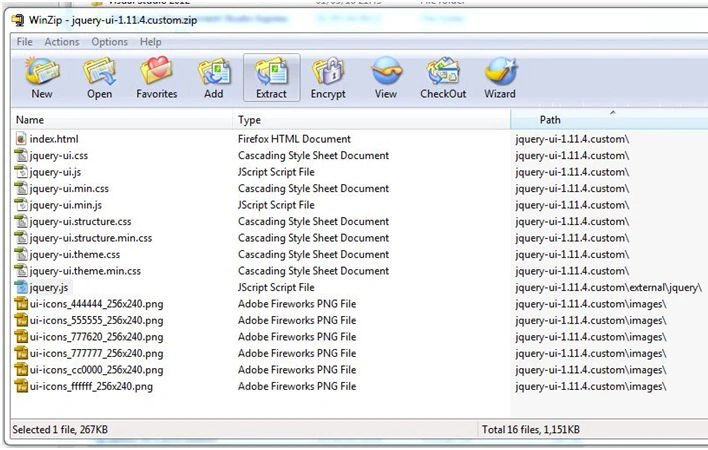
- Add the above mentioned three files into your project after zip is extracted.
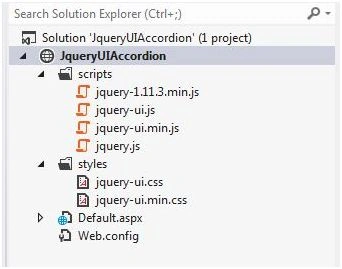
I had created two folder:
1. Styles: In style folder we will keep all CSS files.
2. Scripts: In scripts folder we will keep all JS files.
Right click on Project (Solution Explorer) - Add, Existing Item, then select the following files from your extracted folder.
Jquery-ui.css - Add this file inside Styles folder.
Jquery-1.11.3.min.js - Add this file inside Scripts folder.
Jquery-ui.js - Add this file inside Scripts folder.
- Given reference in Default.aspx file.
- <link href="styles/jquery-ui.css" rel="stylesheet" />
- <script src="scripts/jquery-1.11.3.min.js"></script>
- <script src="scripts/jquery-ui.js"></script>
- How to bind repeater control?
Please refer the following link.
- Default.aspx page drag & drop Repeater control on it.
- Set Connection string in web.config file.
- <connectionStrings>
- <add name="MemberCDACConnectionString" connectionString="Data Source=SAIBABA-PC\SAIBABA;Initial Catalog=MemberCDAC;Integrated Security=True" providerName="System.Data.SqlClient"/>
- </connectionStrings>
- Table structure of tblMembers table.
- GO
- /****** Object: Table [dbo].[tblMembers] Script Date: 01/29/2016 22:50:34 ******/
- SET ANSI_NULLS ON
- GO
- SET QUOTED_IDENTIFIER ON
- GO
- CREATE TABLE [dbo].[tblMembers](
- [MemberID] [int] IDENTITY(1,1) NOT NULL,
- [Name] [nvarchar](50) NULL,
- [address] [nvarchar](500) NULL,
- [place] [nvarchar](50) NULL,
- [joindate] [datetime] NULL,
- CONSTRAINT [PK_tblMembers] PRIMARY KEY CLUSTERED
- (
- [MemberID] ASC
- )WITH (PAD_INDEX = OFF, STATISTICS_NORECOMPUTE = OFF, IGNORE_DUP_KEY = OFF, ALLOW_ROW_LOCKS = ON, ALLOW_PAGE_LOCKS = ON) ON [PRIMARY]
- ) ON [PRIMARY]
- Sample data of Table
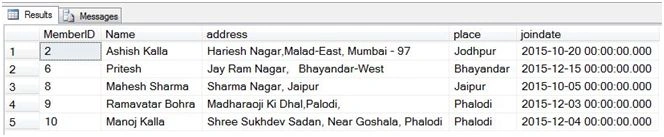
Above data we are going to display in ACCORDION.
- Default.aspx page code.
- <%@ Page Language="C#" AutoEventWireup="true" CodeFile="Default.aspx.cs" Inherits="_Default" %>
- <!DOCTYPE html>
- <html xmlns="http://www.w3.org/1999/xhtml">
- <head runat="server">
- <link href="styles/jquery-ui.css" rel="stylesheet" />
- <script src="scripts/jquery-1.11.3.min.js"></script>
- <script src="scripts/jquery-ui.js"></script>
- <script type="text/javascript">
- $(function ()
- {
- $("#MyAccordion").accordion();
- });
- </script>
- <title>JqueryUI Accordion</title>
- </head>
- <body>
- <form id="form1" runat="server">
- <div id="MyAccordion" style="width:50%">
- <asp:Repeater ID="rptMembers" runat="server">
- <ItemTemplate>
- <h3>
- <asp:Label ID="lblName" runat="server" Text='<%# Eval("Name") %>'></asp:Label></h3>
- <div>
- <p>
- <table>
- <tr>
- <td> <b>Member ID :</b>
- <asp:Label ID="lblMemberID" runat="server" Text='<%# Eval("MemberID")%>'></asp:Label> <br /> <b>Friend Name :</b>
- <asp:Label ID="lblMemberName" runat="server" Text='<%# Eval("Name") %>'></asp:Label> <br /> <b>Address :</b>
- <asp:Label ID="lblAddress" runat="server" Text='<%# Eval("Address") %>'></asp:Label> <br /> <b>Place :</b>
- <asp:Label ID="lblPlace" runat="server" Text='<%# Eval("Place") %>'></asp:Label> <br /> <b>Join Date :</b>
- <asp:Label ID="lblJoinDate" runat="server" Text='<%# Eval("Joindate","{0:dd/MM/yyyy}") %>'></asp:Label> <br /> </td>
- </tr>
- </table>
- </p>
- </div>
- </ItemTemplate>
- </asp:Repeater>
- </div>
- </form>
- </body>
- </html>
- Default.aspx.cs code:
ADO.NET code to fetch data from Microsoft SQL Server database.
- using System;
- using System.Collections.Generic;
- using System.Configuration;
- using System.Data;
- using System.Data.SqlClient;
- using System.Linq;
- using System.Web;
- using System.Web.UI;
- using System.Web.UI.WebControls;
- public partial class _Default: System.Web.UI.Page
- {
- string ConStr = ConfigurationManager.ConnectionStrings["MemberCDACConnectionString"].ConnectionString;
- protected void Page_Load(object sender, EventArgs e)
- {
- SqlConnection con = new SqlConnection(ConStr);
- SqlDataAdapter da = new SqlDataAdapter("Select * From tblMembers", ConStr);
- DataSet ds = new DataSet();
- da.Fill(ds, "FriendTable");
- rptMembers.DataSource = ds;
- rptMembers.DataBind();
- }
- }
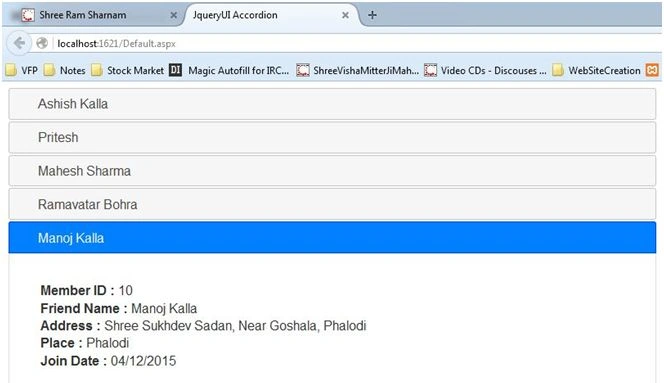
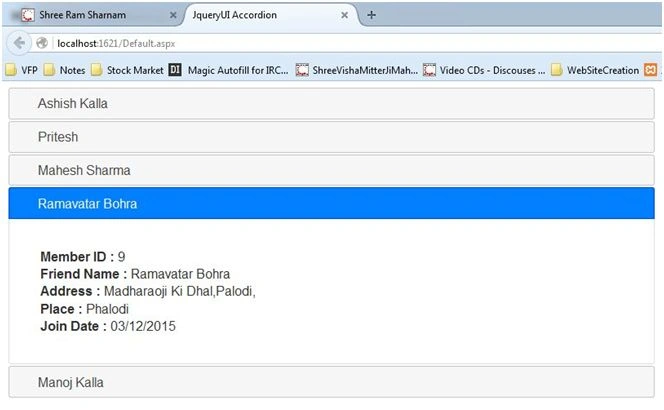
- Result:
Manoj KallaPosted Apr 19, 2016, 3:51 AM
Thank you, Humayun
Humayun Kabir MamunPosted Apr 19, 2016, 12:50 AM
Nice...
Shubham KumarPosted Feb 1, 2016, 1:50 AM
nice
Sibeesh VenuPosted Feb 1, 2016, 1:14 AM
Nice Share
Ankit BansalPosted Feb 1, 2016, 12:40 AM
nice one..
Santhakumar MunuswamyPosted Jan 30, 2016, 2:20 AM
Thanks for nice share