

Key Press Event
This event fires or executes whenever a user presses a key in the TextBox.
You should understand some important points before we are entering into the actual example.
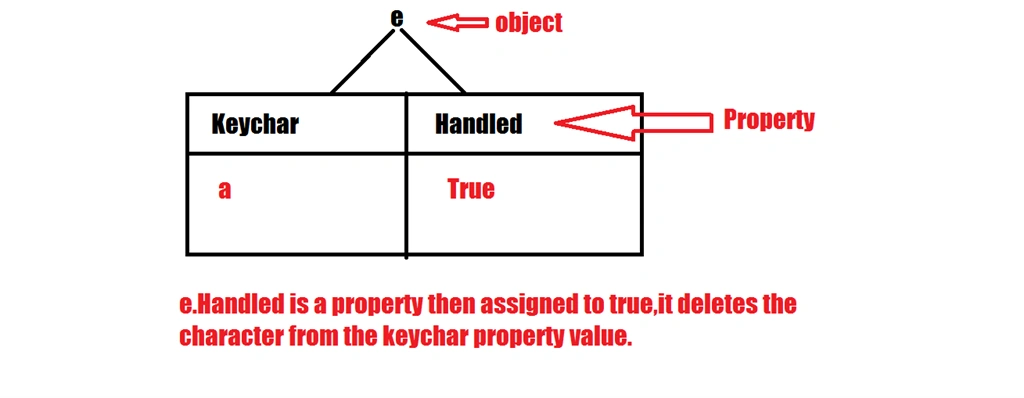
- e.Keychar is a property that stores the character pressed from the Keyboard. Whenever a key is pressed the character is stored under the e object in a property called Keychar and the character appears on the TextBox after the end of keypress event.
- e.Handled is a property then assigned to true, it deletes the character from the keychar property.
Indexof(): it returns the index number of the first occurence of the specified letter in the string.
Note: if the character doesn't exist in the string it returns -1.
Example 1:
Form8.cs[Design]
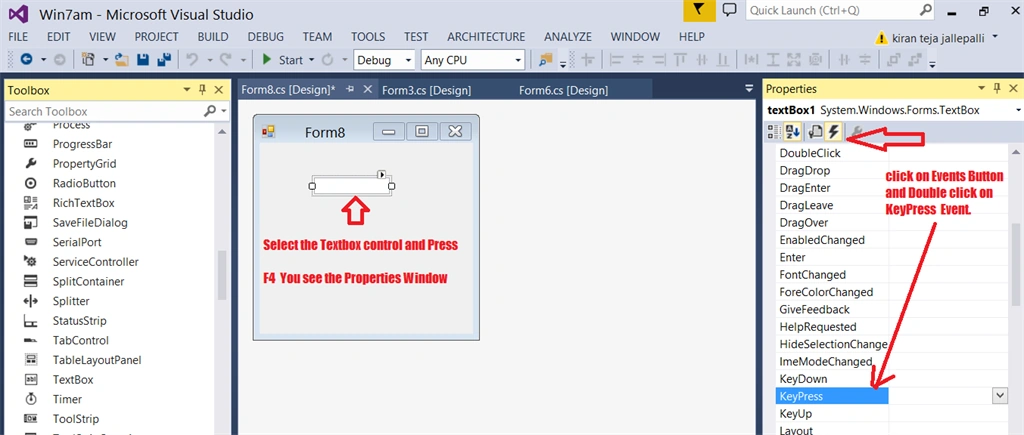
Form8.cs (Code Behind file)
- private void textBox1_KeyPress(object sender, KeyPressEventArgs e)
- {
- string st = "0123456789"+(char)8;
- if(st.IndexOf(e.KeyChar)==-1)
- {
- MessageBox.Show("please enter digits only");
- e.Handled = true;
- }
- }
Note:
The ASCII value of a Backspace is 8. In our keyboard, every key has an ASCII value, but it is very difficult to remember each and every ASCII value.
Microsoft has introduced a class called keys. By using this Key class you can easily determine the ASCII value.
Example 2
(The same example but I am using a predefind function.)
Microsoft provides a predifined function called IsDigit(). By using this function you can easily validate the data, whether a digit was entered or not.
- private void textBox1_KeyPress(object sender, KeyPressEventArgs e)
- {
- if (!(Char.IsDigit(e.KeyChar) || (e.KeyChar == (char)Keys.Back)))
- {
- MessageBox.Show("please enter digits only");
- e.Handled = true;
- }
- }
Thank you.
Santhakumar MunuswamyPosted May 23, 2015, 3:21 PM
Thanks for sharing
Saineshwar BageriPosted May 23, 2015, 10:01 AM
good one
Afzaal Ahmad ZeeshanPosted May 23, 2015, 4:36 AM
The example 2 of your article was great. Good article! :-)