

Welcome back to the Learn Angular 8 in 10 Days article series - Part 7. In the previous article, we discussed the different concepts of View Encapsulation in Angular. Now, in this article, we will discuss the Concept of Angular Forms; i.e. Template Driven Form and Reactive Form. If you want to read the previous articles of this series, then follow the links.
So, in this article, we will discuss the concept of Forms in Angular 8. Form objects are always the backbone of any web-based application. Because, we can use forms for many purposes within the application like login, submit a request, ask the user to fill in some information, place an order, etc. So, in this article, we will discuss different aspects of Forms object in Angular Framework.
About Angular Forms
Types of Angular Forms
- Template Driven Form
- Model Drive Form or Reactive Form
Both the above technology belongs to the @angular/forms packages and are totally based on the form-control classes. But in spite of that, both the techniques are different from each other in respect to their own philosophy, programming style, and technique.
Template Driven Forms
Benefits of Template Driven Forms
- It is much easier to use
- This technique works perfectly in simple scenarios
- It totally depends on two-way data binding techniques i.e. ngModel syntax.
- It requires a minimum of code in the component part since most of the work is done in the HTML template part.
- It automatically tracks the form element and its control.
- Despite the above benefits, it has some drawbacks like –
- Template-driven form techniques fail when we want to design some complex form in the UI section
- We can’t perform any Unit Testing based on the Template Driven Form.
Model-Driven Forms
Benefits of Model-Driven Forms
- In Reactive Forms, form definition including logic related coding mainly maintained within the TypeScript part of the component. Since using this technique, we create form controls programmatically using FormGroup or FormBuilder class. In HTML template, HTML form tags are only used to put a reference of TypeScript based form-control class.
- It provides us programmatic and full control of the form value updates and form validations.
- In this technique, we can create a dynamic structure-based form at run time.
- We can implement custom form validation.
- Since the entire form-based part is in typescript class or component, it is much easier to write unit tests in reactive forms.
- Despite the above benefits, it has some drawback like –
- This technique requires much more coding, especially in the TypeScript part.
- It is a little bit complex to understand and maintain the code.
Template-Driven Form vs Reactive Form
| Template-Driven Form | Reactive Form |
| Template-Driven Form is less explicit, and it is mainly created by Directives. | Reactive Form is more explicit and normally created within the Component class. |
| It supports the unstructured data model | It always supports the structured data model. |
| It uses directives for implementing Form validations | It uses the function for implementing Form Validations |
| When form control value changes, it provides an asynchronous mechanism to update form controls. | When form control value changes, it provides synchronous mechanism to update form controls. |
Form Controls
Reactive Form Validation
Reactive Form Custom Validation
- <div [hidden]="!password.hasError('hasSpecialChars')">
- Your password must have Special Characters like @,#,$, etc!
- </div>
Demo 1 - Template Driven Form
- import { Component, OnInit } from '@angular/core';
- import { NgForm } from '@angular/forms';
- @Component({
- selector: 'app-root',
- templateUrl: './app.component.html',
- styleUrls : ['./custom.css']
- })
- export class AppComponent implements OnInit {
- private formData: any = {};
- private showMessage: boolean = false;
- constructor() {
- }
- ngOnInit(): void {
- }
- registerUser(formdata: NgForm) {
- this.formData = formdata.value;
- this.showMessage = true;
- }
- }
app.component.html
- <h2>Template Driven Form</h2>
- <div>
- <form #signupForm="ngForm" (ngSubmit)="registerUser(signupForm)">
- <table style="width:60%;" cellpadding="5" cellspacing="5">
- <tr>
- <td style="width :40%;">
- <label for="username">User Name</label>
- </td>
- <td style="width :60%;">
- <input type="text" name="username" id="username" [(ngModel)]="username" required>
- </td>
- </tr>
- <tr>
- <td style="width :40%;">
- <label for="email">Email</label>
- </td>
- <td style="width :60%;">
- <input type="text" name="email" id="email" [(ngModel)]="email" required>
- </td>
- </tr>
- <tr>
- <td style="width :40%;">
- <label for="password">Password</label>
- </td>
- <td style="width :60%;">
- <input type="password" name="password" id="password" [(ngModel)]="password" required>
- </td>
- </tr>
- <tr>
- <td style="width :40%;"></td>
- <td style="width :60%;">
- <button type="submit">Sign Up</button>
- </td>
- </tr>
- </table>
- </form>
- <div *ngIf="showMessage">
- <h3>Thanks You {{formData.username}} for registration</h3>
- </div>
- </div>
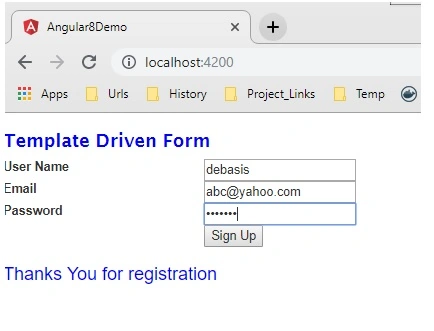
Now check the output in the browser,
Demo 2 - Model-Driven Form
app.component.ts
- import { Component, OnInit, ViewChild } from '@angular/core';
- import { Validators, FormBuilder, FormControl, FormGroup } from '@angular/forms';
- @Component({
- selector: 'app-root',
- templateUrl: './app.component.html',
- styleUrls : ['./custom.css']
- })
- export class AppComponent implements OnInit {
- private formData: any = {};
- username = new FormControl('', [
- Validators.required,
- Validators.minLength(5)
- ]);
- password = new FormControl('', [
- Validators.required,
- hasExclamationMark
- ]);
- loginForm: FormGroup = this.builder.group({
- username: this.username,
- password: this.password
- });
- private showMessage: boolean = false;
- constructor(private builder: FormBuilder) {
- }
- ngOnInit(): void {
- }
- registerUser() {
- this.formData = this.loginForm.value;
- this.showMessage = true;
- }
- }
- function hasExclamationMark(input: FormControl) {
- const hasExclamation = input.value.indexOf('!') >= 0;
- return hasExclamation ? null : { needsExclamation: true };
- }
app.component.html
- <h2>Reactive Form Module</h2>
- <div>
- <form [formGroup]="loginForm" (ngSubmit)="registerUser()">
- <table style="width:60%;" cellpadding="5" cellspacing="5">
- <tr>
- <td style="width :40%;">
- <label for="username">User Name</label>
- </td>
- <td style="width :60%;">
- <input type="text" name="username" id="username" [formControl]="username">
- <div [hidden]="username.valid || username.untouched" class="error">
- <div [hidden]="!username.hasError('minlength')">
- Username can not be shorter than 5 characters.
- </div>
- <div [hidden]="!username.hasError('required')">
- Username is required.
- </div>
- </div>
- </td>
- </tr>
- <tr>
- <td style="width :40%;">
- <label for="password">Password</label>
- </td>
- <td style="width :60%;">
- <input type="password" name="password" id="password" [formControl]="password">
- <div [hidden]="password.valid || password.untouched" class="error">
- <div [hidden]="!password.hasError('required')">
- The password is required.
- </div>
- <div [hidden]="!password.hasError('needsExclamation')">
- Your password must have an exclamation mark!
- </div>
- </div>
- </td>
- </tr>
- <tr>
- <td style="width :40%;"></td>
- <td style="width :60%;">
- <button type="submit" [disabled]="!loginForm.valid">Log In</button>
- </td>
- </tr>
- </table>
- </form>
- <div *ngIf="showMessage">
- <h3>Thanks You {{formData.username}} for registration</h3>
- </div>
- </div>
Now, for using the reactive form we need to inject ReactiveFormModule in our app.module.ts file as below –
- import { BrowserModule } from '@angular/platform-browser';
- import { NgModule, NO_ERRORS_SCHEMA } from '@angular/core';
- import { FormsModule, ReactiveFormsModule } from '@angular/forms';
- import { AppComponent } from './app.component';
- @NgModule({
- declarations: [
- AppComponent
- ],
- imports: [
- BrowserModule, FormsModule, ReactiveFormsModule
- ],
- providers: [],
- bootstrap: [AppComponent],
- schemas: [NO_ERRORS_SCHEMA]
- })
- export class AppModule { }
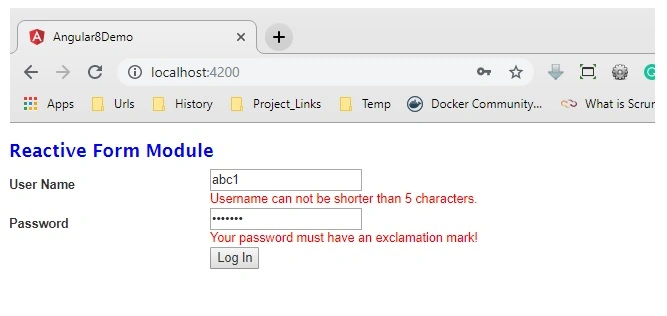
Now check the output in the browser,
Watch here a full video on Angular Forms, and learn how to unleash the power of Angular Forms.
Gerardo FerrariPosted Oct 19, 2021, 8:21 PM
Other than creating a method
Gerardo FerrariPosted Oct 19, 2021, 8:20 PM
In many example is using property as private. This issue an error, when I try to buid o start. I take off this condition, private , and that can execute de example. Does exists and other solution ?
Nic ScheepersPosted Mar 8, 2021, 9:46 AM
I am using angular CLI 11.2.3 and I get the following error: NG8002: Can't bind to 'ngModel' since it isn't a known property of 'input'. I did import FormsModule in app.module.ts. Can you help please!
Manish KathuriaPosted Apr 22, 2020, 8:38 PM
Link for day 8 broken. Please fix the same.
Amit MohantyPosted Jan 29, 2020, 9:50 AM
Nice article.
Dhruv MauryaPosted Nov 19, 2019, 7:08 AM
Please share one article Authentication and Logging
Dhruv MauryaPosted Nov 14, 2019, 12:28 AM
Sir when can we expect day 7 day 8 and day 9. actually i want Angular with Wep Api with Authentication
Vidyadharran GPosted Nov 11, 2019, 7:53 AM
Excellent sir thanks for sharing !
Salman ShaikhPosted Oct 30, 2019, 2:53 PM
Hello when can we expect day 8 ?
Pankajkumar PatelPosted Oct 17, 2019, 11:02 PM
Nice article