

Before reading this article, I highly recommend reading the previous parts of the series.
- Learn Universal Windows Programming Via Modern C++
- Learn Universal Windows Programming Via Modern C++ (Button Control)
- Learn Universal Windows Programming Via Modern C++ (Stackpanel)
- Learn Universal Windows Programming Via Modern C++ (CheckBox)
- Learn Universal Windows Programming Via Modern C++ (RadioButton)
- Learn Universal Windows Programming Via Modern C++ (Combobox)
- Learn Universal Windows Programming Via Modern C++ (Border)
- Learn Universal Windows Programming Via Modern C++ (CommandBar)
- Learn Universal Windows Programming Via Modern C++ (SplitView Control)
- Learn Universal Windows Programming Via Modern C++ (AutoSuggestBox)
- Learn Universal Windows Programming Via Modern C++ (ContentDialog)
- Learn Universal Windows Programming Via Modern C++ (Grid control)
- Linear pattern or Panel.
- Non-Liner pattern or Panel.
Linear Pattern
In a Linear Pattern, all the controls should be either Horizontal or Vertical.
For example, a StackPanel.
Non-Linear pattern
In a Non-Linear pattern, all the controls are aligned in any order with relationship to other controls, like top or bottom or right or left etc.
Now, I am going to explain how to implement the Non-Linear pattern. RelativePanel control is called Non-Linear pattern also.
Relative panel
Each control has a relationship with other controls with any relationship (but not a circular dependency).
Children
All the itemcontrols have to be added to the children property. "Children" is a UIElementCollection container and by default, all the controls are added into the zero-index order. "Append properties" is used to add the Controls into the container.
- RelativePanel RPanel;
- RPanel.Children().Append(txtTop);
- RPanel.Children().Append(txtBottom);
- RPanel.Children().Append(txtLeft);
- RPanel.Children().Append(txtRight);
- RPanel.Children().Append(txtHorCenter);
- RPanel.Children().Append(txtVertical);
- RPanel.Children().Append(txtRightOf);
- RPanel.Children().Append(txtLeftOf);
- RPanel.Children().Append(txtAbove);
- RPanel.Children().Append(txtBelow);
- RPanel.Children().Append(txtHeader);
Properties' position inside the Panel control
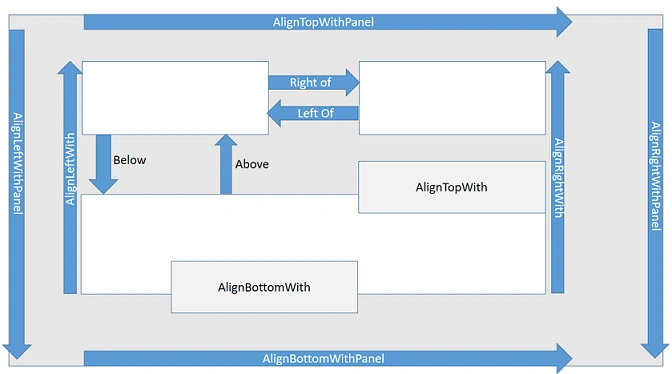
- The complete box is a Relative panel.
- Inside boxes are child controls.
- Arrow is specified as Alignment and Position of the controls.
A RelativePanel is a Parent control, all inside controls are child controls.
There are generally the following two types of relationships,
- Parent to child.
- Child to child.
Parent -> Child: All panel properties are parent types.
Set the parent related controls, pass the control name, & set as true. It's attached to the parent control.
Parent related APIs
- RelativePanel.SetAlignTopWithPanel(control,true);
- RelativePanel.SetAlignBottomWithPanel(control, true);
- RelativePanel.SetAlignLeftWithPanel(control, true);
- RelativePanel.SetAlignRightWithPanel(control, true);
- RelativePanel.SetAlignVerticalCenterWithPanel(control, true);
- RelativePanel.SetAlignHorizontalCenterWithPanel(control,true);
Child relationship
Child to child (other than panel relationship, properties consider the child to child properties).
Below APIs are used to set the Child to Child relationship. For child relationship APIs, first we need to pass the child argument as first, which child we are attaching (Parent) that should be second arguments.
Child APIs
- RelativePanel.SetRightOf(ChildControl, PropertyValue::CreateInspectable(ParentControl));
- RelativePanel.SetLeftOf(ChildControl, PropertyValue::CreateInspectable(ParentControl));
- RelativePanel.SetAbove(ChildControl, PropertyValue::CreateInspectable(ParentControl));
- RelativePanel.SetBelow(ChildControl, PropertyValue::CreateInspectable(ParentControl));
All the alignment properties are high-priority and the remaining (position) properties are low-priority.
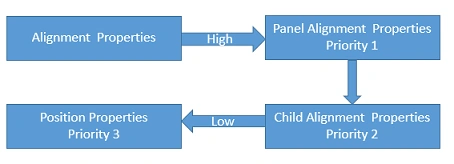
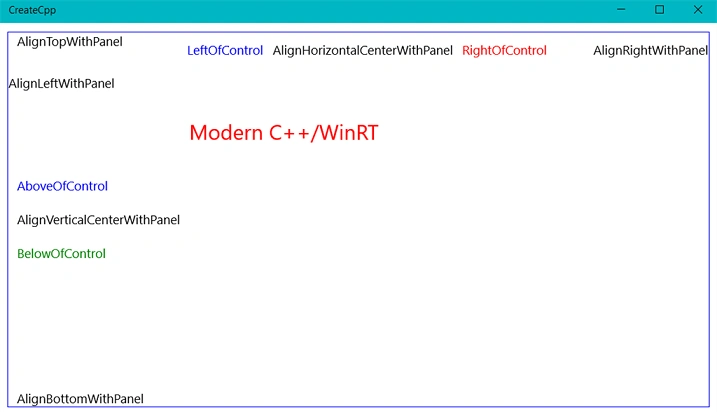
Each control's relation with other controls is something. If we did not provide the relative properties, then the first control aligns with the default position and the next controls overwrite the previous control and always set the relative controls. For each control, one or more relationship depends on the requirements.
Join the conversation! Your thoughts help the community grow.