

Introduction
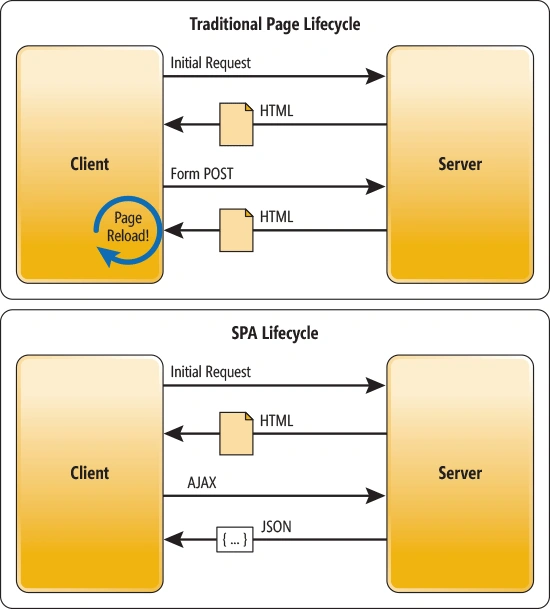
Traditional web applications reside mostly on the Server, with heavy traffic flow between browser and server using GETs, POSTs (and in webforms, the dreaded post-back) being the order of the day. More and more web applications are using a new paradigm, the Single Page Application or "SPA".
Common examples of SPAs are Facebook and Gmail. The concept of an SPA is to keep providing a better, more responsive, seamless experience for the user, so that they seldom have to leave the browser and therefore avoid long tedious full page refresh round-trips to the Server. Frameworks like Angular provide extremely robust methods for creating SPAs, but when you don't have the time for the learning curve, or want something that's light-weight and works simply, a very focused router like SammyJS is an extremely useful alternative. This article introduces the benefits of using an SPA router and explains how to use SammyJS to quickly put together a clean, scalable, modular single page application with MVC.
Why use a router
Let's consider a web based address book. It would have very basic functionality-
- List addresses
- Search address function
- Create/Edit/Delete address entries
Even that restricted functionality however carries a reasonable data entry and management overhead.
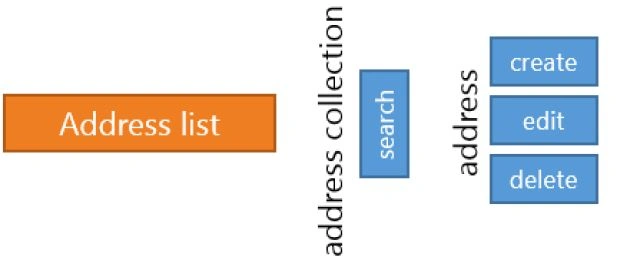
A common approach to workflow in a Single Page Application is to use JavaScript button clicks to move things along. This methodology encourages behavior, for example like using global variables, to track the ID or state of a selected/current data record. While using, this approach works to a degree, it can get messy very quickly. If we can solve this work-flow problem, we have the basis for clear separation of concerns which allows for a far cleaner, scalable, and more maintainable solution.

SammyJS is described as "Restful, evented JavaScript". It allows us to work in an MVC manner, but on the client. Just as we have controllers in MVC and Web API that can accept verbs of get/post/delete etc, we can also implement these patterns using SammyJS.
In a traditional Web Server, we access the controller using full routes. SammyJS routing however uses ANCHOR TAGS "#" to hook routing together - you can see this in the example below that uses a standard "GET" verb to request data from the "#home" route.
- this.get('#home', function (){
- // do something here and send data back to the caller
- })
Using the code - setup
To get SammyJS up and running, we need to initialize it, and add some routes.
- //initialize "SAMMY"
- var app = $.sammy(function () {
- this.get('#home', function () {
- // show home screen
- });
- this.get('#address/create', function () {
- // show create new address screen
- });
- }).run('#home');//run it with default html fragment
Using the code - routes and verbs
For demo purposes, I create a number of DIVs that will act as display forms/regions that are shown/hidden depending on the route choice the user makes. These can be separated out into individual cshtml files and rendered using HTML.Partial(..).
- <div class="divPanel" id="div1" style="display:none">This is div 1<br /> <label id="div1_SomeLabel"></label></div>
- <div class="divPanel" id="div2" style="display:none">This is div 2, the param was: <label id="div2_ParamVal"></label></div>
- <div class="divPanel" id="div3" style="display:none">This is div 3</div>
- <div class="divPanel" id="divHome">This is the Home div<br />
- <p>
- <!-- master div that will be used to host other divs -->
- </p>
- <div class="divPanel" id="divContent"> </div>
- <a href="#home">Home</a> |
- <a href="#d1">Show Div 1</a> |
- <a href="#d2/id=1234">Show Div with param</a> |
- <a href="#d4">Re-direct to div 1</a> |
- <a href="#GetRemote">Get div content from server</a>
- <form id="simpleForm" action="#/post/form" method="POST">
- <label>Some Name</label><br />
- <input type="text" name="some_name" value="a simple name" />
- <input type="submit" value="Submit" />
- </form>
- this.get('#home', function() {
- hideAll();
- $('#divHome').fadeIn();
- });
- this.get('#d1', function() {
- hideAll();
- $('#div1').fadeIn();
- $('#div1_SomeLabel').text('');
- });
- this.get('#d4', function() {
- hideAll();
- this.redirect('#d1');
- $('#div1_SomeLabel').text('Redirect from some a-tag');
- });
- <a href="#d2/id=1234">Show Div with param</a>
- this.get('#d2/:id', function() {
- hideAll();
- var tempID = this.params['id'];
- $('#div2').fadeIn();
- $('#div2_ParamVal').text(tempID)
- });
- <form id="simpleForm" action="#/post/form" method="POST">
- <label>Some Name</label><br />
- <input type="text" name="some_name" value="a simple name" />
- <input type="submit" value="Submit" />
- </form>
- this.post('#/post/form', function() {
- alert('here with ' + this.params['some_name'] + '\n\nNow hiding the form!');
- $('#simpleForm').hide();
- return false; // stops the default POST behaviour back to server
- });
Beyond the router
Creating a Single Page Application has many challenges, including memory management, data exchange with Server, etc. Here is a small example of taking a fresh, updated server-side partial page and using it to update the interface for the user.- <!-- master div that will be used to host other divs -->
- <div id="divContent" class="divPanel"></div>
- // Sammy routing
- this.get('#GetRemote', function () {
- hideAll();
- GetRemoteDiv();
- });
- // Ajax call to get remote html to replace page content
- var GetRemoteDiv = function () {
- $.ajax({
- method: 'get',
- url: '/home/LoadDivFromRemote'
- }
- ).done(function (dataRcvd) {
- $('#divContent').empty();
- $('#divContent').show();
- $('#divContent').html(dataRcvd);
- });
- }
- // server-side C# code that generates the dynamic page data
- public ActionResult LoadDivFromRemote()
- {
- ViewBag.Title = "Remotly injected!";
- ViewBag.Message = "This div was remotly injected into the dom from the server at: " + DateTime.Now.ToLongTimeString();
- return PartialView("~/Views/Home/RemoteDiv.cshtml");
- }
- <h2>@ViewBag.Title</h2>
- <h3>@ViewBag.Message</h3>
Wrap-up
This article has focused on the core concept of routing - what you do with routing is another thing - I suggest you work through the "JSON Store" examples (part 1, part 2) on the SammyJS website to get an in-depth understanding of the capabilities of this library.
SammyJS comes with a raft of extremely useful plugins that cover topics such as html templating, client-side local storage, SPA Google Analytics helper, etc.
I strongly encourage you to download the sample code and try SammyJS out.
Other resources
For a more in-depth walk-through of the architecture of an SPA using Microsoft technologies, read Mike Wasson's article on msdn. Here are the two other general resources on Single Page Applications that go quite in-depth.
- Mixu's single page app book (online)
- And if you prefer to read from dead trees, Michael Mikowski's book is highly recommended.
Manav PandyaPosted Jan 17, 2017, 5:08 AM
Thanks for sharing , worth reading :)