

Validation Settings
To proceed to create a list with the following 2 columns:
- Budget as Number
- Amount as Number

You can access those settings from List, then List Settings and by clicking the Validation Settings link.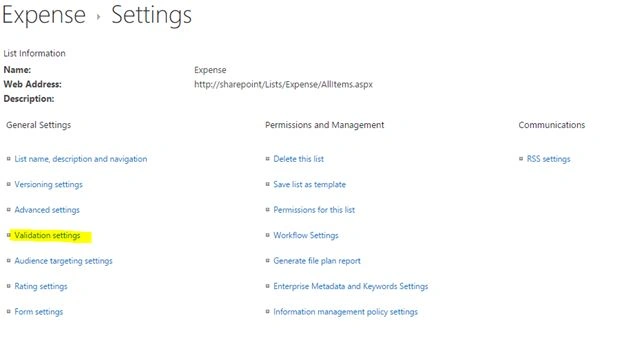
Now you can set a validation that the Amount should not be greater than the Budget. You can see this below.
Additionally, we have set a user message too.
Testing
Now let us try to create an invalid item. It will display an error message as in the following screenshot: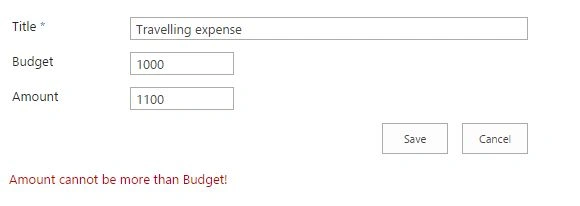
You can change the amount to save the item.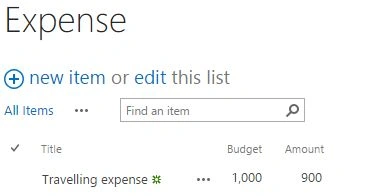
Note
In the advanced scenarios we can come with AND and OR operators too.
Summary
In this article we have explored the List Validation Settings feature. In future articles I will write about more complex validations.
Abhay ShankerPosted Aug 25, 2015, 1:10 PM
Nice Share Sir..
Gowtham KPosted Aug 25, 2015, 12:46 PM
Good one
Gopi ChandPosted Aug 25, 2015, 9:56 AM
Good work
Rajeesh MenothPosted Aug 25, 2015, 9:33 AM
Nice Share :)
Ankit BansalPosted Aug 25, 2015, 6:17 AM
good..
Karthikeyan KPosted Aug 25, 2015, 5:03 AM
Good one sir...Thanks for share
Vaikesh K PPosted Aug 25, 2015, 4:41 AM
Good work :)