
Introduction
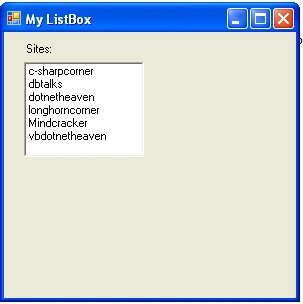
Today I am going to explain about ListBoxes in F# and how to add items to a ListBox in our Windows form. ListBoxes are generally used to represent a list of items to the users. You can select items from a ListBox. The items in a ListBox can be removed as well as added. ListBoxes can be bound to a variety of data sources. The following is the syntax to create a ListBox in F#.
Syntax
//syntax to create listbox
let listbox= new ListBox()
Add Items in ListBox
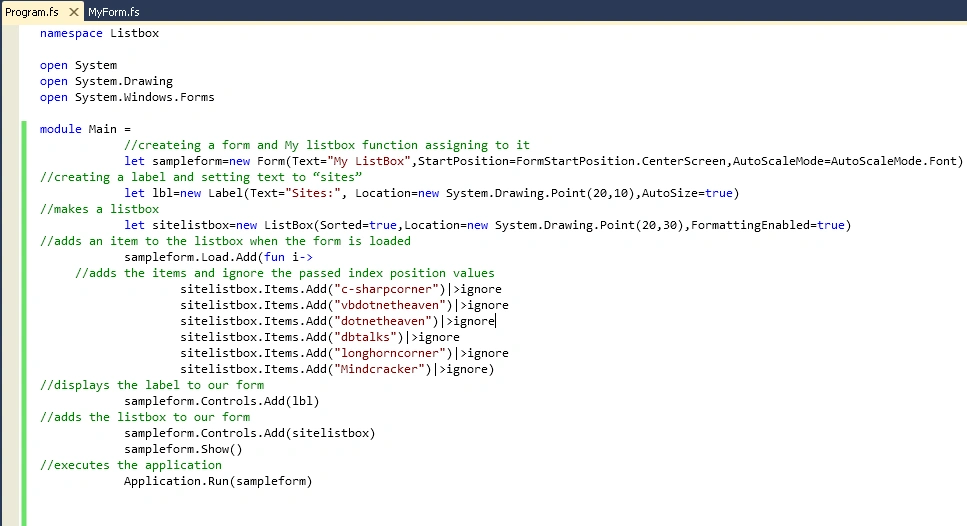
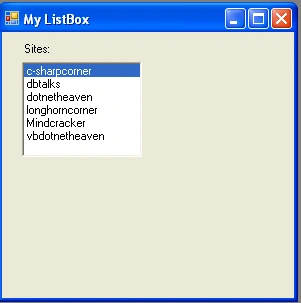
ListBox contains an Add method, which allows users to add items to the ListBox. You can call the Add method like below.
//add method
listbox.Items.Add("c-sharpcorner")
ListBox Properties
ListBox also contains some properties and methods other than the add method like selectedItems, SelectedIndex, Count, RemoveAt and Clear.
| Properties | Description |
| SelectedItem | Get/set the selected Item of the List |
| SelectedIndex | Get/set the Index of the selected Item |
| SelectedItems | Get/set the currently selected Item for the ListBox |
| Template | Get/set a control Template |
ListBox Methods
| Methods | Description |
| RemoveAt | Removes the Item at the specified Index |
| Clear | Removes all Items |
| GetSelected | Returns a value Indicating whether the specified item is selected |
| Focus | Set input Focus to the control |
Join the conversation! Your thoughts help the community grow.