

Introduction
In this article, we will see how to achieve localization in the Blazor app using Microsoft.JSInterop API.
We have already seen the basic features of a Blazor application in my previous articles on C# Corner. Please refer to the below articles to get some idea of the Blazor framework.
- Single Page Application With Blazor And CosmosDB
- Blazor - CRUD Using PostgreSQL And Entity Framework Core
- Blazor - Connect With Amazon DynamoDB Using AWS SDK
- Blazor - Work With Cassandra API In Cosmos DB
Blazor is an experimental .NET web framework using C#/Razor and HTML that runs in the browser with WebAssembly. Blazor provides the benefits of a client-side web UI framework. NET.
In this article, we will see the localization with Microsoft.JSInterop API.
Please open Visual Studio 2017 (I am using a free community edition) and create a Blazor app. Choose an ASP.NET Core Web Application project template.
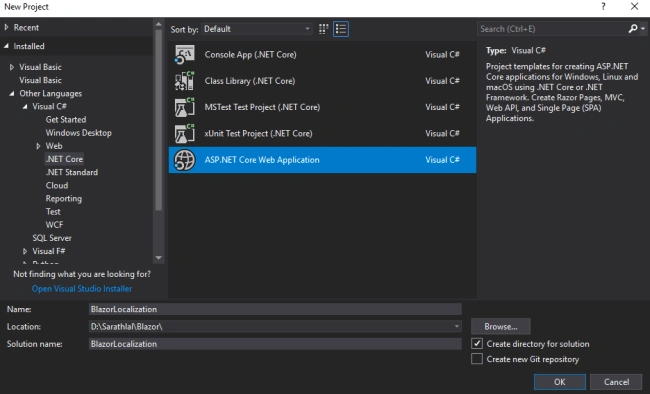
We can choose Blazor (ASP.NET Core hosted) template.
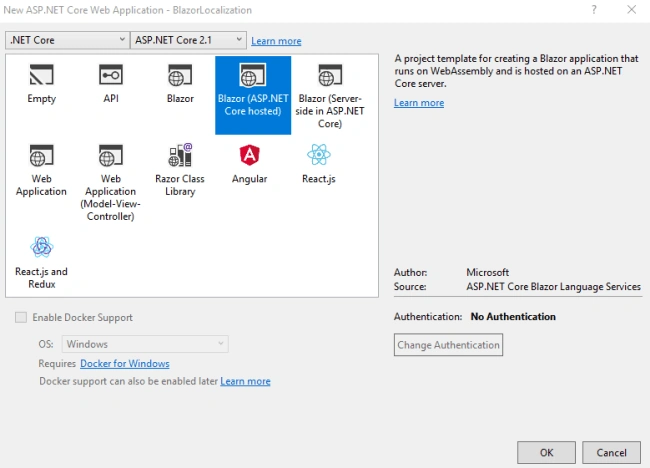
Our solution will be ready in a moment. Please note that there are three projects created in our solution - “Client”, “Server”, and “Shared”.
The client project contains all the client-side libraries and Razor Views, while the server project contains the Web API Controller and other business logic. The shared project contains commonly shared files, like models and interfaces.
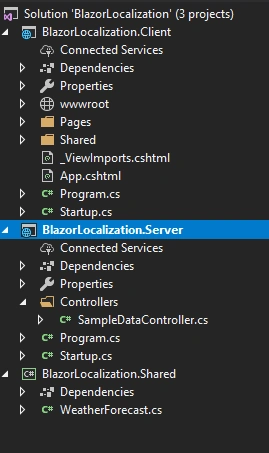
By default, Blazor creates many files in these three projects. We can remove all the unwanted files like “Counter .cshtml”, “FetchData.cshtml”, “SurveyPrompt.cshtml” from the Client project, and “SampleDataController.cs” file from the Server project.
In this app, we do not require a Shared project as well. We can remove that from our solution.
In the Server project, please create a “Resources” folder to keep your resource files inside this folder. These resource files will be used for localization later.
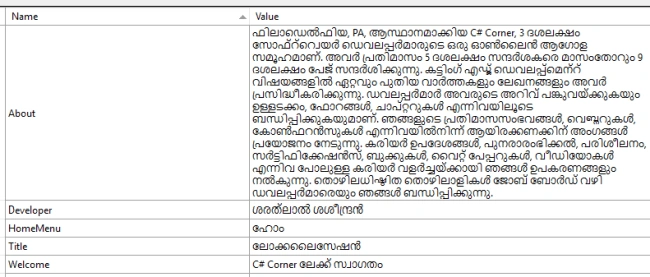
We can create our first locale resource for the “en” (English) locale.
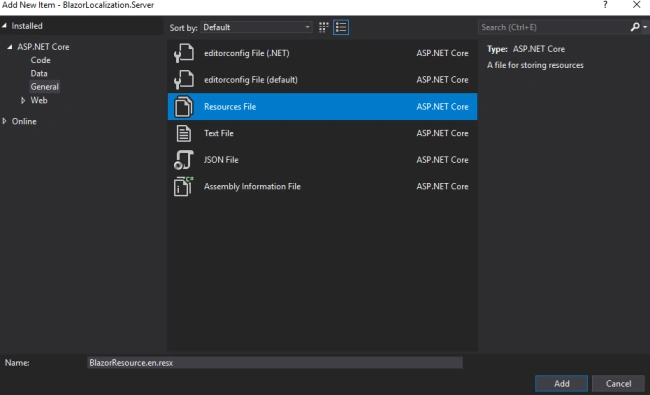
We can add “Name” and “Value” inside this resource file. I will add 5 key-value pairs in this resource file.
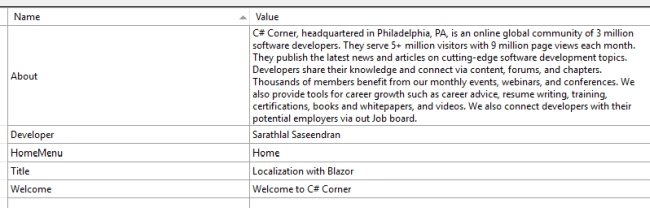
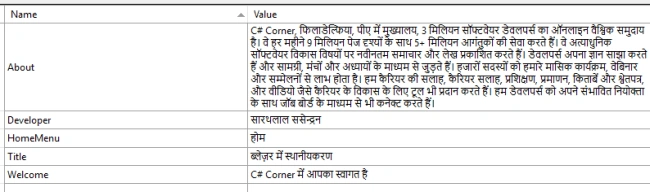
We can create one more resource file for “hi” (Hindi) locale now.
I must add 5 key-value pairs for this resource file also.
We can create a new folder “Extensions” and create a new class “CsrfTokenCookieMiddleware” inside that folder.
Please copy the below code and paste it to the new class.
CsrfTokenCookieMiddleware.cs
using Microsoft.AspNetCore.Antiforgery;
using Microsoft.AspNetCore.Http;
using System.Threading.Tasks;

namespace BlazorLocalization.Server.Extensions
{
    public class CsrfTokenCookieMiddleware
    {
        private readonly IAntiforgery _antiforgery;
        private readonly RequestDelegate _next;

        public CsrfTokenCookieMiddleware(IAntiforgery antiforgery, RequestDelegate next)
        {
            _antiforgery = antiforgery;
            _next = next;
        }

        public async Task InvokeAsync(HttpContext context)
        {
            if (context.Request.Cookies["CSRF-TOKEN"] == null)
            {
                var token = _antiforgery.GetAndStoreTokens(context);
                context.Response.Cookies.Append("CSRF-TOKEN", token.RequestToken, new Microsoft.AspNetCore.Http.CookieOptions { HttpOnly = false });
            }
            await _next(context);
        }
    }
}
We can modify Startup.cs file with below changes.
Startup.cs
using BlazorLocalization.Server.Extensions;
using Microsoft.AspNetCore.Blazor.Server;
using Microsoft.AspNetCore.Builder;
using Microsoft.AspNetCore.Hosting;
using Microsoft.AspNetCore.Localization;
using Microsoft.AspNetCore.ResponseCompression;
using Microsoft.Extensions.DependencyInjection;
using System.Globalization;
using System.Linq;
using System.Net.Mime;

namespace BlazorLocalization.Server
{
    public class Startup
    {
        public void ConfigureServices(IServiceCollection services)
        {
            services.AddMvc();

            services.AddResponseCompression(options =>
            {
                options.MimeTypes = ResponseCompressionDefaults.MimeTypes.Concat(new[]
                {
                    MediaTypeNames.Application.Octet,
                    WasmMediaTypeNames.Application.Wasm,
                });
            });

            services.AddLocalization(options => options.ResourcesPath = "Resources");
        }

        public void Configure(IApplicationBuilder app, IHostingEnvironment env)
        {
            app.UseResponseCompression();

            if (env.IsDevelopment())
            {
                app.UseDeveloperExceptionPage();
            }

            var supportedCultures = new[]
            {
                new CultureInfo("en"),
                new CultureInfo("hi")
            };

            app.UseRequestLocalization(new RequestLocalizationOptions
            {
                DefaultRequestCulture = new RequestCulture("en"),
                // Formatting numbers, dates, etc.
                SupportedCultures = supportedCultures,
                // UI strings that we have localized.
                SupportedUICultures = supportedCultures
            });

            app.UseStaticFiles();

            app.UseMvc(routes =>
            {
                routes.MapRoute(name: "default", template: "{controller}/{action}/{id?}");
            });

            app.UseMiddleware<CsrfTokenCookieMiddleware>();
            app.UseBlazor<Client.Program>();
        }
    }
}
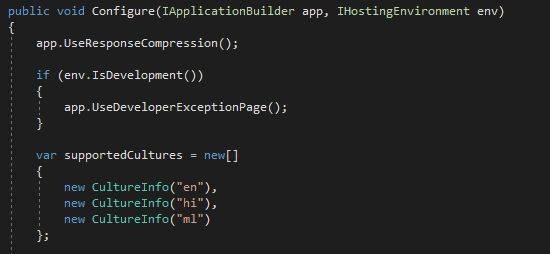
We have added “CultureInfo” for our two locale files. We also invoked “CsrfTokenCookieMiddleware” class in Startup file.
We can create a Web API controller now. This API will be used for localization.
Please copy below code and paste in the Controller file.
I18nController.cs
using Microsoft.AspNetCore.Mvc;
using Microsoft.Extensions.Localization;
using System.Collections.Generic;
using System.Linq;

namespace BlazorLocalization.Server
{
    // This class is used for naming the Resource files.
    // You must specify exact name of Resource here.
    public class BlazorResource { }
}

namespace BlazorLocalization.Server.Controllers
{
    [Route("api/[controller]/")]
    public class I18nController : Controller
    {
        private IStringLocalizer<BlazorResource> stringLocalizer;

        public I18nController(IStringLocalizer<BlazorResource> stringLocalizer)
        {
            this.stringLocalizer = stringLocalizer;
        }

        [HttpGet]
        public ActionResult GetClientTranslations()
        {
            var res = new Dictionary<string, string>();
            return Ok(stringLocalizer.GetAllStrings().ToDictionary(s => s.Name, s => s.Value));
        }
    }
}
We can add a class for our Resource files now. This class is used for naming the Resource files. Please give the same name to the class as our Resource file.
We must create this class inside the Web API Controller file. This is an empty class. We have completed the coding part in the Server project. Now, we can add files to the Client project.
Add a new “Services” folder. We will add some interfaces and classes inside this folder. Please add “JsInterop” class.
JsInterop.cs
using Microsoft.JSInterop;
using System.Threading.Tasks;

namespace BlazorLocalization.Client.Services
{
    public static class JsInterop
    {
        public static async Task<string[]> Languages()
        {
            return await JSRuntime.Current.InvokeAsync<string[]>("navigatorLanguages");
        }

        public static async Task<string> GetCookie()
        {
            return await JSRuntime.Current.InvokeAsync<string>("getDocumentCookie");
        }
    }
}
We will call two JavaScript methods “navigatorLanguages” and “getDocumentCookie” from this class. The JavaScript file will be added later.
Please add the below 4 interfaces and 4 classes inside the Services folder.
IBrowserCookieService.cs
using System;
using System.Threading.Tasks;

namespace BlazorLocalization.Client.Services
{
    public interface IBrowserCookieService
    {
        Task<string> Get(Func<string, bool> filterCookie);
    }
}
BrowserCookieService.cs
using System;
using System.Linq;
using System.Threading.Tasks;

namespace BlazorLocalization.Client.Services
{
    public class BrowserCookieService : IBrowserCookieService
    {
        public async Task<string> Get(Func<string, bool> filterCookie)
        {
            return (await JsInterop
                .GetCookie())
                .Split(';')
                .Select(v => v.TrimStart().Split('='))
                .Where(s => filterCookie(s[0]))
                .Select(s => s[1])
                .FirstOrDefault();
        }
    }
}
Tarik AlkathiriPosted Nov 8, 2019, 9:42 AM
Dear Friend, Can you please upload this project with Blazer Server-Side core 3 release, because when i try open the solution it give me error loading the projects in it. Thank you very much for your kind.
Tarik AlkathiriPosted Nov 8, 2019, 8:45 AM
Thank you very much for this article, I am trying to implement this solution but it gives me error in the flowing service public static class JsInterop { public static async Task<string[]> Languages() { return await JSRuntime.Current.InvokeAsync<string[]>("navigatorLanguages"); } public static async Task<string> GetCookie() { return await JSRuntime.Current.InvokeAsync<string>("getDocumentCookie"); } } can you please give me a hint
Ankur MistryPosted Nov 21, 2018, 9:33 PM
Good stuff, thanks for sharing
Guest UserPosted Oct 16, 2018, 4:29 AM
WOW! What a GREAT article. I've implemented your code on my Blazor (live) website and it works like a charm! Thank you so much for this. FYI: the resx files need to be called 'BlazorResource'-*.resx no matter what the name is of your project.