

Introduction
Nowadays, I am a big fan of Moment.js. One of the reasons is also the way in which localization is handled in Moment.js. That too is with minimal code implementations.
For achieving localization using Moment.js, moment-with-locales.min.js is used. This file can be located using the following CDN path.
Now follow the below steps for localization implementation of the date using the above JavaScript file,
Create index.html and copy paste the following code:
- <!DOCTYPE html>
- <html lang="en">
- <head>
- <title>Localization using moment.js</title>
- <meta charset="utf-8">
- <meta name="viewport" content="width=device-width, initial-scale=1">
- <script src="https://ajax.googleapis.com/ajax/libs/jquery/1.11.3/jquery.min.js"></script>
- <script src="https://cdnjs.cloudflare.com/ajax/libs/moment.js/2.11.2/moment-with-locales.min.js"></script>
- </head>
- <body>
- <h4>
- Select Language from below drop down and see localized date display below.</h4>
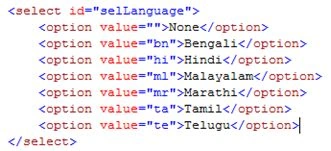
- <select id="selLanguage">
- <option value="">None</option>
- <option value="bn">Bengali</option>
- <option value="hi">Hindi</option>
- <option value="ml">Malayalam</option>
- <option value="mr">Marathi</option>
- <option value="ta">Tamil</option>
- <option value="te">Telugu</option>
- </select>
- <br />
- <br />
- <div id="currentDateTime">
- </div>
- <script type="text/javascript">
- $(document).ready(function(){
- $("#selLanguage").change(function() {
- var selectedVal = $(this).find(':selected').val();
- $('#currentDateTime').text(moment().locale(selectedVal).format('LLLL'));
- });
- });
- </script>
- </body>
- </html>
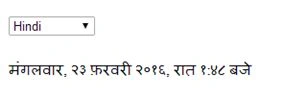
- Open index.html in a browser and select the language from the drop-down.

- Select languages one by one from the drop-down and see the date displayed in respective languages.
 Some of the other samples can be seen below,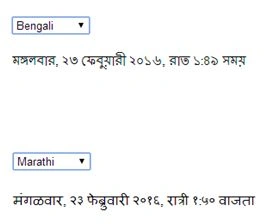
This way, with very minimal code, we can implement localization for the date. And not only date formats but Relative Timelike 'an hour ago,' '1 year ago' can also be localized.
Try the above code snippet and enjoy localization using Moment.js.
Read more articles on JavaScript:
Mohammed IbrahimPosted Feb 24, 2016, 7:13 PM
nice
Madan BhintadePosted Feb 24, 2016, 1:14 AM
Thanks a lot for comments
Raja TPosted Feb 23, 2016, 10:55 PM
Good.Thanks for sharing..
Humayun Kabir MamunPosted Feb 23, 2016, 10:41 PM
Nice...
Kumaresh RajalingamPosted Feb 23, 2016, 8:14 PM
Good one sir
Santhakumar MunuswamyPosted Feb 23, 2016, 2:00 PM
Thanks for nice share
Muhammad Aqib ShehzadPosted Feb 23, 2016, 11:52 AM
nice share
Sibeesh VenuPosted Feb 23, 2016, 9:12 AM
Nice Share
Shubham KumarPosted Feb 23, 2016, 5:55 AM
nice share