Background
Logging the errors of a live application is very important to avoid any inconvenience for the users. In C# to handle exceptions the try, catch and finally keywords are used, so in this article, we will learn how to catch the error and send the error details by Email so developers can fix it as soon as possible.
So let us start by creating the application.
Use the following procedure to create a web site:
- "Start" - "All Programs" - "Microsoft Visual Studio 2010".
- "File" - "New" - "Web Site..." then select "C#" - ""ASP.NET Empty Web Site"" (to avoid adding a master page).
- Provide the project a name such as "ExceptionLoggingToEmail" or another as you wish and specify the location.
- Then right-click on Solution Explorer then select "Add New Item" - "Default.aspx" page.
- Drag and Drop one GridView to the Default.aspx page. Then the page will look as follows.
- <%@ Page Language="C#" AutoEventWireup="true" CodeFile="Default.aspx.cs" Inherits="_Default" %>
- <!DOCTYPE html PUBLIC "-//W3C//DTD XHTML 1.0 Transitional//EN" "http://www.w3.org/TR/xhtml1/DTD/xhtml1-transitional.dtd">
- <html xmlns="http://www.w3.org/1999/xhtml">
- <head runat="server">
- <title></title>
- </head>
- <body bgcolor="silver">
- <form id="form1" runat="server">
- <asp:GridView ID="GridView1" runat="server" CellPadding="4" ForeColor="#333333" GridLines="None">
- </asp:GridView>
- </form>
- </body>
- </html>
In the preceding source code, we have taken the one grid view and we try to assign a file as the data source for the grid view that is not available so it can generate the error file not found and we can send these error details to an Email.
Now create the class named ExceptionLogging to log the error to Email then write the following code:
ExceptionLogging.cs
- using System;
- using System.Net.Mail;
- using System.Configuration;
- using System.Net;
- using context = System.Web.HttpContext;
-
-
-
- public static class ExceptionLogging
- {
- private static String ErrorlineNo, Errormsg, ErrorLocation, extype, exurl, Frommail, ToMail, , Sub, HostAdd, EmailHead, EmailSing;
- public static void SendErrorTomail(Exception exmail)
- {
- try
- {
- var newline = "<br/>";
- ErrorlineNo = exmail.StackTrace.Substring(exmail.StackTrace.Length - 7, 7);
- Errormsg = exmail.GetType().Name.ToString();
- extype = exmail.GetType().ToString();
- exurl = context.Current.Request.Url.ToString();
- ErrorLocation = exmail.Message.ToString();
- EmailHead = "<b>Dear Team,</b>" + "<br/>" + "An exception occurred in a Application Url" + " " + exurl + " " + "With following Details" + "<br/>" + "<br/>";
- EmailSing = newline + "Thanks and Regards" + newline + " " + " " + "<b>Application Admin </b>" + "</br>";
- Sub = "Exception occurred" + " " + "in Application" + " " + exurl;
- HostAdd = ConfigurationManager.AppSettings["Host"].ToString();
- string errortomail = EmailHead + "<b>Log Written Date: </b>" + " " + DateTime.Now.ToString() + newline + "<b>Error Line No :</b>" + " " + ErrorlineNo + "\t\n" + " " + newline + "<b>Error Message:</b>" + " " + Errormsg + newline + "<b>Exception Type:</b>" + " " + extype + newline + "<b> Error Details :</b>" + " " + ErrorLocation + newline + "<b>Error Page Url:</b>" + " " + exurl + newline + newline + newline + newline + EmailSing;
- using (MailMessage mailMessage = new MailMessage())
- {
- Frommail = ConfigurationManager.AppSettings["FromMail"].ToString();
- ToMail = ConfigurationManager.AppSettings["ToMail"].ToString();
- = ConfigurationManager.AppSettings["word"].ToString();
- mailMessage.From = new MailAddress(Frommail);
- mailMessage.Subject = Sub;
- mailMessage.Body = errortomail;
- mailMessage.IsBodyHtml = true;
- string[] MultiEmailId = ToMail.Split(',');
- foreach (string userEmails in MultiEmailId)
- {
- mailMessage.To.Add(new MailAddress(userEmails));
- }
- SmtpClient smtp = new SmtpClient();
- smtp.Host = HostAdd;
- smtp.EnableSsl = true;
- NetworkCredential NetworkCred = new NetworkCredential();
- NetworkCred.UserName = mailMessage.From.Address;
- NetworkCred.word = ;
- smtp.UseDefaultCredentials = true;
- smtp.Credentials = NetworkCred;
- smtp.Port = 587;
- smtp.Send(mailMessage);
- }
- }
- catch (Exception em)
- {
- em.ToString();
- }
- }
- }
In the code above we have created a SendErrorTomail method that accepts the Exception class reference object and we can call this method from the default.aspx.cs file.
If you are unfamiliar with the procedure to send Email then please refer to the following articles of mine:
Now open the default.aspx.cs page and write the following code to assign the data source to the grid view:
- protected void Page_Load(object sender, EventArgs e)
- {
- try
- {
- DataSet ds = new DataSet();
- ds.ReadXml(Server.MapPath("~/abcdfr.xml"));
- GridView1.DataSource = ds;
- GridView1.DataBind();
- }
- catch (Exception ex)
- {
- ExceptionLogging.SendErrorTomail(ex);
- Label1.Text = "Some Technical Error occurred,Please visit after some time";
- }
- }
In the code above, we have used try and catch keywords to handle the exception, first in the try block we are trying to assign the emp.xml as the data source to the grid view that is not available and in the catch block we are calling the method SendErrorTomail of the class ExceptionLogging to log the error by ing the Exception class reference object.
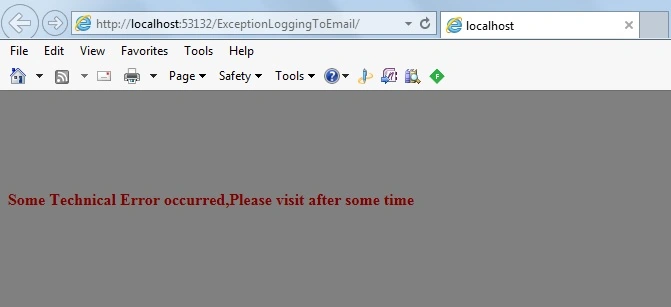
Now run the application. The following dummy message we will be shown to the user and the actual error will be logged to Email as:
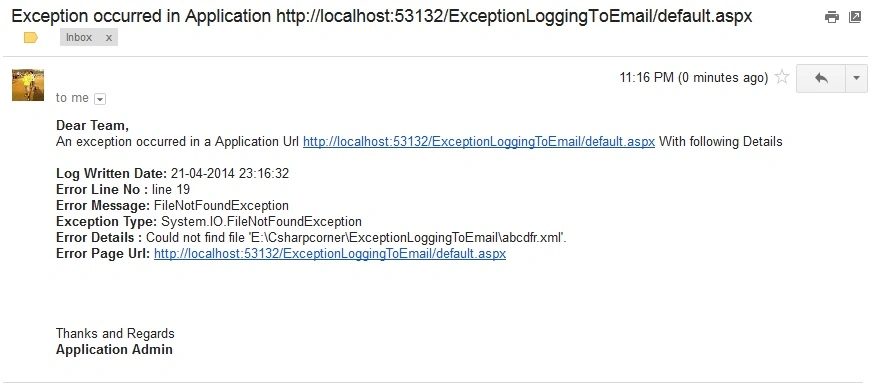
Now all the Exception details will be logged to the Email as:
We can see that in the preceding Image all the Exception details are logged to the Email that helps developers to fix the error easily.
Notes
- Download the Zip file from the attachment for the full source code of the application.
- Make the changes in the web.config file depending on your Email id Credential.
Summary
I hope this article is useful for all readers, if you have any suggestion then please contact me including beginners also.


prince tomyPosted Jul 26, 2019, 6:45 AM
Nice explanations.Helpful explanations
Reddu RPosted May 2, 2018, 11:20 AM
Thanks a lot, I follow your tutorial correctly and its working. Thanks again
Jes SiePosted May 11, 2017, 5:49 AM
Hi, first I would like to thank you for sharing your code. I tried this but I have not receive any email. I follow your tutorial correctly. Could you guide me on how to do this?