

Introduction
This article explains how to implement a login form using ASP.NET C# in a three-tier architecture. I have described it in details. You will also get many new and known concepts to learn in this article whether on the SQL Server Stored Procedure side or C# code side.
The following are the features of the Login Forms:
- Developed in a three-tier architecture
- Determines whether username and password exists
- Maintains a count of incorrect login attempts
- Locks the password after 4 unsuccessful attempts
I have already explained how to create a registration form in ASP.NET C#. You can check this link.
Database design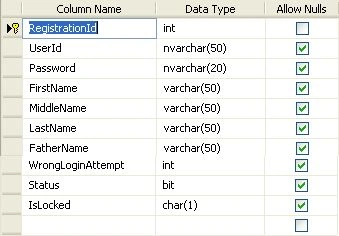
Stored Procedure
- Create PROCEDURE [dbo].[usp_LoginVerification]
- @UserId nvarchar(50),
- @Password nvarchar(20),
- @ERROR VARCHAR(100) OUT
- AS
- Begin
- If exists (select 1 from MemberRegistration where UserId=@UserId and Password=@Password and IsLocked='0')
- Begin
- --declare
- update MemberRegistration set WrongLoginAttempt=0,IsLocked='0' Where UserId=@UserId
- set @ERROR=1
- select UserId,FirstName,MiddleName,LastName from MemberRegistration Where UserId=@UserId
- End
- Else
- Begin
- declare @LoginAttempt int;
- SET @LoginAttempt= (select WrongLoginAttempt from MemberRegistration where UserId=@UserId )
- update MemberRegistration set WrongLoginAttempt=@LoginAttempt+1 Where UserId=@UserId
- Set @ERROR='Your have entered wrong password'
- if @LoginAttempt>=4
- Begin
- update MemberRegistration set IsLocked='1' Where UserId=@UserId
- set @ERROR='Your Password is locked'
- End
- End
- Select @ERROR
- End
The following is the step-by-step procedure for development of the feature-enriched login form in a 3-tier architecture.
Step 1
Design your layered solution as below.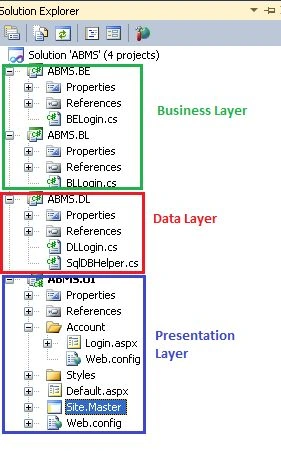
Step 2
Open BELogin.cs and modify the code as below.
- namespace ABMS.BE
- {
- public class BELogin
- {
- private string userId;
- private string password;
- private string firstName;
- public string FirstName
- {
- get { return firstName; }
- set { firstName = value; }
- }
- private string middleName;
- public string MiddleName
- {
- get { return middleName; }
- set { middleName = value; }
- }
- private string lastName;
- public string LastName
- {
- get { return lastName; }
- set { lastName = value; }
- }
- public string Password
- {
- get { return password; }
- set { password = value; }
- }
- public string UserId
- {
- get { return userId; }
- set { userId = value; }
- }
- }
- }
Modify the BL layer BLLogin.cs as below:
- using System.Data;
- namespace ABMS.BL
- {
- public class BLLogin
- {
- ABMS.DL.DLLogin objdal = new ABMS.DL.DLLogin();
- BE.BELogin objbeLogin = new BE.BELogin();
- public DataSet UserLogin(BE.BELogin objbeLogin)
- {
- try
- {
- return objdal.LoginCredential(objbeLogin);
- }
- catch
- {
- throw;
- }
- }
- }
- }
- using System.Data.SqlClient;
- using System.Data;
- namespace ABMS.DL
- {
- public class DLLogin
- {
- SqlDBHelper sql = new SqlDBHelper();
- public DataSet LoginCredential(BE.BELogin belogin)
- {
- string connectionString = sql.ConnectionString();
- SqlConnection con = new SqlConnection();
- con.ConnectionString = connectionString;
- con.Open();
- SqlCommand cmd = new SqlCommand("usp_LoginVerification", con);
- cmd.CommandType = CommandType.StoredProcedure;
- cmd.Parameters.AddWithValue("@UserId", belogin.UserId);
- cmd.Parameters.AddWithValue("@Password", belogin.Password);
- cmd.Parameters.Add("@ERROR", SqlDbType.Char, 500);
- cmd.Parameters["@ERROR"].Direction = ParameterDirection.Output;
- SqlDataAdapter da = new SqlDataAdapter();
- DataSet ds = new DataSet();
- da = new SqlDataAdapter(cmd);
- da.Fill(ds);
- con.Close();
- return ds;
- }
- }
- }
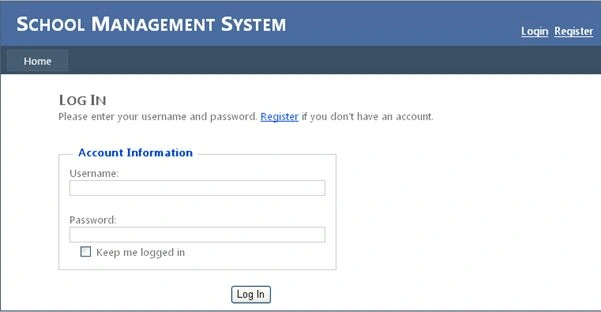
Step 6
- using System;
- using System.Data;
- namespace ABMS.UI.Account
- {
- public partial class Login : System.Web.UI.Page
- {
- ABMS.BL.BLLogin objBL = new ABMS.BL.BLLogin();
- protected void Page_Load(object sender, EventArgs e)
- {
- }
- protected void btnLogin_Click(object sender, EventArgs e)
- {
- ABMS.BE.BELogin obJBE = new BE.BELogin();
- obJBE.UserId = UserName.Text.Trim();
- obJBE.Password = Password.Text.Trim();
- DataSet ds = new DataSet();
- ds = objBL.UserLogin(obJBE);
- if (ds.Tables.Count == 1)
- {
- lblErrorMsg.Text = ds.Tables[0].Rows[0][0].ToString();
- }
- else if (ds.Tables[1].Rows[0][0].ToString() == "1")
- {
- lblErrorMsg.Text = string.Empty;
- Session["UserId"] = ds.Tables[0].Rows[0][0].ToString();
- String name=null;
- if (!string.IsNullOrEmpty( ds.Tables[0].Rows[0][1].ToString()))
- {
- name = name + ds.Tables[0].Rows[0][1].ToString();
- }
- if (!string.IsNullOrEmpty(ds.Tables[0].Rows[0][2].ToString()))
- {
- name = name +" "+ ds.Tables[0].Rows[0][2].ToString();
- }
- if (!string.IsNullOrEmpty(ds.Tables[0].Rows[0][3].ToString()))
- {
- name = name + " "+ds.Tables[0].Rows[0][3].ToString();
- }
- Session["Name"] = name;
- Response.Redirect("~/Default.aspx");
- }
- }
- }
- }
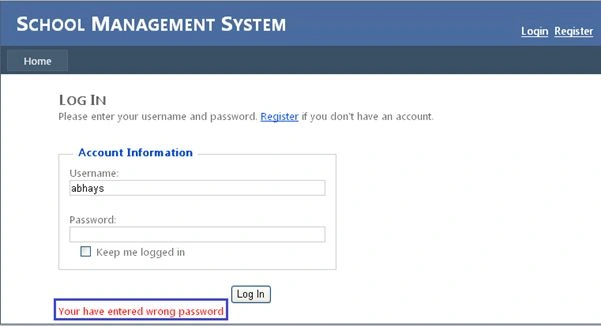
Step 8
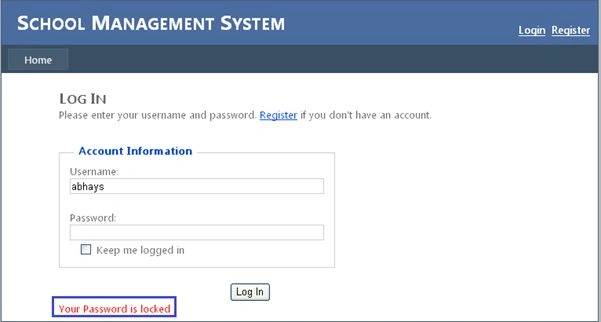
Conclusion
In this article I have explained how to develop a feature-enriched Login form in a 3-tier architecture in ASP.NET C#.
Amit KumarPosted Mar 12, 2015, 5:06 AM
help me sir
Amit KumarPosted Mar 12, 2015, 5:06 AM
Sir Its not working it show only Password invalid not updating table and not showing id locked
Saunak SahaPosted Oct 30, 2014, 5:37 AM
Clearly Clarified.... Thanx
Vithal WadjePosted Sep 28, 2014, 10:48 AM
This is not a 3-tier architecture,please fix it other wise freshers and other people get wrong information ,its a 3 Layered architecture not a tier
Archana KharatPosted Aug 23, 2014, 4:58 AM
nice article
Vithal WadjePosted Jul 20, 2014, 2:41 AM
this is not a 3 tier this a three layered
aditya bhadauriyaPosted Jul 19, 2014, 3:36 AM
where is register.aspx
Hisoka YamaPosted Jul 18, 2014, 3:14 AM
Nice article. How many man-hour did you spend on this form
Rajesh PathakotiPosted Jul 17, 2014, 2:23 AM
Excellent clear picture.
Abhay ShankerPosted Jul 1, 2014, 1:32 AM
Thank you...
Prerana TiwariPosted Jul 1, 2014, 1:14 AM
Nice article..........