

Introduction
This article explains the best way to implement a simple login form to check account information and authenticate a user. If the user details exist in the database then the user is redirected to a welcome page, otherwise, we should instead display "Invalid Username/Password".
First I created a database EmpDetail and now I created a table in this database.
Query Code
- create table Login_Info
- (
- Emp_Name varchar(50),
- Passwrd varchar(50)
- )
Now Insert some Data in LoginDetail table.
- insert into Login_Info values('Sharad','sharad')
- insert into Login_Info values('Manish','manish')
Select * from Login_Info
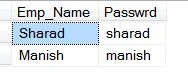
Now the following procedure is used.
Step 1
Open Visual Studio 2012 and click "File" -> "New" -> "Project...". A window is opened. In this window, click "HTML Application for TypeScript" under Visual C#.
Give the name of your application as "Login" and then click "Ok".
Step 2
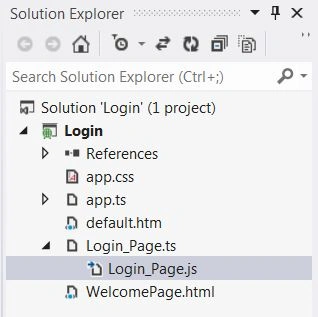
After this session the project has been created; a new window is opened on the right side. This window is called the Solution Explorer. The Solution Explorer contains the ts file, js file, and css file.
Coding
Login_Page.ts
- class Login_Page {
- login() {
- var a = 0;
- var txtuname = ( < HTMLTextAreaElement > (document.getElementById('txtuname'))).value;
- var txtpwd = ( < HTMLTextAreaElement > (document.getElementById('Pwd'))).value;
- if (txtuname.length != 0 && txtpwd.length != 0) {
- var connection = new ActiveXObject("ADODB.Connection");
- var connectionstring = "Data Source=MCNDESKTOP20;Initial Catalog=EmpDetail;uid=sa;pwd=password@123;Provider=SQLOLEDB";
- connection.Open(connectionstring);
- var rs = new ActiveXObject("ADODB.Recordset");
- rs.Open("select * from Login_Info where Emp_Name='" + txtuname + "' and Passwrd='" + txtpwd + "'", connection);
- while (!rs.eof) {
- window.location.assign('WelcomePage.html');
- a = 1;
- rs.MoveNext();
- }
- if (a == 0) {
- alert("Invalid UserName and Password");
- }
- rs.close();
- connection.close();
- } else {
- alert("Please Enter Values in Textbox ");
- }
- }
- cancelLogin() {
- document.getElementById('txtuname').innerText = "";
- document.getElementById('Pwd').innerText = "";
- }
- }
- window.onload = () => {
- var bttn = document.getElementById("login");
- var obj = new Login_Page();
- bttn.onclick = function() {
- obj.login();
- }
- var bttncancel = document.getElementById("cancel");
- bttncancel.onclick = function() {
- obj.cancelLogin();
- }
- };
Default.html
- < !DOCTYPE html >
- <
- html lang = "en"
- xmlns = "http://www.w3.org/1999/xhtml" >
- <
- head >
- <
- meta charset = "utf-8" / >
- <
- title > TypeScript HTML App < /title> <
- link rel = "stylesheet"
- href = "app.css"
- type = "text/css" / >
- <
- script src = "Login_Page.js" > < /script> <
- /head> <
- body >
- <
- fieldset style = " width: 356px;" >
- <
- legend style = "background-color: #99CCFF; font-size:larger" > User Login < /legend> <
- br / >
- <
- b > UserName < /b> <
- input id = "txtuname"
- type = "text" / > < br / >
- <
- br / >
- <
- b > Password < /b> <
- input id = "Pwd"
- type = "password" / > < br / >
- <
- br / >
- <
- input id = "login"
- type = "button"
- value = "Login" / >
- <
- input id = "cancel"
- type = "button"
- value = "Cancel" / >
- <
- /fieldset> <
- /body> <
- /html>
Login_Page.js
- var Login_Page = (function() {
- function Login_Page() {}
- Login_Page.prototype.login = function() {
- var a = 0;
- var txtuname = ((document.getElementById('txtuname'))).value;
- var txtpwd = ((document.getElementById('Pwd'))).value;
- if (txtuname.length != 0 && txtpwd.length != 0) {
- var connection = new ActiveXObject("ADODB.Connection");
- var connectionstring = "Data Source=MCNDESKTOP20;Initial Catalog=EmpDetail;uid=sa;pwd=password@123;Provider=SQLOLEDB";
- connection.Open(connectionstring);
- var rs = new ActiveXObject("ADODB.Recordset");
- rs.Open("select * from Login_Info where Emp_Name='" + txtuname + "' and Passwrd='" + txtpwd + "'", connection);
- while (!rs.eof) {
- window.location.assign('WelcomePage.html');
- a = 1;
- rs.MoveNext();
- }
- if (a == 0) {
- alert("Invalid UserName and Password");
- }
- rs.close();
- connection.close();
- } else {
- alert("Please Enter Values in Textbox ");
- }
- };
- Login_Page.prototype.cancelLogin = function() {
- document.getElementById('txtuname').innerText = "";
- document.getElementById('Pwd').innerText = "";
- };
- return Login_Page;
- })();
- window.onload = function() {
- var bttn = document.getElementById("login");
- var obj = new Login_Page();
- bttn.onclick = function() {
- obj.login();
- };
- var bttncancel = document.getElementById("cancel");
- bttncancel.onclick = function() {
- obj.cancelLogin();
- };
- };
- //@ sourceMappingURL=Login_Page.js.map
Output 1
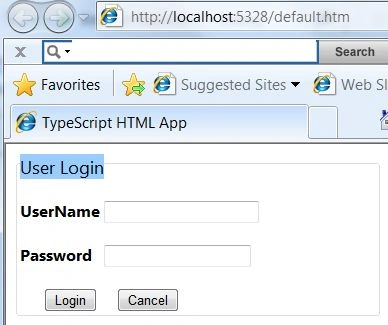
Enter the username and password and then click on the Login button.
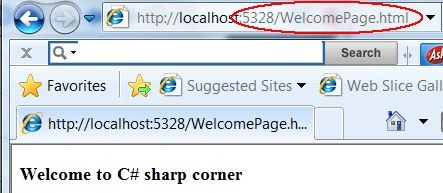
The user is redirected to the "WelcomPage.html" page.
Output 2
If we enter the wrong UserName or Password then:

Output 4
If you enter a UserName and Password and then click on the "Cancel" button:
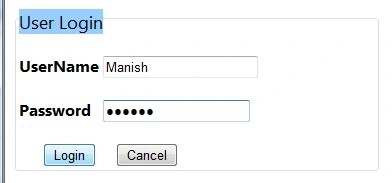
After clicking on the "Cancel" button:
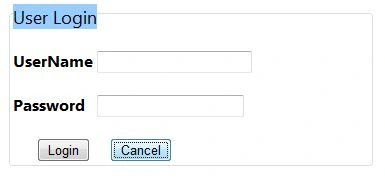
For more information, download the attached sample application.
Nishant VyasPosted Jan 18, 2020, 11:46 AM
I want to use pure typescript using web application (.net framework) project. for DB connection we are going to use asmx file. I am getting error when loading npm i request, all other d.ts files gets errors after installing request. Can you help me how to setup the said project?
Divya TandelPosted May 2, 2019, 1:07 PM
It gives error at var connection = new ActiveXObject("ADODB.Connection");
Divya TandelPosted May 2, 2019, 1:05 PM
I m getting error -0x80004005 - JavaScript runtime error: [Microsoft][ODBC Driver Manager] Data source name not found and no default driver specified.
Santhakumar MunuswamyPosted Jul 27, 2015, 2:56 PM
Thanks for nice article:)