

First of all, purchase a domain from Go Daddy or Big Rock or from any other domain name provider. Now, open the Azure portal and login with your Microsoft account and create a Web App (website) there.
To create a Web app in Azure, visit
Configure your Azure Web app:
- Login to your Microsoft Account.
Select the Web app that you have created. In my case, I am using “hariharadhikari” as an example and it is shown below: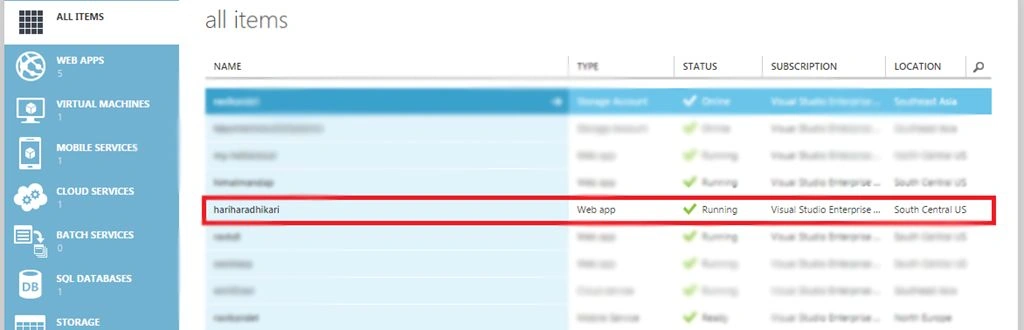
- Go to the Scale Menu.

- Now, change “app service plan pricing tier” to either SHARED, BASIC or STANDARD mode and “Save”. This requires an active subscription. In my case, I am changing it to the “BASIC” mode, as shown below:

Afterwards, select the Web app that you have created and click “Manage Domains” at the bottom of the page as shown below:
To Link your custom domain to Azure App
Copy the “IP Address”, available at the end of the popup page that appeared and keep it safe, because it is required to point your custom domain to the Azure Web App.
Leave it as it is, go to your domain dashboard and update/change the “Name Server” of your domain to:
- Primary Name Server: NS1.AFRAID.ORG
- Secondary Name Server: NS2.AFRAID.ORG
- Tertiary Name Server: NS3.AFRAID.ORG
Note
It may takea certain amount of time to point to the Server.
- Sign up at http://afraid.org. Go to the domain menu and click on “Add a Domain into Free DNS”, as shown below:
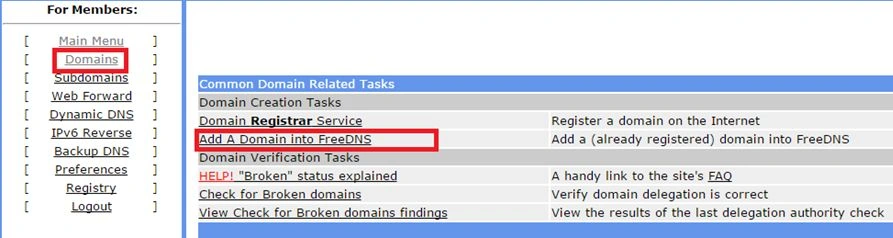
- Enter your “Domain Name” in the domain input field and select “Private” from the shared state and submit, as shown below:
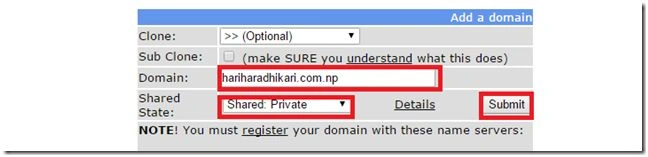
- Again, go to the domain and configure your domain similar to the domain that I have configured and remember that you must point the copied “IP Address”, as shown below:

- Go to "Manage Domain" of the particular Web app in Azure and configure your domain there, similar to the one shown below:
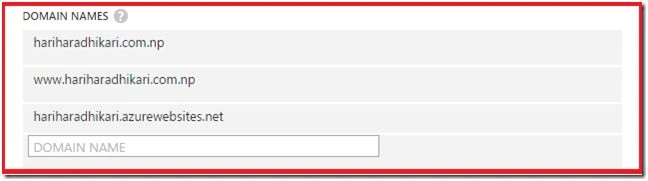
Go to the Browser and enter your domain name there. You will be redirected to the Webpage. Now, you have done it successfully. In my case, the domain name is “hariharadhikari.com.np”. You can check it from your Browser.
If any problem occurs, feel free to comment.
Ravi KandelPosted Jun 25, 2016, 2:54 AM
Thanks
Santhakumar MunuswamyPosted Jun 25, 2016, 12:35 AM
Nice share
Prasanna MuraliPosted Jun 23, 2016, 10:09 AM
Nice one...
Debasis SahaPosted Jun 23, 2016, 2:26 AM
Good One..
RajaPosted Jun 23, 2016, 12:07 AM
Nice...