Math Object In TypeScript: Part 4
Before reading this article, please go through the following articles:
Introduction
In this article, I am describing some of the TypeScript math functions.
In TypeScript, the sin() method is used to get the sine of a number. It returns a numeric value between -1 and 1. In this method, the numeric value represents the sine of the parameter.
Sin() Method
Syntax
- sin(number)
- Sin(num: number)
- {
- var span = document.createElement("span");
- span.innerText = "The sin value of " + num + " is -> " + Math.sin(num) + "\n";
- document.body.appendChild(span);
- }
Cos() Method
Syntax
- cos(number)
Function
- Cos(num: number)
- {
- var span = document.createElement("span");
- span.innerText = "The cos of " + num + " is -> " + Math.cos(num) + "\n";
- document.body.appendChild(span);
- }
Tan() Method
Syntax
- tan(number)
Function
- Tan(num: number) {
- var span = document.createElement("span");
- span.innerText = "The tan value of " + num + " is -> " + Math.tan(num);
- document.body.appendChild(span);
- }
Complete Program
Sin_Cos_Tan.ts
- class Math_function {
- Sin(num: number) {
- var span = document.createElement("span");
- span.innerText = "The sin value of " + num + " is -> " + Math.sin(num) + "\n";
- document.body.appendChild(span);
- }
- Cos(num: number) {
- var span = document.createElement("span");
- span.innerText = "The cos of " + num + " is -> " + Math.cos(num) + "\n";
- document.body.appendChild(span);
- }
- Tan(num: number) {
- var span = document.createElement("span");
- span.innerText = "The tan value of " + num + " is -> " + Math.tan(num);
- document.body.appendChild(span);
- }
- }
- window.onload = () => {
- var obj = new Math_function();
- var num = parseFloat(prompt("Enter a number for calculate Sin, Cos and Tan"));
- obj.Sin(num);
- obj.Cos(num);
- obj.Tan(num);
- };
Sin_Cos_Tan.htm
- < !DOCTYPE html >
- <
- html lang = "en"
- xmlns = "http://www.w3.org/1999/xhtml" >
- <
- head >
- <
- meta charset = "utf-8" / >
- <
- title > TypeScript HTML App < /title>
- <
- link rel = "stylesheet"
- href = "app.css"
- type = "text/css" / >
- <
- script src = "Sin_Cos_Tan.js" > < /script>
- <
- /head>
- <
- body >
- <
- h3 > Sin, Cos and Tan Math Function in TypeScript < /h3>
- <
- div id = "content" / >
- <
- /body>
- <
- /html>
Sin_Cos_Tan.js
- var Math_function = (function() {
- function Math_function() {}
- Math_function.prototype.Sin = function(num) {
- var span = document.createElement("span");
- span.innerText = "The sin value of " + num + " is -> " + Math.sin(num) + "\n";
- document.body.appendChild(span);
- };
- Math_function.prototype.Cos = function(num) {
- var span = document.createElement("span");
- span.innerText = "The cos of " + num + " is -> " + Math.cos(num) + "\n";
- document.body.appendChild(span);
- };
- Math_function.prototype.Tan = function(num) {
- var span = document.createElement("span");
- span.innerText = "The tan value of " + num + " is -> " + Math.tan(num);
- document.body.appendChild(span);
- };
- return Math_function;
- })();
- window.onload = function() {
- var obj = new Math_function();
- var num = parseFloat(prompt("Enter a number for calculate Sin, Cos and Tan"));
- obj.Sin(num);
- obj.Cos(num);
- obj.Tan(num);
- };
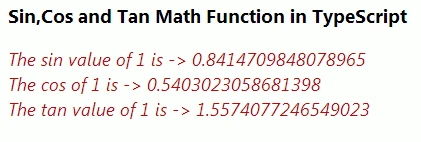
Output 1

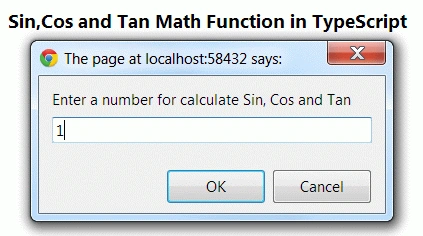
Output 2


Comments
Join the conversation! Your thoughts help the community grow.