

There are two kinds of CSS used to customize the print and screen look and feel of a web page.
The JavaScript function is used to print the current web page without any server code. The window. print() method is used to print the web page as it is. But if you want to print a portion of the web page then server-side code is needed to do the printing. However the media CSS is used to customize the printing of a page without any server-side logic.
<link href="Print.css" type="text/css" rel="stylesheet" media="print" />
The media has several types and print is the property that applies the CSS for printing the web page. You can write the CSS to customize the web page like font style, background color, foreground color, display and hide the content.
It will not affect the current web page display in the browser and when you take the printout and view the page in the print view then you can look at the media CSS effect.
Let's create the aspx page to display the list of names in the Grid.
<%@ Page Language="C#" AutoEventWireup="true" CodeFile="Default.aspx.cs" Inherits="MediaCSS_Default" %>
<!DOCTYPE html PUBLIC "-//W3C//DTD XHTML 1.0 Transitional//EN" "http://www.w3.org/TR/xhtml1/DTD/xhtml1-transitional.dtd">
<html xmlns="http://www.w3.org/1999/xhtml">
<head id="Head1" runat="server">
    <title>Untitled Page</title>
    <link href="Print.css" type="text/css" rel="Stylesheet" media="print"/>
</head>
<body>
    <form id="form1" runat="server">
    <p>
        <table width="100%">
            <tr class="TrNotDisplay">
                <td>
                    <h3>
                        CSS for Print out - Example Page</h3>
                </td>
            </tr>
            <tr class="TrNotDisplay">
                <td>
                    <a style="color: blue;" onclick="window.print();">Print</a>
                </td>
            </tr>
            <tr>
                <td>
                    <asp:GridView CssClass="GridStyle" ID="GridView1" runat="server">
                    </asp:GridView>
                </td>
            </tr>
            <tr class="TrNotDisplay">
                <td style="padding-top: 25px;">
                    Note:
                    <br/>
                    Take the print out unless until it is important<br/>
                    Save the trees
                </td>
            </tr>
        </table>
    </p>
    </form>
</body>
</html>
Let's write the server-side logic to load the data to the grid control.
protected void Page_Load(object sender, EventArgs e)
{
    if (!Page.IsPostBack)
    {
        BindGrid();
    }
}

private void BindGrid()
{
    GridView1.DataSource = GetDataTable();
    GridView1.DataBind();
}

private DataTable GetDataTable()
{
    DataTable dTable = new DataTable();
    DataColumn dColumn = null;
    DataRow dRow = null;

    dColumn = new DataColumn();
    dColumn.ColumnName = "SNo";
    dColumn.AutoIncrement = true;
    dColumn.AutoIncrementSeed = 1;
    dColumn.AutoIncrementStep = 1;
    dTable.Columns.Add(dColumn);

    dColumn = new DataColumn();
    dColumn.ColumnName = "FirstName";
    dTable.Columns.Add(dColumn);

    dColumn = new DataColumn();
    dColumn.ColumnName = "LastName";
    dTable.Columns.Add(dColumn);

    dColumn = new DataColumn();
    dColumn.ColumnName = "Address";
    dTable.Columns.Add(dColumn);

    dColumn = new DataColumn();
    dColumn.ColumnName = "City";
    dTable.Columns.Add(dColumn);

    dRow = dTable.NewRow();
    dRow["FirstName"] = "Senthil";
    dRow["LastName"] = "kumar";
    dRow["Address"] = "Bangalore";
    dRow["City"] = "Bangalore";
    dTable.Rows.Add(dRow);

    dRow = dTable.NewRow();
    dRow["FirstName"] = "Vinay";
    dRow["LastName"] = "kumar";
    dRow["Address"] = "Adyar";
    dRow["City"] = "Chennai";
    dTable.Rows.Add(dRow);

    dRow = dTable.NewRow();
    dRow["FirstName"] = "Ravi";
    dRow["LastName"] = "kulkarni";
    dRow["Address"] = "GST";
    dRow["City"] = "Mumbai";
    dTable.Rows.Add(dRow);

    dRow = dTable.NewRow();
    dRow["FirstName"] = "Sanjay";
    dRow["LastName"] = "Prasad";
    dRow["Address"] = "Mettupalayam";
    dRow["City"] = "Coimbatore";
    dTable.Rows.Add(dRow);

    dRow = dTable.NewRow();
    dRow["FirstName"] = "Ravi";
    dRow["LastName"] = "Ashwin";
    dRow["Address"] = "Numgambakkam";
    dRow["City"] = "Chennai";
    dTable.Rows.Add(dRow);

    return dTable;
}
On the design page, we need to mention the CSS type as print. It will apply the style in the style sheet when the only print is applied.
Let's create the style sheet for the media - print CSS.
body {
    background-color: Silver;
    font-family: Tahoma;
    font-size: medium;
    color: Olive;
    vertical-align: middle;
    text-align: center;
}

.TrNotDisplay {
    display: none;
}

.GridStyle {
    width: 100%;
}

.GridStyle tr th {
    color: Orange;
    font-weight: bold;
}

.GridStyle tr td {
    width: 70px;
    background-color: Blue;
}
Here I have set the background color and font style properties. The grid view control has the font style and background color.
When you run the above web page it will display as designed.
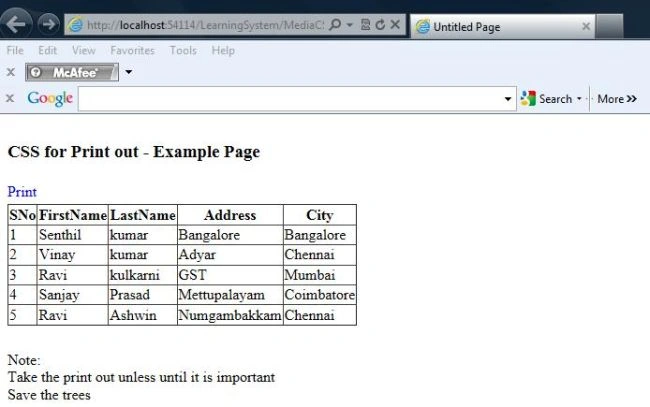
Here, you can see the output of the web page as designed in the .aspx page.
Now, if you apply the print or print view then you will see the output.
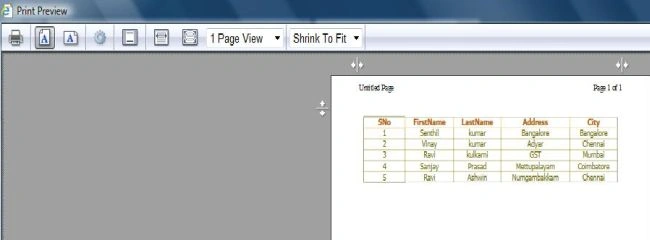
Hope this will help you to customize the printout of your web page on the client side.
kannanPosted Jan 4, 2019, 12:51 AM
Hi Senthil, Iam trying to print html page to dot matrix printer but its not clear,can you please tell me is there any possible solutions to print html/webpages to dot matrix printer.
Gowtham RajamanickamPosted Apr 14, 2016, 11:16 PM
nice article
htun lin aungPosted Sep 5, 2012, 9:27 PM
I am creating business card web site. In this site, i allow the customer to change their name and image on it.So how can i create the web page to allow customize and print the card.
Gaurav GuptaPosted Apr 26, 2012, 11:53 PM
Hi, Nice Article, Thanx for sharing..
Arjun PanwarPosted Apr 26, 2012, 11:51 PM
Hi...I want to know that how do I remove a line segment from a PathGeometry in wpf?
Arjun PanwarPosted Apr 26, 2012, 11:50 PM
Hi....I want to know that how to remove a line segment from a PathGeometry in wpf?
Lajapathy ArunPosted Apr 26, 2012, 3:25 PM
Thanks good one
Lajapathy ArunPosted Apr 26, 2012, 3:24 PM
this works in IE9 Compability?