
Microsoft's ASP.NET development environment provides an exciting new technology for creating Web-based applications that includes functionality not readily available in "classic" ASP. This document introduces ASP.NET and examines a few of the reasons why migrating ASP applications to ASP.NET is worthwhile. Topics
covered include:
- Active Server Pages: Pros and Cons
- What is the .NET Framework?
- ASP.NET Pros
- Language Choice
- Code Compilation
- Server Controls
- User Controls
- Caching
- Session Management
- Security
- Recommendation of Best Practices
General Description
Microsoft's release of Active Server Pages (ASP) spawned a new revolution in Web application development that provided developers with a powerful server-side platform for creating dynamic Web applications. ASP's success can be tied to several factors including its scripted language environment, the ease with which data can be integrated into Web pages, and its overall low learning curve. These positive factors along with others have made it one of the most popular Web application development technologies in the world.
No matter how good a particular technology is there are always inadequacies that are discovered as the technology matures. ASP is no exception. Microsoft realized this early on through customer interaction and feedback. They knew that although ASP as very good at allowing developers to rapidly create dynamic Web sites, a new and improved technology needed to be developed to fill in some of the technology gaps. The technology they developed to fill these gaps is now known as the .NET Framework. Before discussing some of the pros found in the .NET Framework and ASP.NET, let's take a quick look at a few of the ASP technology gaps that Microsoft needed to fill.
Active Server Pages: Cons
ASP Web pages are driven by scripting languages such as VBScript, JScript, or even PerlScript. While this provides a rapid development environment, it means that each ASP page must be interpreted (read from top to bottom) each time a client request comes into the Web server. While interpreted code is easy to write (it isn't compiled), it's not the most scalable and doesn't lend itself well to the principles of object-oriented programming (OOP) which have become so popular. Because ASP script code is generally embedded within HTML, the code can also become difficult to read and maintain as pages become more and more complex. ASP developers affectionately refer to this phenomenon as "spaghetti code."
In addition to these issues, ASP typically requires developers to write a lot of code to perform common tasks such as adding data to a drop-down list or paging through an HTML table that displays customer records. Database records must be programmatically walked through using ActiveX Data Objects (ADO) and dynamically injected into HTML code. Although this process is not overly difficult and can be simplified by placing reuseable code in include files, it isn't nearly as simple as it should be.
Extending ASP functionality can also be somewhat cumbersome as more advanced functionality must be added through COM components written in languages such as C++ or Visual Basic. These components must be "registered" in the Windows operating system registry in order to be used, which makes deployment to Web servers that much more difficult and error prone. In addition to their reliance on COM, ASP pages have limited caching functionality that can be used to store frequently accessed pieces of information. The lack of caching support doesn't provide the best environment for building scalable Web sites. Finally, although the availability of sessions in ASP pages can certainly be viewed as a pro due to the ease that state can be stored between client requests to the Web server, ASP session state is stored in-process on the server. This ultimately reduces the scalability of an application and makes it difficult to spread the load across multiple servers found in a Web Farm. While the cons mentioned here are not meant to detract from the success of ASP, they're highlighted to illustrate some of the main issues that Microsoft needed to resolve. Rather than resolve these issues through enhancing ASP, they chose a completely different road with their release of the .NET Framework and ASP.NET.
What is the .NET Framework?
If you're unfamiliar with the .NET Framework, it is an object-oriented development platform that can be used to create Web-based, Client-Server, XML Web Service, and wireless applications. The framework offers numerous development, scalability, and architectural advantages over Microsoft's previous Component Object Model (COM) approach through providing a central execution engine referred to as the Common Language Runtime or CLR. Because the .NET framework and the CLR do not rely on the Windows registry (no more regsvr32.exe), developers can easily deploy .NET applications without being forced to create elaborate setup packages. .NET's CLR handles virtually all aspects of code execution. This includes handling memory management and garbage collection, supporting multiple languages such as C# and VB.NET, managing security, and performing Just-in-Time (JIT) code compilation. Although CLR specific topics won't be covered in this article, you can read more about them in the .NET Software Developers Kit (SDK) that is freely downloadable from http://msdn.microsoft.com/netframework/downloads/howtoget.aspx
ASP.NET Pros
Although at first glance it may seem that ASP.NET is simply a minor upgrade from ASP due to the name similarities, don't let the name mislead you. Rather than enhancing the technology found in ASP, Microsoft's release of the .NET Framework and ASP.NET offers a completely new way of developing applications. ASP.NET contains many new features that allow for greater developer productivity and enhanced application scalability and stability. Microsoft made these features available while still allowing "classic" ASP applications to run on the same server as ASP.NET applications. This is possible due to a new .aspx file extension used by ASP.NET Web pages. Note, however, that running ASP.NET Web applications requires Internet Information Server (IIS) 5 or higher.
In order to understand best practices for migrating existing ASP applications to ASP.NET, let's take a look at a few ASP.NET features starting with language supportand code compilation. However, there are many advantages to porting your application from ASP to ASP.NET. Some of the biggest advantages include:
- Increased performance: Microsoft tests have shown that ASP.NET applications can handle two to three times the requests per second as classic ASP applications.
- Increased stability: Processes are closely monitored and managed by the ASP.NET run time, so that if one misbehaves (leaks, deadlocks), a new process can be created in its place, which helps keep your application constantly available to handle requests.
- Increased developer productivity: New features like server controls and event handling in ASP.NET help developers build applications more rapidly and in fewer lines of code. It is also easier than ever to separate code from HTML content.
Language Support
One of the most notable changes from ASP to ASP.NET is the way code executes when a page (now called a Web form) is requested on the server. ASP.NET no longer relies on scripting languages such as VBScript to execute code. This provides faster page execution times and greater scalability since the compiled code provides a "roadmap" for the execution engine. It also allows many errors to be entified during the compilation process rather than at run-time. The language used to write ASP.NET Web forms varies reatly from person to person. Currently the .NET Framework supports over 24 different languages ranging from VB.NET to Cobol.NET to Eiffel. While this language choice may sound enticing, in reality you'll probably choose one of the more ainstream languages such as VB.NET or C# depending upon your background. If you come from a Visual Basic or VBScript background, VB.NET will likely be your language of choice. If you come from a C++, C, Java, or J++ background, then C# may be better suited for you.
Figure 1 provides a simple example of VB.NET and C# code that would be executed when an ASP.NET page first loads. Notice that the code is strongly-typed which provides better performance and stability, and makes code less error-prone.
VB.NET Code:
Public Sub Page_Load(ByVal sender As Object, ByVal e As EventArgs)
'Hit when the ASP.NET Web form first loads
End Sub
C# Code:
public void Page_Load (object sender, EventArgs e)
{
//Hit when the ASP.NET Web form first loads
}
Figure 1. VB.NET and C# are two of the mainstream .NET languages used to create ASP.NET Web applications. The code shown here is executed each time an ASP.NET page is requested on the Web server.
Code Compilation
As code within an ASP.NET Web form is compiled (using built-in language compilers), a special type of code called Microsoft Intermediate Language (MSIL) is generated within the assembly (the .dll file created by the compiler). As its name implies, MSIL is an intermediate language that is recognized by the Common Language Runtime (CLR). When an ASP.NET page is first executed, MSIL is automatically converted into native machine code using the CLR's Just-in-Time compiler, which provides optimal performance of the code. Figure 2 demonstrates the compilation process.

Figure 2. All .NET language code (C#, VB.NET, etc.) is compiled into Microsoft Intermediate Language (MSIL). When an ASP.NET page is first requested, the MSIL is converted into native machine code by the CLR's Just-in-Time compiler.
Server Controls
Seemingly simple tasks such as adding dynamic data from a database to a drop-down list or table can require that a lot of code be written in ASP. Fortunately, much of this coding is eliminated in ASP.NET through using new "controls" referred to as Server Controls. Server Controls are pieces of code supplied by Microsoft or other third parties that are capable of generating browser specific HTML. A list of commonly used ASP.NET Server Controls is shown below (many other controls exist):
- DropDownList - Creates an HTML <select> tag with <option> tags.
- DataGrid - Creates a fully pageable, editable, and selectable table of data using the HTML <table> tag.
- Calendar - Creates HTML for a calendar using a <table> tag.
- Button - Creates an HTML <input> tag that is capable of raising "events".
- TextBox - Creates standard, password, or multi-line textboxes using the <input> and <textarea> HTML tags.
To show how powerful server controls are, let's take a quick look at how easy it is to create a monthly calendar using ASP.NET's Calendar control. Figure 3 shows the code you need to add into an ASP.NET page (named Calendar.aspx) to create a basic calendar. Figure 4 shows the result that is generated when the ASP.NET page is called.
<html>
<body bgcolor="#ffffff">
<h2>ASP.NET Calendar Control</h2>
<form runat="server" ID="Form1">
<asp:calendar id="calMonths" runat="server" />
</form>
</body>
</html>
Figure 3. The Calendar control is capable of generating fully functioning calendars with minimal effort on the developer's part. If you've ever had to write a calendar for ASP applications, you'll appreciate how much time is saved by using the ASP.NET Calendar control.
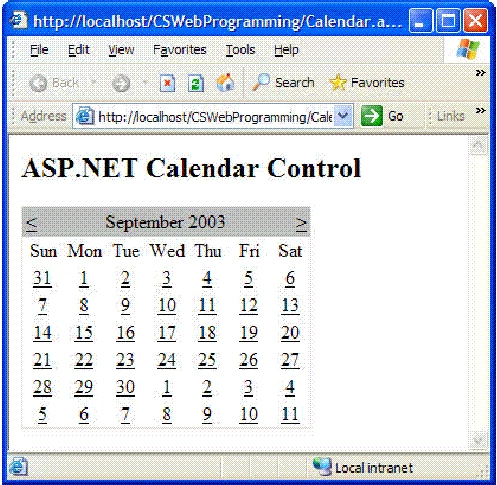
Figure 4. The ASP.NET Calendar control makes creating calendars a snap. Although not shown, events, meetings, and other data can be added to the calendar without writing a lot of code. The calendar's look and feel can also be customized.
All ASP.NET Server Controls start with the "asp" prefix and are followed by the name of the control. Although the "id" attribute is optional it is recommended since it can be used to identify the control programmatically. The runat="server" attribute and associated value is required. Server Controls such as the Calendar control simplify coding and allow
relational, XML, or other data to be associated with the control using .NET languages such as C# or VB.NET.
User Controls
ASP Web developers are quite familiar with the concept of include files. These files allow frequently used code or HTML (such as headers or footers) to be stored in text files that can be re-used throughout a Web site. An example of the ASP syntax used to reference an include file named Header.inc is shown below:
<!--#Include Virtual="/Includes/Header.inc" -->
While include files are quite powerful and can greatly simplify the maintenance of a Website, they do have a few shortcomings. First, ASP does not provide a convenient way to dynamically add an include file into a Web page. To illustrate this, consider the common scenario where several include files (weather, news, markets, etc.) need to be
dynamically added into a Web page depending upon a user's selected preferences. To handle this task each include file is typically added into a large If statement or Select Case code block which makes it more difficult for other include files to be dynamically added to an application in the future. An example of this is shown below:
'Hit when the ASP.NET Web form first loads
'Read in user preference from cookie or db into
'pref variable
Dim pref
pref = GetUserPref()
Select Case pref
Case "Weather"
<!--#Include Virtual="/Includes/Weather.inc" -->
Case "News"
<!--#Include Virtual="/Includes/News.inc" -->
Case "Markets"
<!--#Include Virtual="/Includes/Markets.inc" -->
Case Else
<!--#Include Virtual="/Includes/Default.inc" -->
End Select
Join the conversation! Your thoughts help the community grow.