In web applications, domain validation plays a core part. Data entered from the client’s end may not always be correct. Therefore you need to ensure that the data entered by the client is not only validated but is also correct application-logic wise.
This article is about the ASP.NET Model validations. The following three type of validations we can do in ASP.NET MVC web applications:
- HTML validation / JavaScript validation
- ASP.NET MVC Model validation
- Database validation
But the most secure validation is the ASP.NET MVC model validation. In HTML/JavaScript, the validation can break easily, but the model validation can't. In ASP.NET MVC model validations are done using Data Annotation, its inherited System.ComponentModel.DataAnnotations assembly. In ASP.NET MVC 4 provides a different way to build custom validation.
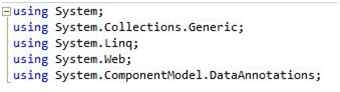
Before you do the ASP.NET MVC model validations you need to add the following reference:
“using System.ComponentModel.DataAnnotations;”
Now you are ready to do the model validations.
In the example, create a new class called “company” under the Model add the preceding references:
Now add the properties. In the following example, I have added various properties that are not directly related to the “company.”
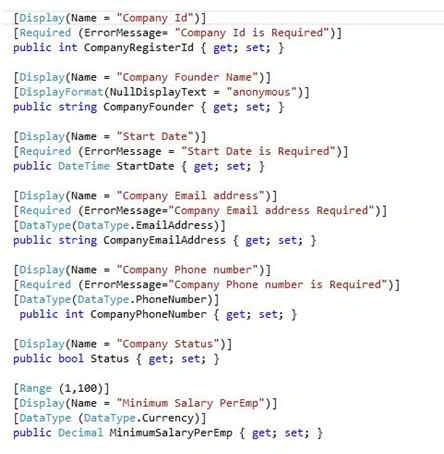
- [Display(Name = "Company Id")]
- public int CompanyRegisterId { get; set; }
In the preceding example you need to only add the “Required” attribute without using an error message. The default message will appear as in the following:

- [Display(Name = "Company Id")]
- [Required (ErrorMessage= "Company Id is Required")]
- public int CompanyRegisterId { get; set; }
But if you add an error message then a custom error message will appear as in the following:

In HTML view you do not even need to add a label. Using ASP.NET.MVC Model we can do that easily.
The only thing is, you need to call the relevant attribute in the HTML view using Razor syntax.
The “ComponentModel.DataAnnotations” assembly has many built-in validation attributes, for example:
- Required
- Range,
- RegularExpression ,
- Compare
- StringLength
- Data type
There are many data types the user can select to validate the input. Using this, you can validate for the exact data type as in the following:
- Credit Card number
- Currency
- Custom
- Date
- DateTime
- Duration
- Email Address
- HTML
- Image URL
- Multiline text
- Password
- Phone number
- Postal Code
- Text
- Tine
- Upload
- [Required (ErrorMessage="Company Email address Required")]
- [DataType(DataType.EmailAddress)]
- public string CompanyEmailAddress { get; set; }
- [Required (ErrorMessage="Company Phone number is Required")]
- [DataType(DataType.PhoneNumber)]
- public int CompanyPhoneNumber { get; set; }
- [Range (1,100)]
- [DataType (DataType.Currency)]
- public Decimal MinimumSalaryPerEmp { get; set; }
-
- [Required]
- [DataType (DataType.MultilineText)]
- public string CompanyDescription { get; set; }
-
- [Required]
- [DataType (DataType.PostalCode , ErrorMessage = " Please Enter Valid Postal Code")]
- public String PostalCode { get; set; }
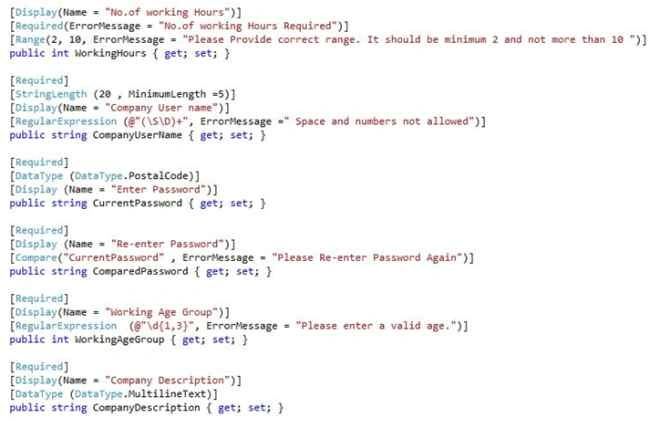
Also, you can validate the range as in the following examples. The minimum value you can enter here is 2, whereas the maximum value you can enter is 10.
- [Required (ErrorMessage="No.of working Hours Required")]
- [Range(2, 10, ErrorMessage = "Please Provide correct range. It should be minimum 2 and not more than 10 ")]
- public int WorkingHours { get; set; }
Also you can validate the string length using model validation.
- [Required]
- [StringLength (10 , MinimumLength =5)]
- [Display(Name = "User name")]
- [RegularExpression (@"(\S\D)+", ErrorMessage =" Space and numbers not allowed")]
- public string UserName { get; set; }
In the preceding, you cannot exceed 10 letters, although it should be a minimum of 5 letters. It is also important that a regular expressions be used to do some validations. Using regular expressions I ignore empty spaces and digits that the user may enter in the text box.
You can compare a user-entered password and re-enter password that are matched using this compare attribute.
- [Required]
- [DataType (DataType.Password)]
- [Display (Name = "Enter Password")]
- public string CurrentPassword { get; set; }
-
- [Required]
- [Display (Name = "Re-enter Password")]
- [Compare("CurrentPassword" , ErrorMessage = "Please Re-enter Password Again")]
- public string ComparedPassword { get; set; }
Using “
DisplayFormat” you can specify the data format that should be displayed. For example, display date, currency, etc.
- [Display(Name = "Company Founder Name")]
- [DisplayFormat(NullDisplayText = "anonymous")]
- public string CompanyFounder { get; set; }
Here, instead of displaying
null, you can display
anonymous.Now create a controller and a view to apply those validations. In this example I am using a default controller and view. The Index action returns a view that contains a form through that a user can fill in the details of the company and submit it.
Sometimes a user needs to implement validation scenarios that are not provided in the MVC framework.
In these kinds of scenarios you need to implement an “
IValidatableObject” interface. Using this, you can conduct an in-depth inspection of the model.
- public IEnumerable<ValidationResult> Validate(ValidationContext validationContext)
- {
- if (MinimumSalaryPerEmp < 10 && WorkingHours > 5)
- {
- yield return new ValidationResult("Provide Fair Amount for Workers");
- }
- }
In the preceding example, the method used will allow you to access all the properties in the model and you can easily implement the custom validation logic also.
(Important: in the view “ValidationSummary” needs to be true.)
- @Html.ValidationSummary(true))
When the user submits the form view, the controller will send a POST request. To respond to this request, we need to create one more ActionResult in our controller.
- [HttpPost]
- public ActionResult Index(Company company)
- {
- if (ModelState.IsValid)
- {
-
- return View();
- }
- return View();
- }
Considering the view, you may first need to add the model reference as in the following:
- @model SampleModelValidation.Models.Company
Thereafter you add the form inputs and validation that you implemented in the model. It is important that the form inputs should be inside the BeginForm as shown below:
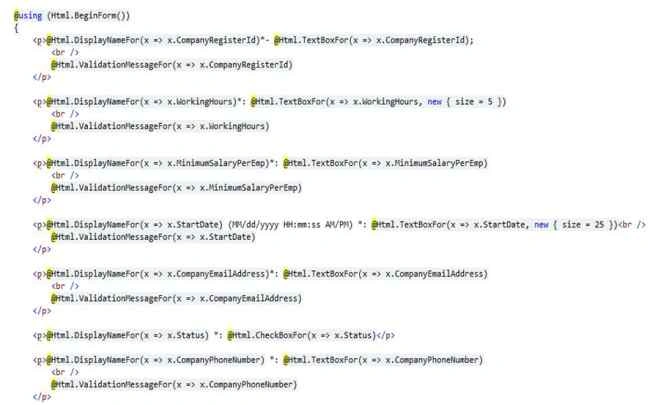
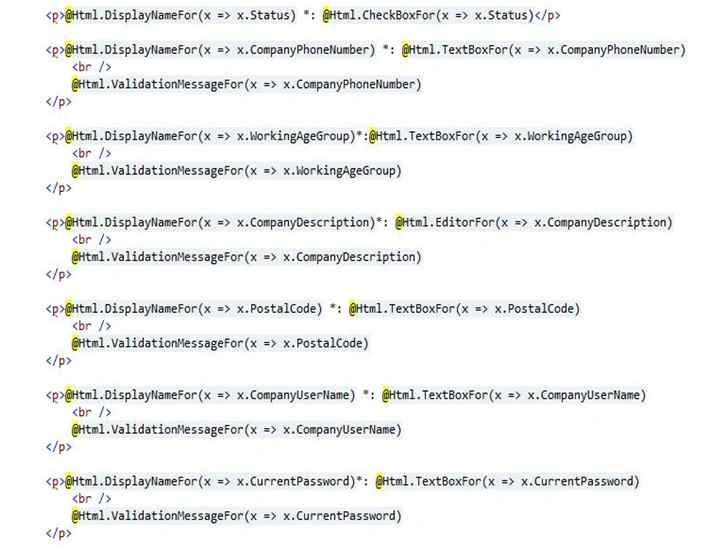
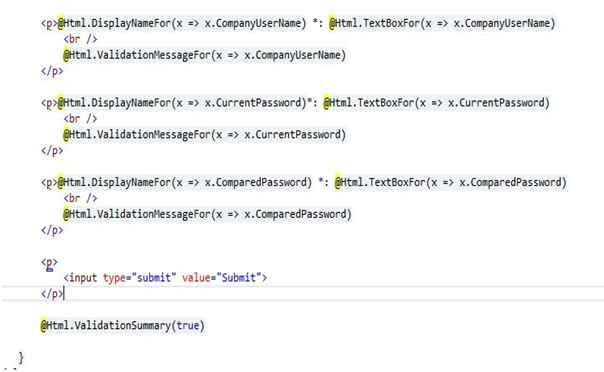
Now your web application will be ready to run. Run the website, if incorrect input values are submitted you will then see invalid input error messages.
This validation only applies to the server side. But there is also a need to do validation from the client side as well. When considering client-side validation, reducing the server load will be a great benefit to the user. The ASP.NET MVC Framework will support client-side validations as well.
To do client-side validation, a few JavaScripts can be used. They are:
- jQuery
- jQuery validation library
- jQuery unobtrusive validation library (developed by Microsoft)
When you open a new ASP.NET.MVC project you will get all the JavaScripts in the scripts folder that you want in the client-side validation. First we should set the configuration inside the <appSettings> tag in the web.config file.
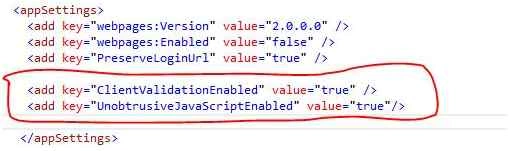
Now we need to add the JavaScript references inside the “BundleConfig.cs” file, creating a new script bundle as shown below.

Then render these scripts in the “_Layout.chtml” file as shown below.
- @Scripts.Render("~/bundles/jqueryval")
Now you are good to go with client-side validation and server-side validation as well.



Anant DhasPosted Sep 20, 2017, 1:42 AM
Nice One.......!!!
Hamid KhanPosted Sep 18, 2017, 8:23 AM
Nice......................
Gowtham RajamanickamPosted Aug 27, 2015, 9:52 AM
good
Debasis SahaPosted Aug 25, 2015, 12:31 AM
Nice one..
Shridhar SharmaPosted Aug 24, 2015, 12:42 PM
good one
Sibeesh VenuPosted Aug 24, 2015, 9:23 AM
Nice Share :)
Rajeesh MenothPosted Aug 24, 2015, 6:54 AM
Good Buddy..Remove Images and Paste your code here.it help for every one
Ankit BansalPosted Aug 24, 2015, 5:33 AM
nice...
Gowtham KPosted Aug 24, 2015, 2:57 AM
Good one
Karthikeyan KPosted Aug 24, 2015, 2:55 AM
Thanks for share sir
Sumit JoshiPosted Aug 24, 2015, 2:39 AM
Thanks for sharing..
Mohammed IbrahimPosted Aug 24, 2015, 2:15 AM
nice
Buddika WiduPosted Aug 24, 2015, 2:12 AM
sure , you can do using custom validation by implementing “IValidatableObject” interface .
Saineshwar BageriPosted Aug 24, 2015, 1:38 AM
sir its good one but you should show with dropdownlist validation and checkbox validation