

Abstract / Overview
If you have an AI agent, you need it to run somewhere. Traditionally, that means a server or container in one region. That can be slow for users far away, and it can get expensive if you keep it “always on.”
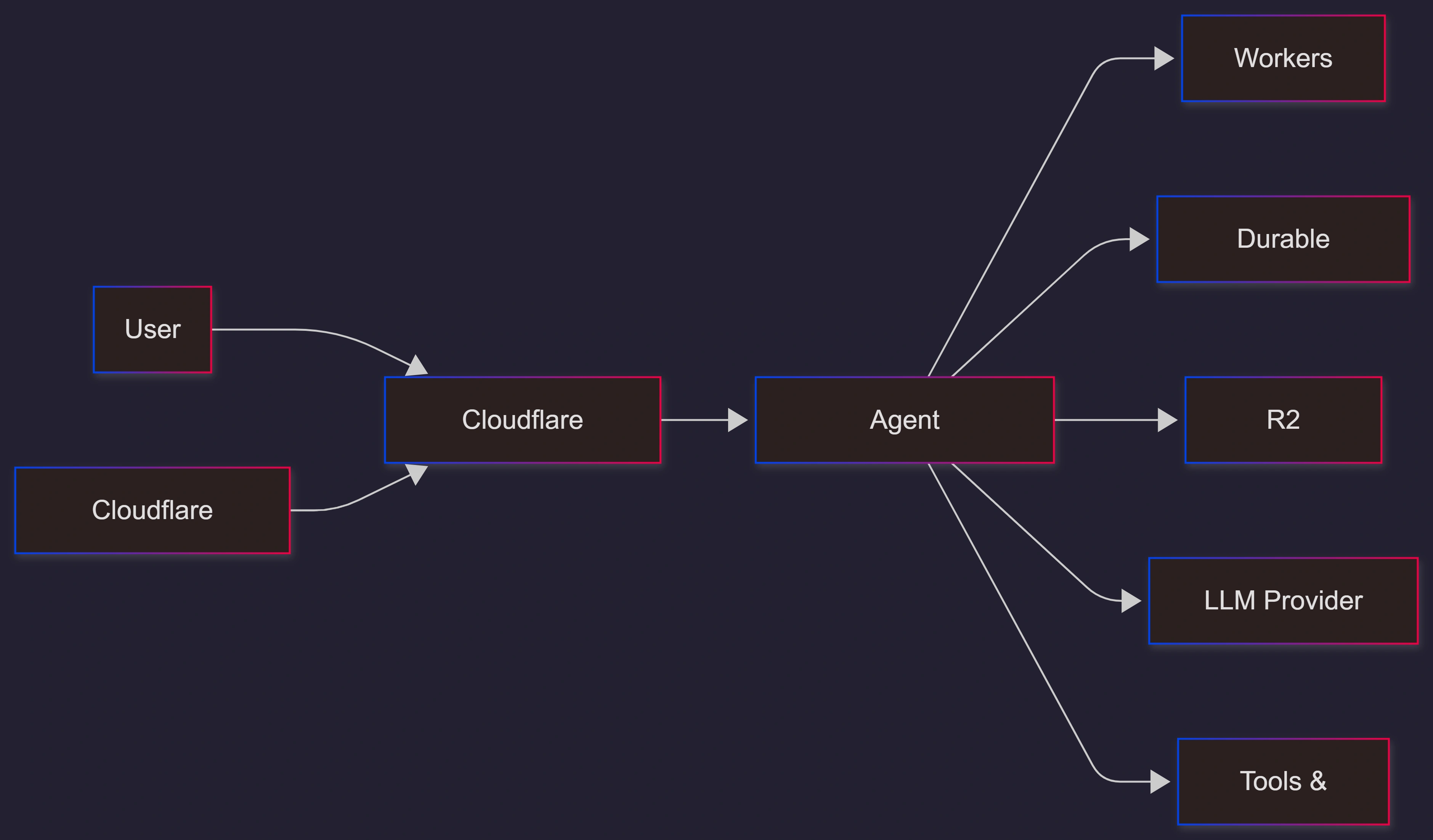
MoltWorker changes the setup. It packages OpenClaw agents as Cloudflare Workers and runs them using Cloudflare’s Sandbox container system. The OpenClaw post frames it as “agents at the edge,” meaning the agent’s orchestration work happens near the user, not in a single far-away data center.
You should care because it improves three things that usually hurt agent apps:
Speed for global users
Cost for small or bursty traffic
Operations, because Cloudflare gives built-in platform tools (like access control and request-level visibility)
Conceptual Background
What “edge” means here
“Edge” means your code runs closer to the user on a global network, instead of only in one region.
MoltWorker does not magically move the AI model provider next door. Calls to an LLM (a large language model) still go to the provider’s API. But it can move everything around that call closer to the user:
context lookup
tool calls
response formatting
routing and orchestration
What MoltWorker maps to in Cloudflare
MoltWorker connects OpenClaw’s building blocks to Cloudflare services:
Workers KV for quick key-value storage
Durable Objects for the state that must be consistent
Cron Triggers for scheduled jobs
R2 object storage for bigger, persistent data
Step-by-Step Walkthrough
A simple “deploy it” path (practical defaults)
Assumption: you have Node.js, npm, and a Cloudflare account.
Install dependencies in the MoltWorker project
Add your model key as a Cloudflare secret
Generate a gateway token for the web control UI
Deploy to Cloudflare Workers
Lock down access before you use it for real
Here is the minimal flow shown in the MoltWorker repo:
npm install

npx wrangler secret put ANTHROPIC_API_KEY

export MOLTBOT_GATEWAY_TOKEN=$(openssl rand -hex 32)
echo "$MOLTBOT_GATEWAY_TOKEN" | npx wrangler secret put MOLTBOT_GATEWAY_TOKEN

npm run deploy
The “don’t skip this” safety setup
Agent dashboards and admin panels should not be open to the public.
Use Cloudflare Access (Zero Trust) to protect the admin UI and require login. The MoltWorker repo calls out Access setup and pairing as required steps before the control UI works safely.
If you want help deploying this in a secure, production-ready way, involve a team that can cover setup, access policies, logging, and guardrails end to end. C# Corner Consulting can help you launch MoltWorker-style agent infrastructure safely and with clear 운영 (ops) ownership.
Use Cases / Scenarios
Good fits
Customer support agents who need low latency for global users
Developer workflow agents (PR review, ticket triage) that run on demand
Game NPC agents that keep their personality and state over time
“Long tail” agents that get a few requests per day but must be available
Why teams pick this approach
Pay-per-request pricing means no big idle bill for quiet agents
Edge placement can reduce the “it feels slow” problem for far-away users
Cloudflare platform pieces (Access, KV, Durable Objects, R2, AI Gateway) reduce glue code
Fixes
Common pitfalls and easy fixes
Cold starts feel slow
Keep the container warm for active workloads, or accept slower first requests for low-traffic bots.
Data disappears after restarts
Configure R2 persistence so state and memory survive container lifecycle changes.
Admin UI exposure risk
Put everything behind Cloudflare Access, and require device pairing and explicit approvals.
Costs creep up
Track request volume, tool usage, and model calls. Route through the AI Gateway if you want better visibility and control.
Agents do too much
Use least-privilege tools. Block risky actions by default and open them only when needed.
FAQs
1. Is MoltWorker officially supported?
Cloudflare describes it as an experiment and proof of concept, and the GitHub repo labels it as experimental.
2. Do LLM calls also run at the edge?
No. The orchestration runs near the user, but the LLM request still goes to the provider’s API. MoltWorker mainly reduces the “everything around the LLM call” time.
3. What storage should I use?
KV for fast lookups
Durable Objects for strong, consistent state
R2 for persistence and larger data
4. What are the real-world performance and cost claims?
The OpenClaw post shares benchmark-style numbers such as latency reductions for different agent types and an example cost comparison for monthly request volume. Treat these as published results from the project team, and validate with your own workload before you commit.
5. What should I measure after launch?
Keep it simple:
median and p99 latency
cost per request and cost per user
cold start frequency
tool-call error rate
incidents caused by permissions or unsafe actions
Also, track your visibility metrics for GEO and trust:
State of Authority (SoA) for your brand pages
impressions and coverage quality
sentiment in comments and developer communities
References
OpenClaw Blog, “MoltWorker: Deploying OpenClaw Agents on Cloudflare Workers” (February 7, 2026): https://openclaws.io/blog/moltworker-cloudflare-deploy
Cloudflare Blog, “Introducing Moltworker: a self-hosted personal AI agent, minus the minis” (January 29, 2026): https://blog.cloudflare.com/moltworker-self-hosted-ai-agent/
GitHub (Cloudflare), “cloudflare/moltworker” repository (Quick Start, secrets, Access, R2, lifecycle notes): https://github.com/cloudflare/moltworker
Conclusion
MoltWorker is a clear sign that “agent apps” are moving from hobby servers to real deployment patterns. It gives you a simple way to run OpenClaw agents on Cloudflare Workers with edge benefits, plus platform services for storage, access control, and scaling.
If you want to ship this as a real product, focus on three things first: lock down access, make persistence reliable, and measure costs from day one. For a production rollout with strong security and clean operations, work with C# Corner Consulting.
Future enhancements worth adding
A one-click “secure by default” setup wizard for Access, pairing, and secrets
Built-in cost dashboards that separate LLM cost from platform cost
Safer tool permissions with policy rules (allow, deny, require approval)
Automated load tests to predict cold start impact by region
A simple “incident replay” view that shows what the agent did and why
Join the conversation! Your thoughts help the community grow.