CBefore reading this article, I highly recommend reading the previous installments in the series:
Remove() Method
The Remove method deletes (removes) document(s) from a collection. The Remove method searches documents based on the deleting-criteria (<query>) and removes all documents matching the criteria. We can remove a single item at a time using the <justOne> parameter, but we can't use the remove() method with a capped collection.
Syntax
- db.Collection_Name.remove( query,{ justOne:<Boolean>} )
Parameters
| Parameter |
Type |
Description |
| Query |
Document |
Specify the deletion criteria |
| justone |
Boolean |
Optional, the default value is false. Remove a single document if set to true otherwise delete all the documents matching the deletion criteria. |
Return Type
The remove() returns an object containing the status of the operation. The remove() method returns a WriteResult object that contains the status of the operation. The WriteResult object is an integer type that returns the number of documents removed.
Now, we consider some examples and examine the behavior of the remove() method.
1. Create a collection
Code
- db.createCollection("Demo",{autoIndex:false,max:100,size:5040320})
Result
Now insert some documents into the “Demo” collection.
- {
- "_id" : ObjectId("55ca1d327ad050ed6214a4e3"),
- "Product_Name" : "Pendrive",
- "Price" : 250
- "Amount" : 2
- }
- {
- "_id" : ObjectId("55ca1d547ad050ed6214a4e4"),
- "Product_Name" : "Book",
- "Price" : 350,
- "Amount" : 4
- }
- {
- "_id" : ObjectId("55ca1d6a7ad050ed6214a4e5"),
- "Product_Name" : "Photo Frame",
- "Price" : 150,
- "Amount" : 3
- }
- {
- "_id" : ObjectId("55ca1d947ad050ed6214a4e6"),
- "Product_Name" : "Pencil",
- "Price" : 15,
- "Amount" : 20
- }
- {
- "_id" : ObjectId("55ca1dc47ad050ed6214a4e7"),
- "Product_Name" : "Keyboard",
- "Price" : 1500,
- "Amount" : 4
- }
- {
- "_id" : ObjectId("55ca1dd57ad050ed6214a4e8"),
- "Product_Name" : "Mouse",
- "Price" : 125,
- "Amount" : 5
- }
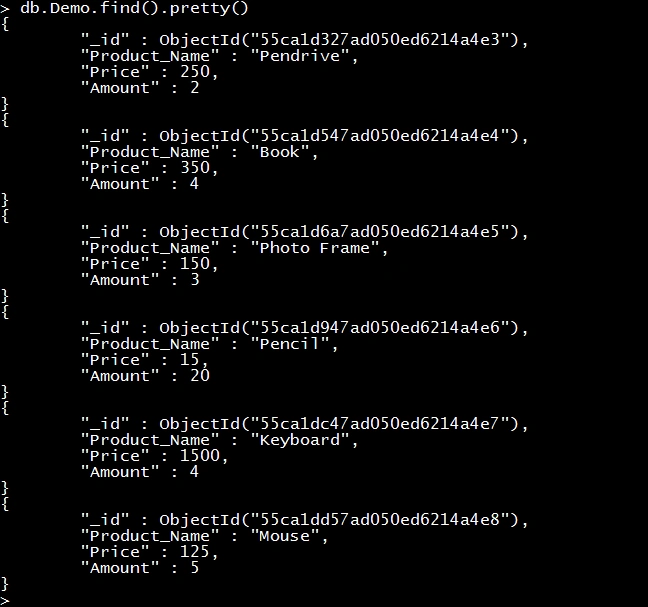
Structure of “Demo” collection
 Remove all document from collection
To remove all the documents in a collection, use the remove method with an empty query document {}.
Query
Collection after Query
This query removes all the documents from the “Demo” collection.

Note that the remove() and drop() methods are not the same. The Drop() method drops an entire collection including its structure and index, but the remove() method deletes only the documents from the collection.
Remove all Documents that Match the Deletion CriteriaTo remove all the documents that match a certain criteria, use the <query> parameter and apply the deletion criteria.
Query
- db.Demo.remove({Price:{$gt:235,$lt:2001}})
This query removes all the documents where the value of the “Price” field is greater than 350 and less than 2001.
Collection after Query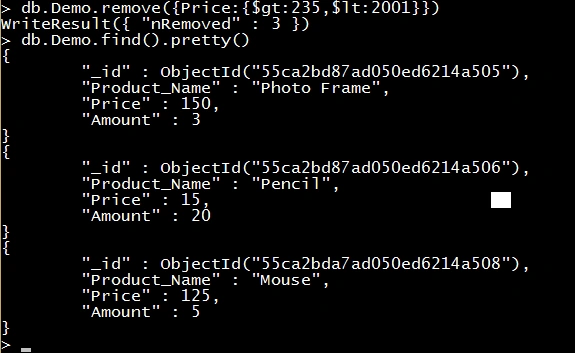 Remove Single Document
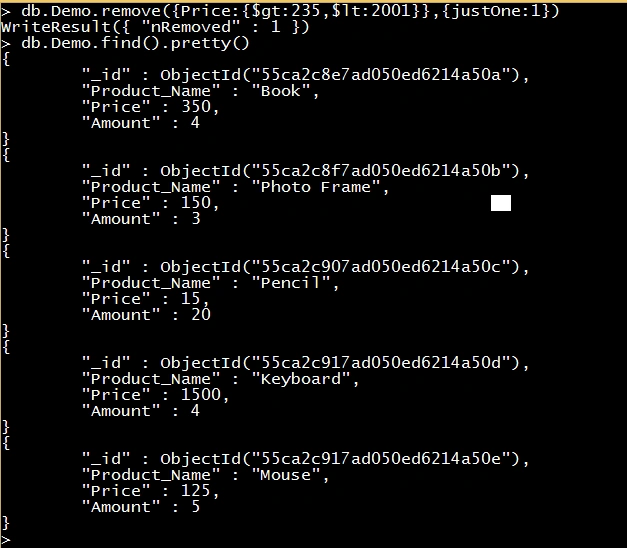
 To remove the first document that matches a deletion criteria, use the “justOne” parameter of the remove() method. Set the value of the “justOne” parameter to true or 1.
Query
- db.Demo.remove({Price:{$gt:235,$lt:2001}},{justOne:1})
This removes the first document that matches the deletion criteria.
Collection after Query
 Remove method with Capped Collection
We can't delete a specific document from a capped collection. To remove all documents from a collection, use the drop() method to drop the collection.
Let's see an example:
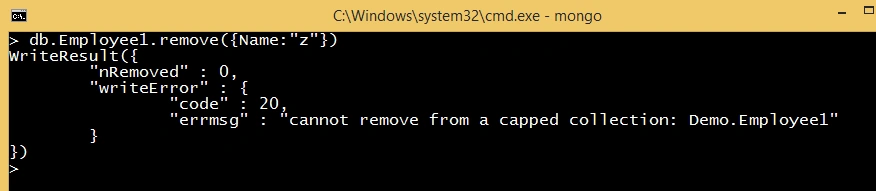
In the preceding example, we tried to use the remove method with a capped collection so MongoDB throws an error. To remove all documents from a collection, use the drop() method.
Use Isolated option with remove operationDuring the removal of multiple documents, the remove operation may interleave with other read and write operations of the collection. To override this behavior, use the “$isolated” option. The isolated option ensures that no client can see the affected documents until they are all processed or an error stops the removal operation. To use the isolate behavior in the remove method, set the “$isolated” parameter to 1 or true.
Example
Today, we learned about the remove method. In next the article, I will explain another method. Until then keep coding.


Hamid KhanPosted Aug 16, 2017, 1:14 AM
Very good article dear friend
Sr KarthigaPosted Feb 14, 2016, 7:44 AM
Good one sir
Yashwant VishwakarmaPosted Aug 26, 2015, 3:06 AM
Wonderful series :-)
Vaikesh K PPosted Aug 26, 2015, 2:28 AM
Good Share :)
Yashwanth MuthineniPosted Aug 25, 2015, 5:42 AM
Nice Share
Shridhar SharmaPosted Aug 13, 2015, 5:34 PM
nice series
Ankit BansalPosted Aug 13, 2015, 7:41 AM
good one..
Pankaj Kumar ChoudharyPosted Aug 13, 2015, 5:34 AM
Thanks Vaikesh K P sir............
Pankaj Kumar ChoudharyPosted Aug 13, 2015, 5:33 AM
Thanks Sibeesh Sir........
Pankaj Kumar ChoudharyPosted Aug 13, 2015, 5:32 AM
Thanks Gowtham Sir...........
Pankaj Kumar ChoudharyPosted Aug 13, 2015, 5:31 AM
Thanks Nilesh Jadav Sir............
Pankaj Kumar ChoudharyPosted Aug 13, 2015, 5:31 AM
Thanks Karthikeyan Sir..........
Pankaj Kumar ChoudharyPosted Aug 13, 2015, 5:30 AM
Thanks Rahul..........
Gowtham RajamanickamPosted Aug 13, 2015, 4:49 AM
good one..
Sibeesh VenuPosted Aug 13, 2015, 4:27 AM
Nice Share :)
Vaikesh K PPosted Aug 13, 2015, 2:57 AM
Great Series :)
Nilesh JadavPosted Aug 13, 2015, 2:50 AM
This is really nice sir Day 10 uh ?? haha great Pankaj Kumar Choudhary
Karthikeyan KPosted Aug 13, 2015, 2:40 AM
Good nice..Thanks for sharing
Rahul PrajapatPosted Aug 12, 2015, 8:45 PM
Good article Pankaj Kumar Choudhary sir
Pankaj Kumar ChoudharyPosted Aug 12, 2015, 8:40 PM
Thanks Santhakumar Munuswamy Sir...........
Pankaj Kumar ChoudharyPosted Aug 12, 2015, 8:39 PM
Thanks Debasis Saha Sir..........
Pankaj Kumar ChoudharyPosted Aug 12, 2015, 8:39 PM
Thanks Pankaj Bajaj sir for your enthusiastic words but i am not expert , i am beginner in this field................
Pankaj Kumar ChoudharyPosted Aug 12, 2015, 8:33 PM
Thanks Chervine Bhiwoo Sir.........
Debasis SahaPosted Aug 12, 2015, 3:15 PM
good one..
Santhakumar MunuswamyPosted Aug 12, 2015, 2:52 PM
Good Article. Thanks for sharing
Pankaj BajajPosted Aug 12, 2015, 1:25 PM
Good Going Pankaj..Now you are MongoDB Expert..I missed some articles but will read when time permit..
Chervine BhiwooPosted Aug 12, 2015, 10:54 AM
Good work
Pankaj Kumar ChoudharyPosted Aug 12, 2015, 9:47 AM
Thanks Sandeep Bro............
Sandeep KumarPosted Aug 12, 2015, 8:40 AM
Nicely Done sir :)
Pankaj Kumar ChoudharyPosted Aug 12, 2015, 7:44 AM
Thanks Gopi Chand Sir........
Pankaj Kumar ChoudharyPosted Aug 12, 2015, 7:43 AM
Thanks Rajeesh Menoth Sir........
Pankaj Kumar ChoudharyPosted Aug 12, 2015, 7:42 AM
Thanks Rakesh Chavda sir.......
Pankaj Kumar ChoudharyPosted Aug 12, 2015, 7:42 AM
Thanks Vaikesh Sir....
Gopi ChandPosted Aug 12, 2015, 7:34 AM
Nice job
Rajeesh MenothPosted Aug 12, 2015, 5:57 AM
Good One again
RakeshPosted Aug 12, 2015, 5:18 AM
Good work
Vaikesh K PPosted Aug 12, 2015, 4:26 AM
Nice Series ... :)
Pankaj Kumar ChoudharyPosted Aug 12, 2015, 4:21 AM
Thanks Rahul Prajapat........
Pankaj Kumar ChoudharyPosted Aug 12, 2015, 4:21 AM
Thanks Sibeesh Venu Sir.........
Pankaj Kumar ChoudharyPosted Aug 12, 2015, 4:21 AM
Thanks Karthikeyan K Sir........
Pankaj Kumar ChoudharyPosted Aug 12, 2015, 4:20 AM
Thanks Nihal Ahmed..........
Sibeesh VenuPosted Aug 12, 2015, 3:08 AM
Nice Share...
Rahul PrajapatPosted Aug 12, 2015, 3:05 AM
Thanks for sharing pankaj sir
Karthikeyan KPosted Aug 12, 2015, 1:47 AM
Nice collections...Thanks for share
Nihal AhmedPosted Aug 12, 2015, 1:44 AM
Nice one.