
This article is in continuation of my previous article MVVM Architecture When Using Webservices For Database Interaction. Let's see how to use the events and commands described in the previous article.

  1. First of all, for differentiating between the Views from where the command has been received and what to send in return to that view result, we have used a GUID variable named as token.

So, let's define the Guid variable _token in CompanyDetail View and ViewModel.

Let's create a helper class to send a request and get a response for View navigation.

  1. Message helper or appMessage.
  2. Message helper: We will use it to get response from a command.

Let's start by taking an example.

We will be creating a View (Window) for company details and then, we need to match if those details occur in our database. Let's do it step by step.

Step 1

Create the architecture as discussed in previous article, MVVM Architecture When Using Webservices For Database Interaction.

Step 2

Add a window under View section in main project. I named it as CompanyDetails.

  1. <Window x:Class="MVVMAndWebService.Views.CompanyDetails" x:Name="This"
  2. xmlns="http://schemas.microsoft.com/winfx/2006/xaml/presentation"
  3. xmlns:x="http://schemas.microsoft.com/winfx/2006/xaml"
  4. Title="CompanyDetails" Height="400" Width="500" Loaded="Window_Loaded">
  5. <Grid >
  6. <Grid.RowDefinitions>
  7. <RowDefinition Height="63"></RowDefinition>
  8. <RowDefinition Height="*"></RowDefinition>
  9. <RowDefinition Height="10"></RowDefinition>
  10. </Grid.RowDefinitions>
  11. <Grid.ColumnDefinitions>
  12. <ColumnDefinition Width="10"></ColumnDefinition>
  13. <ColumnDefinition Width="*"></ColumnDefinition>
  14. <ColumnDefinition Width="10"></ColumnDefinition>
  15. </Grid.ColumnDefinitions>
  16. <Border BorderThickness="0"
  17. Grid.Row="0"
  18. Grid.ColumnSpan="3"
  19. BorderBrush="Transparent"
  20. Grid.Column="0">
  21. <Image x:Name="logoImage"
  22. Stretch="UniformToFill" Width="140" HorizontalAlignment="Left"
  23. Margin="0,5,20,0">
  24. </Image>
  25. </Border>
  26. <Grid Grid.Column="1" Margin="0,37,0,26" Grid.RowSpan="2">
  27. <Grid.RowDefinitions>
  28. <RowDefinition Height="40"></RowDefinition>
  29. <RowDefinition Height="40"></RowDefinition>
  30. <RowDefinition Height="40"></RowDefinition>
  31. <RowDefinition Height="70"></RowDefinition>
  32. </Grid.RowDefinitions>
  33. <Grid.ColumnDefinitions>
  34. <ColumnDefinition Width="171*"></ColumnDefinition>
  35. <ColumnDefinition Width="80*"></ColumnDefinition>
  36. <ColumnDefinition Width="176*"/>
  37. </Grid.ColumnDefinitions>
  38. <Label x:Name="lblCompanyName"
  39. Content="Name : "
  40. FontSize="14"
  41. HorizontalAlignment="Right"
  42. VerticalAlignment="Center"
  43. Grid.Row="0"
  44. Grid.Column="0" Margin="0,6">
  45. </Label>
  46. <TextBox x:Name="TextBoxCompanyName"
  47. Width="200"
  48. MaxLength="50"
  49. Grid.Column="1"
  50. Grid.Row="0"
  51. TabIndex="0"
  52. Text="{Binding CompanyName}" Grid.ColumnSpan="2" Margin="0,6,0,7">
  53. </TextBox>
  54. <Label x:Name="lblUserName"
  55. Content="User Name : "
  56. FontSize="14"
  57. HorizontalAlignment="Right"
  58. VerticalAlignment="Center"
  59. Grid.Row="1"
  60. Grid.Column="0" Margin="0,6"
  61. >
  62. </Label>
  63. <TextBox x:Name="TextBoxUserName"
  64. Width="200"
  65. MaxLength="50"
  66. Grid.Column="1"
  67. Grid.Row="1"
  68. TabIndex="0"
  69. Text="{Binding UserName}" Grid.ColumnSpan="2" Margin="0,7,0,6">
  70. </TextBox>
  71. <Label x:Name="lblPassword"
  72. Content="Password : "
  73. FontSize="14"
  74. HorizontalAlignment="Right"
  75. VerticalAlignment="Center"
  76. Grid.Row="2"
  77. Grid.Column="0" Margin="0,6">
  78. </Label>
  79. <PasswordBox x:Name="TextBoxPassword"
  80. Width="200"
  81. MaxLength="50"
  82. Grid.Column="1"
  83. Grid.Row="2"
  84. TabIndex="0" Grid.ColumnSpan="2" Margin="13,2,40,11"
  85. >
  86. </PasswordBox>
  87. <StackPanel Grid.Row="3" Orientation="Horizontal" HorizontalAlignment="Stretch"
  88. Grid.Column="0" Grid.ColumnSpan="3" Margin="0,76,0,-76">
  89. <Button x:Name="ButtonSave"
  90. FontSize="20"
  91. HorizontalAlignment="Right"
  92. Width="100"
  93. Height="50"
  94. Margin="50,10,0,11"
  95. Content="Save"
  96. Command="{Binding SaveCompanyCommand}"
  97. CommandParameter="{Binding ElementName=This}"
  98. TabIndex="7" IsDefault="True"/>
  99. <Button x:Name="ButtonCancel"
  100. FontSize="20"
  101. Margin="20,10,0,11"
  102. Command="{Binding CancelCompanyCommand}"
  103. CommandParameter="{Binding ElementName=This}"
  104. HorizontalAlignment="Left"
  105. Width="90"
  106. Height="50"
  107. Content="Cancel"
  108. TabIndex="8" IsCancel="True" />
  109. </StackPanel>
  110. </Grid>
  111. </Grid>
  112. </Window>

Step 3

On cs page of the above View, let's define a property GUID _token, to differentiate the requests received from Views.

Then, as we know the password will be a secured string, to get the value of the passwordBox, we cannot use the direct bindings as we have used in case of other textboxes. Please see the XAML provided above. Password is yet not bound to any property of ViewModel.

So, we need to implement an interface to the View which will be used to access the password string. So, this interface will help the View to get secure password string and that can be converted back to insecure string in View Model.

Binding for commands is done on Buttons.

Let's create an interface to the CommonClasses for above purpose, which will contain the below code.

  1. using System;
  2. using System.Collections.Generic;
  3. using System.Linq;
  4. using System.Text;
  5. using System.Threading.Tasks;
  6. namespace CommonClasses
  7. {
  8. public interface IHavePassword
  9. {
  10. System.Security.SecureString Password { get; }
  11. }
  12. }

Now, for getting the response as we have discussed earlier, we will be receiving the message at the end of each command. So, let's create a Message class as a helper. Keep it separate from the above architecture and add Helper project to the existing solution.
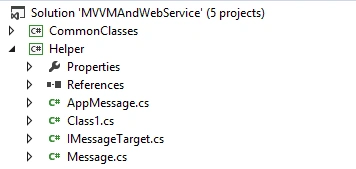


As you can see from the above screenshot, we need to create a class ‘Message’ containing the message properties.
  1. using System;
  2. using System.Collections.Generic;
  3. using System.Linq;
  4. using System.Text;
  5. using System.Threading.Tasks;
  6. namespace Helper
  7. {
  8. public class Message
  9. {
  10. public string Type;
  11. public object Data;
  12. }
  13. }
Next, we need to create an interface for Message because we need to implement it in the same View so as to support multiple inheritance.
  1. using System;
  2. using System.Collections.Generic;
  3. using System.Linq;
  4. using System.Text;
  5. using System.Threading.Tasks;
  6. namespace Helper
  7. {
  8. public interface IMessageTarget
  9. {
  10. Guid Token { get; }
  11. void ReceiveMessage(Message msg);
  12. }
  13. }

Token will differentiate between the requests from different Views. Let's create static class to send response to the Views.

  1. using System;
  2. using System.Collections.Generic;
  3. using System.Linq;
  4. using System.Text;
  5. using System.Threading.Tasks;
  6. namespace Helper
  7. {
  8. public static class AppMessage
  9. {
  10. static Dictionary<Guid, IMessageTarget> _registerWindow = new Dictionary<Guid, IMessageTarget>();
  11. //Register a view.
  12. public static void Register(IMessageTarget View, Guid token)
  13. {
  14. if (_registerWindow.ContainsKey(token))
  15. {
  16. _registerWindow.Remove(token);
  17. }
  18. _registerWindow.Add(token, View);
  19. }
  20. //Send response
  21. public static void Send(Guid token, Message notification)
  22. {
  23. if (_registerWindow.ContainsKey(token))
  24. {
  25. _registerWindow[token].ReceiveMessage(notification);
  26. }
  27. }
  28. //unregister that view.
  29. public static void UnRegister(Guid token)
  30. {
  31. if (_registerWindow.ContainsKey(token))
  32. {
  33. _registerWindow.Remove(token);
  34. }
  35. }
  36. }
  37. }
  1. Register a View by token.
  2. Send response.
  3. Unregister that View.

OK. As per the above understanding, our View should contain GUID property token, Message response Method from IMessage, Password string property from IhavePassword.

Our View.cs page will look like the below.
  1. using CommonClasses;
  2. using Helper;
  3. using System;
  4. using System.Collections.Generic;
  5. using System.Linq;
  6. using System.Text;
  7. using System.Threading.Tasks;
  8. using System.Windows;
  9. using System.Windows.Controls;
  10. using System.Windows.Data;
  11. using System.Windows.Documents;
  12. using System.Windows.Input;
  13. using System.Windows.Media;
  14. using System.Windows.Media.Imaging;
  15. using System.Windows.Shapes;
  16. using ViewModels;
  17. namespace MVVMAndWebService.Views
  18. {
  19. /// <summary>
  20. /// Interaction logic for CompanyDetails.xaml
  21. /// </summary>
  22. public partial class CompanyDetails : Window,IHavePassword, IMessageTarget
  23. {
  24. private Guid _token;
  25. public Guid Token
  26. {
  27. get
  28. {
  29. return _token;
  30. }
  31. }
  32. public CompanyDetails()
  33. {
  34. InitializeComponent();
  35. }
  36. private CompanyDetailsViewModel _CompanyDetailsViewModel;
  37. private void Window_Loaded(object sender, RoutedEventArgs e)
  38. {
  39. _token = Guid.NewGuid();
  40. //Now question is how to get response and take next step?
  41. //Register a view with appMessage:
  42. AppMessage.Register(this, _token);
  43. this.DataContext = _CompanyDetailsViewModel = new CompanyDetailsViewModel(_token);
  44. }
  45. public System.Security.SecureString Password
  46. {
  47. get
  48. {
  49. return TextBoxPassword.SecurePassword;
  50. }
  51. }
  52. //This method is to get the response.Message will contain the response and we can modify it as per the requirement.
  53. public void ReceiveMessage(Message msg)
  54. {
  55. if (msg.Type.Equals("OpenView"))
  56. {
  57. MessageBox.Show("The response is {0}", msg.Type);
  58. }
  59. else if (msg.Type.Equals("CloseView"))
  60. {
  61. MessageBox.Show("The response is {0}", msg.Type);
  62. }
  63. else if (msg.Type.Equals("OpenInformationBox"))
  64. {
  65. MessageBox.Show("The response is {0}", msg.Type);
  66. }
  67. }
  68. }
  69. }

Let's move to ViewModel containing commands and call method from Web Service.

Note

From the previous article, we already know how to use a baseViewModel and Command class in a View Model. To access methods from Web Service, let's add a class in WebService and write the common code in that.

  1. using System;
  2. using System.Collections.Generic;
  3. using System.Linq;
  4. using System.Text;
  5. using System.ServiceModel;
  6. namespace WebService
  7. {
  8. public class Service
  9. {
  10. CarWashService.CarWashServiceClient carWashService;
  11. public void GetAddress()
  12. {
  13. String baseAddress = "AddressOfYourWebservice";
  14. BasicHttpBinding binding = new BasicHttpBinding();
  15. EndpointAddress endPointAddress = new EndpointAddress(baseAddress);
  16. carWashService = new CarWashService.CarWashServiceClient(binding, endPointAddress);
  17. }
  18. public CarWashService.CompanySetupDetail GetCompanyForSetup(string CompanyName, string UserName, String password)
  19. {
  20. GetAddress();
  21. return carWashService.GetcompanyForSetup(CompanyName, UserName, password);
  22. }
  23. }
  24. }
View Model should look like.
  1. using CommonClasses;
  2. using Helper;
  3. using System;
  4. using System.Collections.Generic;
  5. using System.Linq;
  6. using System.ServiceModel;
  7. using System.Text;
  8. using System.Threading.Tasks;
  9. using WashifyKIOSK.Service.CarWashService;
  10. namespace ViewModels
  11. {
  12. public class CompanyDetailsViewModel:BaseViewModel
  13. {
  14. //Define Properties:
  15. #region Constructor
  16. private Guid ViewToken;
  17. public CompanyDetailsViewModel(Guid _token)
  18. {
  19. ViewToken = _token;
  20. }
  21. #endregion
  22. #region Properties
  23. private string companyName;
  24. private string userName;
  25. private string _PasswordInVM;
  26. private string _message = string.Empty;
  27. private string _newLine = Environment.NewLine;
  28. public string CompanyName
  29. {
  30. get { return companyName; }
  31. set
  32. {
  33. if (value != companyName)
  34. {
  35. companyName = value;
  36. //Call OnPropertyChanged from BaseViewModel,and Pass the name of the property.
  37. OnPropertyChanged("CompanyName");
  38. }
  39. }
  40. }
  41. public string UserName
  42. {
  43. get { return userName; }
  44. set
  45. {
  46. if (value != userName)
  47. {
  48. userName = value;
  49. OnPropertyChanged("UserName");
  50. }
  51. }
  52. }
  53. public string PassWord
  54. {
  55. get { return _PasswordInVM; }
  56. set
  57. {
  58. if (value != _PasswordInVM)
  59. {
  60. _PasswordInVM = value;
  61. OnPropertyChanged("PassWord");
  62. }
  63. }
  64. }
  65. #endregion
  66. #region Commands
  67. private CommandClass<object> m_SaveCompanyCommand;
  68. public CommandClass<object> SaveCompanyCommand
  69. {
  70. get
  71. {
  72. return m_SaveCompanyCommand ?? (m_SaveCompanyCommand = new CommandClass<object>(
  73. ve => SaveCompanyInfo(ve), (t) => true));
  74. }
  75. }
  76. private CommandClass<object> m_CancelCompanyCommand;
  77. public CommandClass<object> CancelCompanyCommand
  78. {
  79. get
  80. {
  81. return m_CancelCompanyCommand ?? (m_CancelCompanyCommand = new CommandClass<object>(
  82. ve => CancelCompanyInfo(), (t) => true));
  83. }
  84. }
  85. #endregion
  86. #region Methods
  87. /// <summary>
  88. /// Method to send notification to close the window
  89. /// </summary>
  90. private void CancelCompanyInfo()
  91. {
  92. AppMessage.Send(ViewToken, new Helper.Message() { Type = "CloseView" });
  93. }
  94. /// <summary>
  95. /// Method to check the valid company details
  96. /// </summary>
  97. /// <param name="parameter"></param>
  98. private void SaveCompanyInfo(object parameter)
  99. {
  100. if (!ValidateInfo(parameter))
  101. {
  102. AppMessage.Send(ViewToken, new Helper.Message() { Type = "OpenInformationBox", Data = _message });
  103. }
  104. else
  105. {
  106. try
  107. {
  108. var passwordContainer = parameter as IHavePassword;
  109. if (passwordContainer != null)
  110. {
  111. var secureString = passwordContainer.Password;
  112. PassWord = ConvertToUnsecureString(secureString);
  113. }
  114. String baseAddress = "AddressofWebservice";
  115. BasicHttpBinding binding = new BasicHttpBinding();
  116. EndpointAddress endPointAddress = new EndpointAddress(baseAddress);
  117. WebService.Service.CarWashService.CarWashServiceClient carWashService = new WashifyKIOSK.Service.CarWashService.CarWashServiceClient(binding, endPointAddress);
  118. {
  119. WebService.Service.CarWashService.CompanySetupDetail company = carWashService.MethodName(CompanyName, UserName, PassWord);
  120. if (company != null)
  121. {
  122. AppMessage.Send(ViewToken, new Helper.Message() { Type = "OpenView", Data = company });
  123. }
  124. }
  125. }
  126. catch (Exception ex)
  127. {
  128. throw ex;
  129. }
  130. }
  131. }
  132. /// <summary>
  133. /// Validate the information entered
  134. /// </summary>
  135. /// <param name="param"></param>
  136. /// <returns></returns>
  137. /// <summary>
  138. /// Validate the information entered
  139. /// </summary>
  140. /// <param name="param"></param>
  141. /// <returns></returns>
  142. public bool ValidateInfo(object param)
  143. {
  144. bool err = false;
  145. _message = "Please provide required information." + _newLine;
  146. if (CompanyName == null)
  147. {
  148. _message = _message + _newLine;
  149. _message = _message + "* Company Name.";
  150. err = true;
  151. }
  152. if (UserName == null)
  153. {
  154. _message = _message + _newLine;
  155. _message = _message + "* User Name.";
  156. if (!err)
  157. err = true;
  158. }
  159. var passwordContainer = param as IHavePassword;
  160. if (passwordContainer != null)
  161. {
  162. var secureString = passwordContainer.Password;
  163. PassWord = ConvertToUnsecureString(secureString);
  164. }
  165. if (PassWord == "")
  166. {
  167. _message = _message + _newLine;
  168. _message = _message + "* Password.";
  169. if (!err)
  170. err = true;
  171. }
  172. if (err)
  173. {
  174. return false;
  175. }
  176. return true;
  177. }
  178. /// <summary>
  179. /// Decript the password
  180. /// </summary>
  181. /// <param name="securePassword"></param>
  182. /// <returns></returns>
  183. private string ConvertToUnsecureString(System.Security.SecureString securePassword)
  184. {
  185. if (securePassword == null)
  186. {
  187. return string.Empty;
  188. }
  189. IntPtr unmanagedString = IntPtr.Zero;
  190. try
  191. {
  192. unmanagedString = System.Runtime.InteropServices.Marshal.SecureStringToGlobalAllocUnicode(securePassword);
  193. return System.Runtime.InteropServices.Marshal.PtrToStringUni(unmanagedString);
  194. }
  195. finally
  196. {
  197. System.Runtime.InteropServices.Marshal.ZeroFreeGlobalAllocUnicode(unmanagedString);
  198. }
  199. }
  200. #endregion
  201. } }
The coding of our View, ViewModel, Service, and other parts is complete. Now, we can run the application to see how commands will run.