

Introduction
In this article I explain the "MySQL_Fetch_Array()" function in PHP. This function fetches the data from your table. The MySQL_fetch_array() function fetches the result row as an associative array, a numeric array, or both and gets a row from the MySQL_query() function and returns an array on success.
Syntax
MySQL_fetch_array(data,Array_type);
| Parameter | |
| data | Required. Specifies which data pointer to use. The data pointer is the result from a MySQL_Query() function. |
| Array_type | The type of the array to be fetched. It is a constant and can use the following values MYSQL_ASSOC, MYSQL_NUM, and MYSQL_BOTH. |
Returns an array corresponding to the fetched row and this function returns field names that are case-sensitive.
MySQL_Fetch_Array with MySQL_NUM
- <?php
- MySQL_connect("localhost", "root", "") or
- die("Could not connect: " . MySQL_error());
- MySQL_select_db("smart");
- $rs = MySQL_query("SELECT c_id, c_name FROM courses");
- while ($row = MySQL_fetch_array($rs, MYSQL_NUM))
- {
- echo "<pre>";
- printf("ID: %s Name: %s", $row[0], $row[1]);
- }
- MySQL_free_result($rs);
- ?>
Output
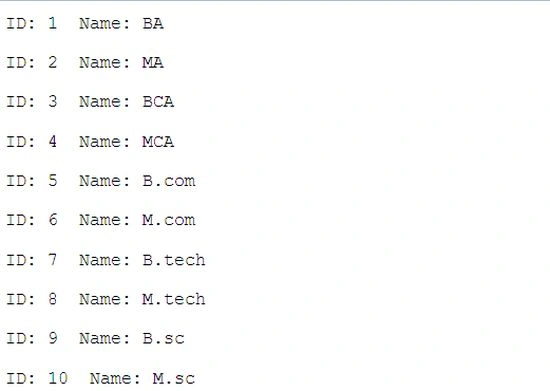
MySQL_Fetch_Array with MySQL_ASSOC
- <?php
- MySQL_connect("localhost", "root", "") or
- die("Could not connect: " . MySQL_error());
- MySQL_select_db("smart");
- $rs = MySQL_query("SELECT c_id, c_name FROM courses");
- while ($row = MySQL_fetch_array($rs, MYSQL_ASSOC))
- {
- echo "<pre>";
- printf("ID: %s Name: %s", $row['c_id'], $row['c_name']);
- }
- MySQL_free_result($rs);
- ?>
Output
MySQL_Fetch_Array with MySQL_BOTH
- <?php
- MySQL_connect("localhost", "root", "") or
- die("Could not connect: " . MySQL_error());
- MySQL_select_db("smart");
- $rs = MySQL_query("SELECT c_id, c_name FROM courses");
- while ($row = MySQL_fetch_array($rs, MYSQL_BOTH))
- {
- echo "<pre>";
- printf("ID: %s Name: %s", $row[0], $row['c_name']);
- }
- MySQL_free_result($rs);
- ?>
Output
Join the conversation! Your thoughts help the community grow.