

Introduction
This tutorial is for beginners or students. I created a functionality to add, edit and delete a record in PHP with MVC logic without Framework. Also, explained how to create an MVC pattern in PHP. I hope it will be helpful for you to add a data table in your program.
Building Our MVC Framework Pattern in PHP
You might be wondering why we would even need to create our own framework when there are already so many good choices out there. The reason for this is so that we can gain an understanding of the underlying principles of MVC.
As we learn more about these principles, we will grow in our understanding of why the excellent MVC frameworks do things the way they do. We are not learning how to create an application in Zend Framework, or in CakePHP. We are learning how MVC works, and by extension, how these frameworks have built upon (or deviated from) the way in which we would expect an MVC framework to be built.
MVC Model & PHP MVC Project Structure
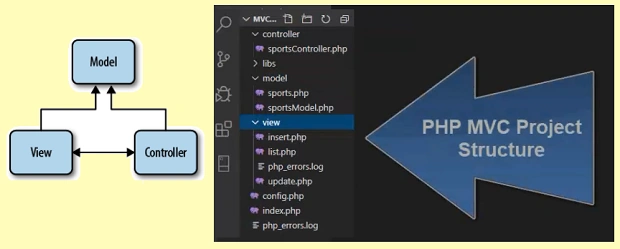
Section 1
Config.php is used to connect the mysql database to create a connection parameter for mysql host,user,password and database name.
<?php
class config
{
    function __construct() {
        $this->host = "localhost";
        $this->user  = "root";
        $this->pass = "welcome";
        $this->db = "mydb13";
    }
}
?>
A small part of the code in index.php is used to setup a controller object and call mvcHandler() to view the default page list.php.
<?php
    session_unset();
    require_once  'controller/sportsController.php';
    $controller = new sportsController();
    $controller->mvcHandler();
?>
In the model folder, create one class for table structure, its named sports and has field and message field to hold messages and data.
<?php
class sports
{
    // table fields
    public $id;
    public $category;
    public $name;
    // message string
    public $id_msg;
    public $category_msg;
    public $name_msg;
    // constructor set default value
    function __construct()
    {
        $id=0;$category=$name="";
        $id_msg=$category_msg=$name_msg="";
    }
}
?>
Section 2
The second section is a sportsModel class structure. We are going to explain and show insertRecord(), updateRecord(),selectRecord() and insertRecord(). The sportsModel class is used to access the function sportsController. The sportsModel class constructor receives a mysql connection parameter to work with the database.
<?php

class sportsModel
{
    // set database config for mysql
    function __construct($consetup)
    {
        $this->host = $consetup->host;
        $this->user = $consetup->user;
        $this->pass =  $consetup->pass;
        $this->db = $consetup->db;
    }
    // open mysql data base
    public function open_db()
    {
        $this->condb=new mysqli($this->host,$this->user,$this->pass,$this->db);
        if ($this->condb->connect_error)
        {
            die("Erron in connection: " . $this->condb->connect_error);
        }
    }
    // close database
    public function close_db()
    {
        $this->condb->close();
    }
    // insert record
    public function insertRecord($obj){ }
        //update record
    public function updateRecord($obj){ }
         // delete record
    public function deleteRecord($id){ }
         // select record
    public function selectRecord($id){ }
}

?>
Section 3
Section 3 is the controller code part. The sportsController has mvcHandler() and the CRUD functions insert(), update(),delete() and list(). mvcHandler() receives request and execute. This request shows views according to call request by user.
// insert record
public function insertRecord($obj)
{
    try
    {
        $this->open_db();
        $query=$this->condb->prepare("INSERT INTO sports (category,name) VALUES (?, ?)");
        $query->bind_param("ss",$obj->category,$obj->name);
        $query->execute();
        $res= $query->get_result();
        $last_id=$this->condb->insert_id;
        $query->close();
        $this->close_db();
        return $last_id;
    }
    catch (Exception $e)
    {
        $this->close_db();
        throw $e;
    }
}
//update record
public function updateRecord($obj)
{
    try
    {
        $this->open_db();
        $query=$this->condb->prepare("UPDATE sports SET category=?,name=? WHERE id=?");
        $query->bind_param("ssi", $obj->category,$obj->name,$obj->id);
        $query->execute();
        $res=$query->get_result();
        $query->close();
        $this->close_db();
        return true;
    }
    catch (Exception $e)
    {
        $this->close_db();
        throw $e;
    }
}
 // delete record
public function deleteRecord($id)
{
    try{
        $this->open_db();
        $query=$this->condb->prepare("DELETE FROM sports WHERE id=?");
        $query->bind_param("i",$id);
        $query->execute();
        $res=$query->get_result();
        $query->close();
        $this->close_db();
        return true;
    }
    catch (Exception $e)
    {
        $this->closeDb();
        throw $e;
    }
}
// select record
public function selectRecord($id)
{
    try
    {
        $this->open_db();
        if($id>0)
        {
            $query=$this->condb->prepare("SELECT * FROM sports WHERE id=?");
            $query->bind_param("i",$id);
        }
        else
        {$query=$this->condb->prepare("SELECT * FROM sports");    }

        $query->execute();
        $res=$query->get_result();
        $query->close();
        $this->close_db();
        return $res;
    }
    catch(Exception $e)
    {
        $this->close_db();
        throw $e;
    }

}
Section Four
Section four is the view part, when mvcHandler() receives a request and executes the request, it shows views for user. We have created three views in the view folder, which is insert, update and list, which all have HTML design. These views work with controller, and the controller works with model to get or set records in a database table.
<div class="wrapper">
    <div class="container-fluid">
        <div class="row">
            <div class="col-md-12">
                <div class="page-header clearfix">
                    <a href="index.php" class="btn btn-success pull-left">Home</a>
                    <h2 class="pull-left">Sports Details</h2>
                    <a href="view/insert.php" class="btn btn-success pull-right">Add New Sports</a>
                </div>
                <?php
                    if($result->num_rows > 0){
                        echo "<table class='table table-bordered table-striped'>";
                            echo "<thead>";
                                echo "<tr>";
                                    echo "<th>#</th>";
                                    echo "<th>Sports Category</th>";
                                    echo "<th>Sports Name</th>";
                                    echo "<th>Action</th>";
                                echo "</tr>";
                            echo "</thead>";
                            echo "<tbody>";
                            while($row = mysqli_fetch_array($result)){
                                echo "<tr>";
                                    echo "<td>" . $row['id'] . "</td>";
                                    echo "<td>" . $row['category'] . "</td>";
                                    echo "<td>" . $row['name'] . "</td>";
                                    echo "<td>";
                                    echo "<a href='index.php?act=update&id=". $row['id'] ."' title='Update Record' data-toggle='tooltip'><i class='fa fa-edit'></i></a>";
                                    echo "<a href='index.php?act=delete&id=". $row['id'] ."' title='Delete Record' data-toggle='tooltip'><i class='fa fa-trash'></i></a>";
                                    echo "</td>";
                                echo "</tr>";
                            }
                            echo "</tbody>";
                        echo "</table>";
                        // Free result set
                        mysqli_free_result($result);
                    } else{
                        echo "<p class='lead'><em>No records were found.</em></p>";
                    }
                ?>
            </div>
        </div>
    </div>
</div>
Conclusion
This article showed and explained to beginners how to make an MVC framework pattern in PHP. You might be wondering why we would even need to create our own framework when there are already so many good choices out there. The reason for this is so we can gain an understanding of the underlying principles of MVC.
Join the conversation! Your thoughts help the community grow.