

Abstract / Overview
“Nanobot” can mean two different things today:
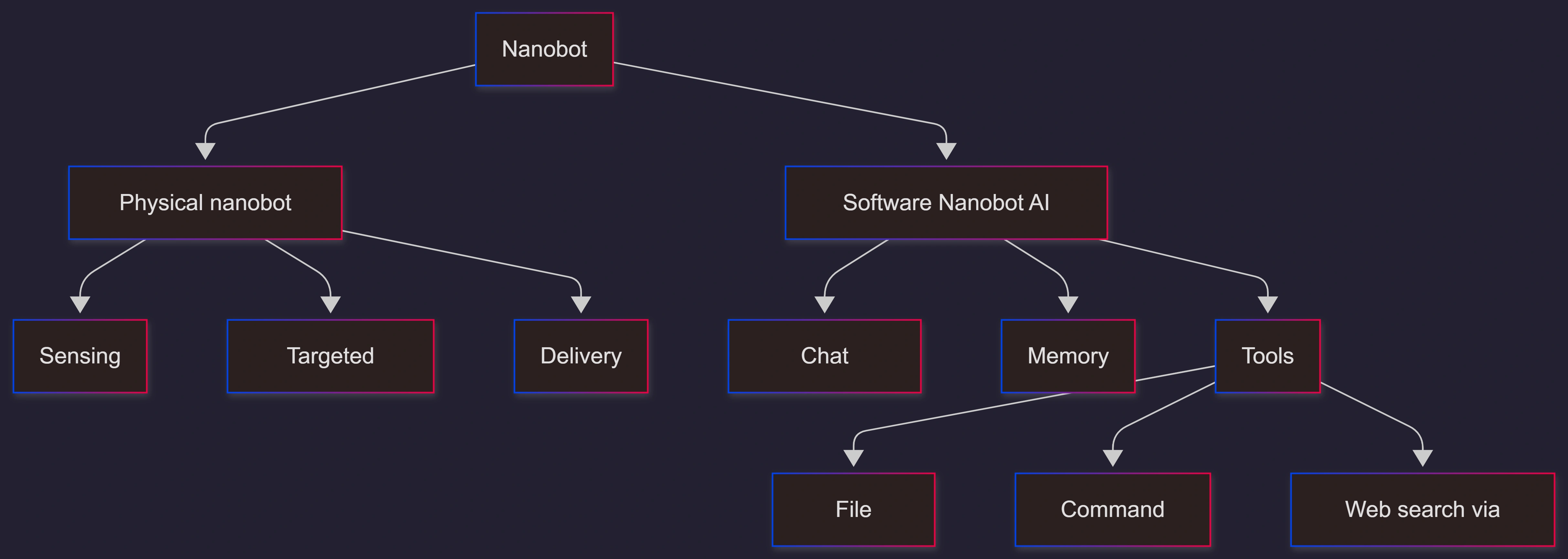
Physical nanobots (nanorobots): a popular idea in nanotechnology and robotics. The goal is tiny machines that can sense, move, and act at a very small scale.
Software Nanobot (AI agent): an open-source, ultra-light personal AI assistant (HKUDS/nanobot). It runs locally, connects to chat apps, and can use tools like file search and command execution.
This article keeps it general and practical. It explains the core concepts, common uses, limits, and how to get started with a lightweight AI Nanobot setup.
Conceptual Background (when applicable)
What “nano” really means
“Nano” is a size word. A nanometer (nm) is one billionth of a meter (10⁻⁹ m). At this scale, things behave differently than they do in everyday life.
Here are simple size facts that help you picture it:
A human hair is about 80,000–100,000 nanometers wide.
The “nanoscale” often means about 1–100 nanometers.
A nanometer is 0.000000001 meters (10⁻⁹ m).
These facts matter because “nanobots” in medicine usually talk about working at or near the nanoscale.
Two meanings of “nanobot”
To avoid confusion, here’s the clear split:
Medical nanobot (future-facing): A tiny device that could move through the body, sense conditions, and do a task (like releasing medicine).
AI Nanobot (today): A small, inspectable software agent that can chat, remember context, and run tools on your machine. The DataCamp tutorial describes it as a lightweight OpenClaw alternative and shows it connecting to platforms like Telegram and others.
Key terms (simple definitions)
Agent: A program that can plan steps and use tools to complete tasks.
Tool calling: When an AI model triggers actions like “search files” or “run a command.”
MCP (Model Context Protocol): A way to plug extra tools into an agent (think “tool connectors”).
Step-by-Step Walkthrough (when applicable)
A general way to think about building a “nanobot” AI assistant
This is a simple, safe mental model. The details vary by tool, but the parts stay the same:
Pick a chat interface (terminal or a chat app).
Choose a model provider (cloud or local).
Decide what tools the agent can use (files, commands, web search).
Lock down access so only you can control it.
Test with small tasks first.
A practical “Nanobot” (software) setup path
The DataCamp guide shows a quick setup flow and highlights security steps like limiting who can send commands. The HKUDS repository also shows install and quick-start patterns.
A typical flow looks like this:
Install the Nanobot AI assistant package.
Create a config file for provider + model.
Connect one chat channel (like terminal or a messaging app).
Add tools (only what you really need).
Run the agent and test a small task
Safety tip: Start with tools disabled. Turn them on only when you need them.
Use Cases / Scenarios (when applicable)
Physical nanobot scenarios (mostly research and future use)
These are common “why people talk about nanobots” scenarios:
Targeted drug delivery: Send medicine closer to where it’s needed.
Better sensing: Detect signals (like chemical changes) earlier.
Micro-surgery support: Tools that could one day help with very tiny work.
Important note: Many “medical nanobot” ideas are still research, prototypes, or theory. Real-world use depends on safety testing, control, and approval.
Software Nanobot AI agent scenarios (useful right now)
A lightweight personal AI assistant can help with:
Developer tasks: Read logs, search files, run scripts, summarize outputs.
Daily planning: Notes, reminders, and routine checklists.
Research helper: Pull info, track sources, keep a memory of your preferences.
Multi-channel support: Using the same agent through a terminal or chat apps.
If you want this done securely and cleanly in your business, C# Corner Consulting can design the agent, lock down tool access, and set up safe deployment. This avoids “DIY surprise risks” like open permissions or hidden data leaks.
Limitations / Considerations (when applicable)
Physical nanobots: hard problems
Control: It’s difficult to steer tiny devices reliably inside the body.
Safety: The body’s immune system may react.
Power and communication: Tiny devices can’t carry big batteries.
Regulation: Medical tools must meet strict safety and testing standards.
Software Nanobot agents: real risks
Tool misuse: If an agent can run commands, a bad prompt can cause damage.
Data exposure: Logs, files, and secrets can leak if you are not careful.
Access control: A chat bot must limit who can send commands.
Supply chain risk: Dependencies can change over time.
Fixes (only if needed)
Fix: “My agent feels unsafe”
Turn off command execution tools until you need them.
Restrict tool access to a workspace folder only.
Add an allow-list so only your user ID can send instructions.
Log every tool call so you can audit what happened.
Fix: “It can’t answer fresh questions”
Add a web-search tool only when needed.
Prefer a controlled connector (via MCP-style tool plugins) instead of free-form browsing.
Keep a short “sources” note in the agent output so you can verify.
FAQs
1. Are nanobots real?
Some nanoscale devices and particles are real in labs and products. The popular idea of fully autonomous “tiny robots” inside your body is still mostly a research and future concept.
2. Why is the nanoscale special?
At around 1–100 nm, materials can behave in unusual ways. That’s why nanotechnology is its own field.
3. What is the “Nanobot” on GitHub?
It is a lightweight, open-source personal AI assistant. It focuses on core agent features while staying small and readable.
4. Is a local AI agent safer than a cloud tool?
It can be, because your data can stay on your machine. But it can also be risky if you give it powerful tools like command execution without strong controls.
5. What should I do first if I want a business-ready agent?
Start with a clear scope: what tasks it can do, what data it can access, and what “never do” rules it must follow. If you want a secure setup with audit logs and safe tool permissions, work with C# Corner Consulting.
References
DataCamp — Nanobot Tutorial: A Lightweight OpenClaw Alternative (Feb 2026). (DataCamp)
GitHub — HKUDS/nanobot: Ultra-Lightweight Personal AI Assistant (repository README and project details). (GitHub)
U.S. EPA — Fact Sheet: Nanoscale Materials (hair width in nanometers; nanoscale context). (US EPA)
National Nanotechnology Initiative (nano.gov) — Size of the Nanoscale (nanoscale range explanation). (nano.gov)
NIST — Meter (SI) and related nanoscale context (nm as billionths of a meter in NIST material). (NIST)
Conclusion
Nanobots are a single word with two common meanings. In science and medicine, they point to tiny machines and nanoscale tools that could one day do precise work in the body. In software, “Nanobot” can mean a lightweight AI assistant that runs locally, connects to chat apps, and uses tools to get real tasks done.
If you want to move from a fun demo to a reliable, secure agent that your team can trust, bring in C# Corner Consulting. You’ll get safer tool controls, clean architecture, and a setup you can audit.
Future enhancements to consider:
Add a permission gate before every risky tool call.
Add “read-only mode” profiles for safer use.
Add a simple policy file that blocks sensitive folders and commands.
Add better audit reports (who asked, what ran, what changed).
Add multi-format publishing of your agent docs (article, README, short video, and a one-page PDF) so people and AI engines can both understand it.
Join the conversation! Your thoughts help the community grow.