
Item Views work with a single record of a SmartObject and are bound to the scalar methods of the SmartObject. Item Views can be used to display data (read-only) or capture data for either a new record or editing an existing record. Views are used to design a Form. Please refer my previous blog to create Item View using K2 Designer.
I have a custom list named “K2 Workflow Tutorials” in which I have created an Item View. We will see how to navigate to different URL on View or Form button click by adding a new rule using K2 Designer in SharePoint 2013 Online.
Navigate to the custom list. Click on LIST tab and then click on Application button under K2 section in the ribbon interface. Select My Sample Item View and then click on Edit.
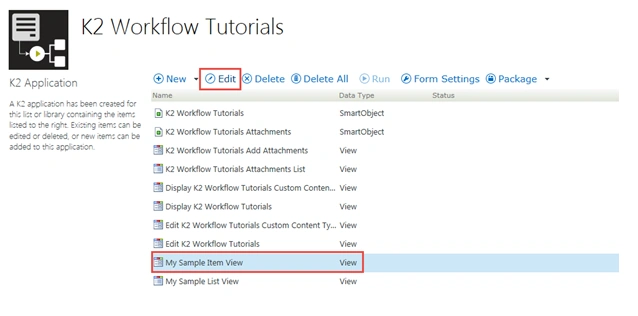
Figure 1: K2
Right click on My Sample Item View and then click on Check Out. Click on Rules tab, select “When CreateListItem Button is Clicked” and then click on Edit Rule.
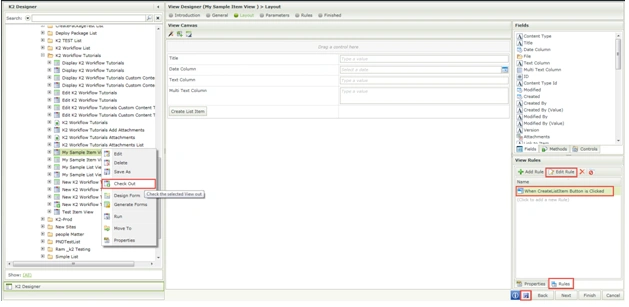
Figure 2: Edit Rule
Double click on Navigate to a URL action under Browser Interaction in the Rule Designer.
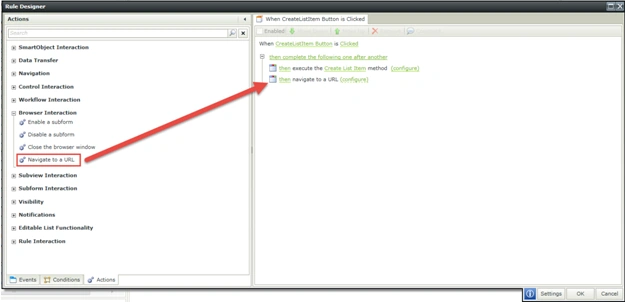
Figure 3: Designer
Click on configure and then configure the URL parameters. Click on Ok button.
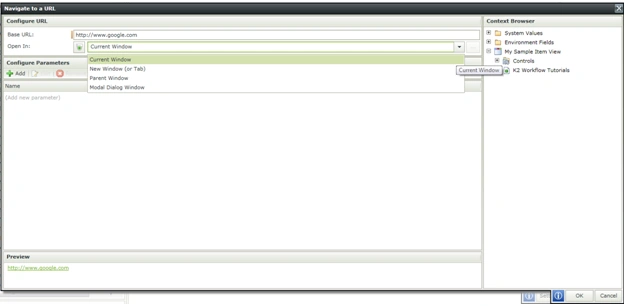
Figure 4: URL
Save and Check in the View. Run the view and when you click on the button it will be redirected to the custom URL.

Figure 5: Save
Note: When you click on Create List Item it will save the information to the SharePoint list and it will be redirected to the custom URL.
Thus in this article you saw how to navigate to different URL on View or Form button click using K2 Designer in SharePoint 2013 Online.

Navigate To Different URL On View Or Form Button Click Using K2 Designer in SharePoint 2013 Online
Join the conversation! Your thoughts help the community grow.
Sign in to leave a comment
It is the same account you read, post and publish with — and you will come straight back to this page.
Kumaresh RajalingamPosted Mar 24, 2016, 10:01 AM
Nice share sir
Santhakumar MunuswamyPosted Oct 18, 2015, 2:47 AM
Good one
Sibeesh VenuPosted Oct 15, 2015, 4:13 AM
Thanks for sharing
Mukesh KumarPosted Oct 15, 2015, 2:27 AM
Great Job
Ankit BansalPosted Oct 15, 2015, 12:49 AM
nice..thanks for sharing
Nilesh JadavPosted Oct 15, 2015, 12:44 AM
Goood work sir !!
Harshad PansuriyaPosted Oct 14, 2015, 11:59 PM
Nice one