

What is Service Discovery?
Service discovery is the mechanism that allows services to dynamically locate and communicate with each other at runtime. Rather than relying on fixed URLs or ports, services register themselves and are discoverable by name within the Aspire application model.
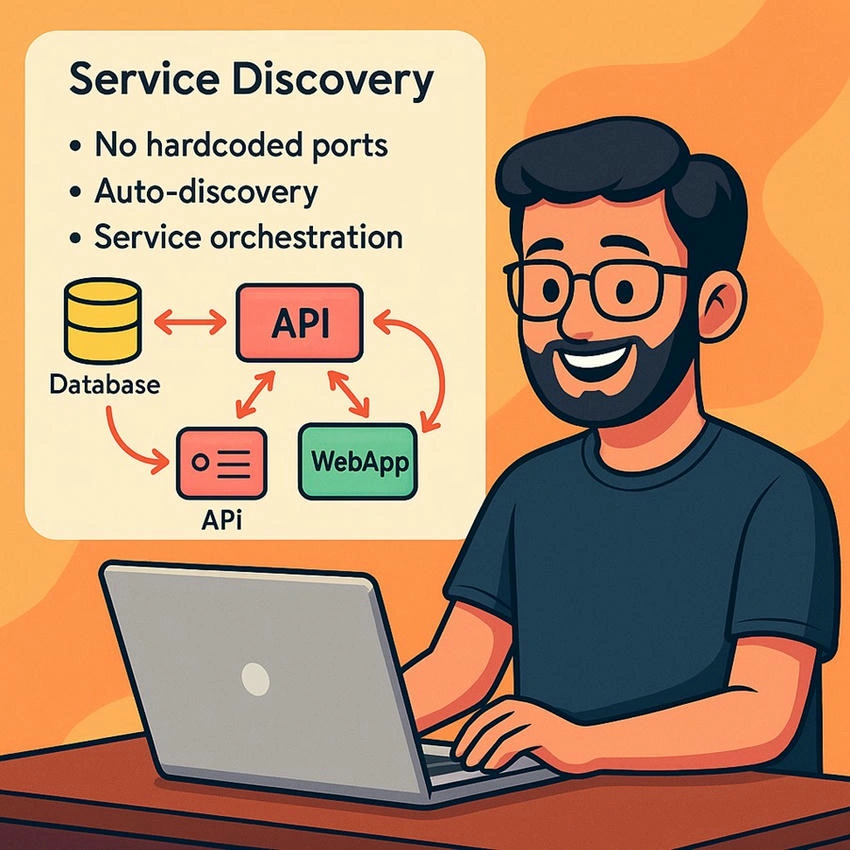
This supports the broader capability of dynamic connectivity, critical in modern distributed systems.
Service Discovery in Aspire
.NET Aspire abstracts away much of the complexity by allowing you to,
- Register services with AddProject<T>("name")
- Reference other services using their registered names
- Use IServiceEndPointProvider to resolve actual endpoints
Let’s See Service Discover in Action
I am using the same aspire project that we have been building since the first chapter of this .NET Aspire Series. If you are new here, please check out the previous chapters.
- How to Get Started with .NET Aspire
- .NET Aspire: Setting Up Your Environment
- Core Concepts of .NET Aspire
- Enhancing Real-World Microservices with Resiliency in .NET Aspire
- Understanding Resiliency in .NET Aspire
- Service Orchestration in .NET Aspire
- Observability with the Aspire Dashboard
This is what my solution structure looks like,
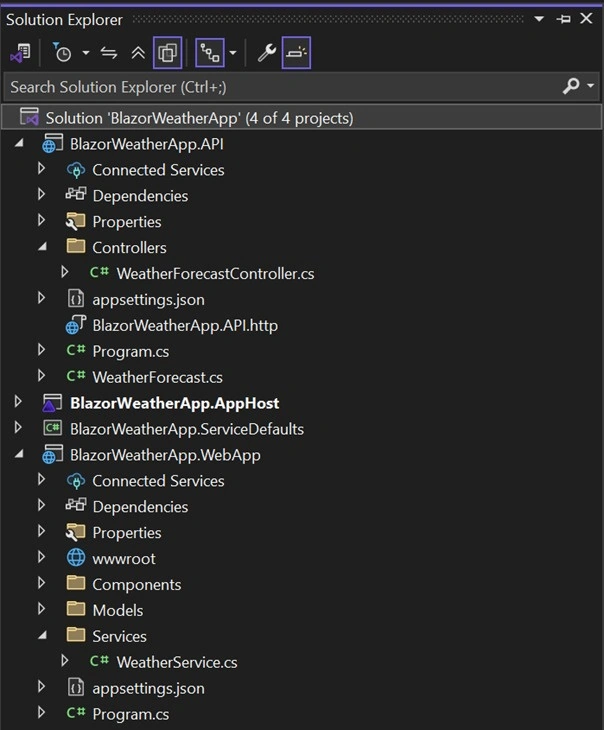
Step 1. Open “Program.cs” from “BlazorWeatherApp.AppHost”.
This is how we have added all the Blazor UI/Microservices/Frontend projects into the App Host project with the Distributed Application instance.
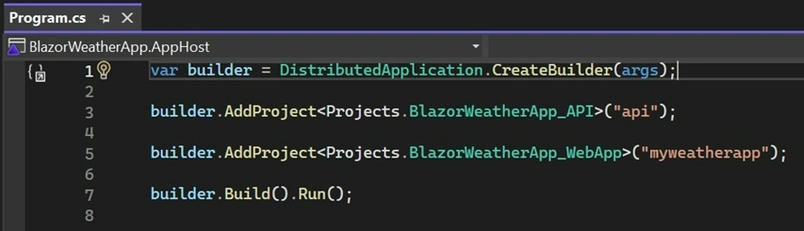
Step 2. Adding/injecting Service endpoint’ dynamically.
We have made some changes here to add the dependency of the APIs/Services with other applications, where we need to call/use them.
Like I have “BlazorWeatherApp.WebApp” as a front end/UI for my end users, which needs the weather data from the weather API’s response.
To do this, I have passed the API project reference using the “WithReference()” method, and then I added, “WithExternalHttpEndpoints()”.
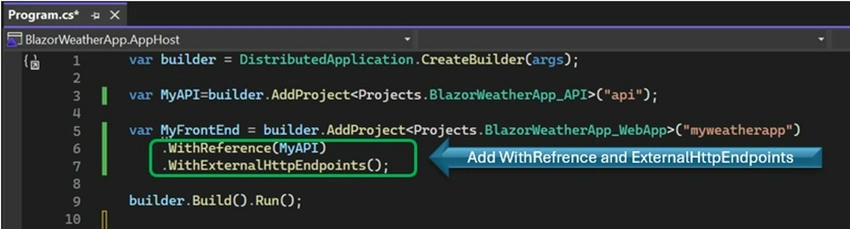
What it does- Let’s break down this code?
var builder = DistributedApplication.CreateBuilder(args);
- Initializes the Distributed Application Builder.
- This is the entry point for defining all your microservices (projects), dependencies (like databases and more), and how they interconnect.
- It’s like setting up your entire microservice ecosystem in one place, using a fluent API.
var MyAPI = builder.AddProject<Projects.BlazorWeatherApp_API>("api");
- Registers the BlazorWeatherApp_API project (your backend API or any Microservice) into the distributed application model.
- "api" is the service name used for discovery—other services will use this name to connect to it.
- Internally, this project might expose endpoints like /weather that frontend apps can call.
var MyFrontEnd = builder.AddProject<Projects.BlazorWeatherApp_WebApp>("myweatherapp")
    .WithReference(MyAPI)
    .WithExternalHttpEndpoints();
Registers the BlazorWeatherApp_WebApp project (your frontend Blazor app) as "myweatherapp".
- WithReference(MyAPI) tells Aspire: "Hey, this frontend depends on the API service. Make sure it’s available and inject its endpoint dynamically."
- WithExternalHttpEndpoints() exposes this frontend so it can be accessed in the browser (Aspire sets up the HTTP endpoint for you).
- This line wires up service discovery: the front end doesn’t need a hardcoded API URL—it uses the service name ("api") to discover the backend's base address.
builder.Build().Run();
- Builds the distributed app definition.
- Spins up all registered projects (services) and starts the distributed application environment.
- It’ll open the Aspire Dashboard so you can observe and control your services from a central place.
Step 3. Modify API Endpoints with API name.
As of now, we are calling API from https://localhost:7273/ in my Blazor Web App (Front End/UI). This is hardcoded in our Application Settings file, let’s modify this.
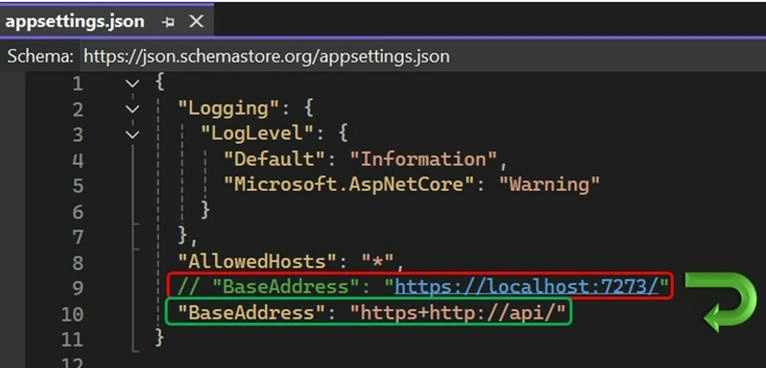
Note. This “API” is the same name that we used to register this API in the App Host project.
In earlier stages of development or without service discovery, it’s common to configure service URLs using fixed addresses like,
"BaseAddress": "https://localhost:7273/"
While this works for local development, it becomes a rigid and fragile approach when scaling to multiple environments (like staging, test, or production) or when services are deployed in containers.
Transition to Dynamic Service Discovery
To take advantage of .NET Aspire’s service discovery capabilities, we replace the hard-coded URL with a service-discoverable address:
"BaseAddress": "https+http://api/"
This change brings several benefits
Environment Agnostic
- No need to manually change base URLs between local, dev, or production environments.
- Aspire automatically resolves the correct address based on the service name ("api" in this case).
Dynamic Endpoint Resolution
- The value "https+http://api/" is a special composite scheme used by Aspire.
- It attempts to connect via HTTPS first, falling back to HTTP if necessary.
- The actual address (like https://localhost:7273) is discovered at runtime.
Simplified Service-to-Service Communication
- Services can refer to each other by name rather than IP or port.
- This supports cloud-native, containerized, and orchestrated deployments.
| Before | After |
|---|---|
| "BaseAddress": "https://localhost:7273/" | "BaseAddress": "https+http://api/" |
| Hardcoded, environment-dependent | Dynamic, environment-independent |
| Manual changes required | Uses Aspire’s service discovery |
| Tightly coupled | Loosely coupled, more scalable |
Step 4. Let’s run App Host.
We are all set to test the new communication between our UI and Microservices/API Endpoints.
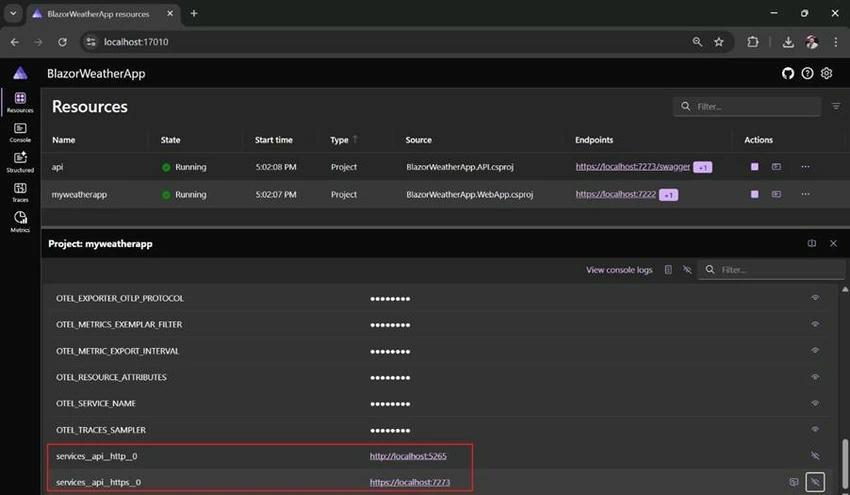
Now you can check the environment variables of the front end application in the dashboard which Aspire have added in your request.
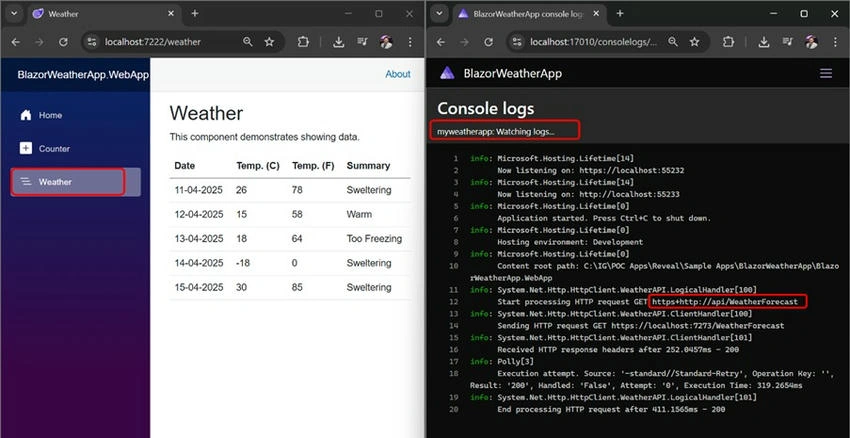
Console logs are also a best practice to test/review the requests generated by the Blazor Web App to API Endpoints.
Why is Service Discovery helpful?
- Abstracts environment-specific URLs (no hardcoding of https://localhost:7273)
- Enables local orchestration: services just talk by name.
- Cloud-ready: works in containerized or production environments with proper service registries/load balancers.
Join the conversation! Your thoughts help the community grow.