
Introduction
This article explains how to resolve the common threading problem of when the service and clients share the same process. When the service and clients communicate in the same process, the ideal binding used in WCF is netnamedpipe binding (the ideal term is Inter-Process Communication).
Example:
Let's create a service that echos the received message from the client.
Create a blank solution in Visual Studio and add a separate project named service and add the following code.
- public class MessengerService:IMessenger
- {
- public string SendMessage(string Message)
- {
- return Message + "Received from Service";
- }
- }
- [ServiceContract]
- public interface IMessenger
- {
- [OperationContract]
- String SendMessage(String Message);
- }
Let's create a UI application where we would invoke the preceding service and also create a client that consumes the service via netNamedPipeBinding.
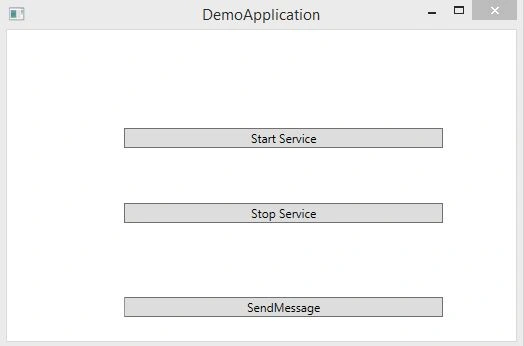
Create a separate project named AppUI and add a WPF application. It would hold three buttons, one to start the service, the other to stop the service and the last one to send a message to the service and a label that is updated when the service echoes back the message sent from the client. The application would look as in the following:
Go to the App.Config and add the following code.
- <system.serviceModel>
- <services>
- <service name="Servce.MessengerService">
- <endpoint address="net.pipe://localhost/testservice" binding="netNamedPipeBinding" contract="Contracts.IMessenger"></endpoint>
- </service>
- </services>
- <client>
- <endpoint address="net.pipe://localhost/testservice" binding="netNamedPipeBinding" contract="Contracts.IMessenger"></endpoint>
- </client>
- </system.serviceModel>
- private void btnstartservice_Click(object sender, RoutedEventArgs e) //Invoke the service
- {
- _host = new ServiceHost(typeof(Servce.MessengerService));
- _host.Open();
- }
- private void btnstopservice_Click(object sender, RoutedEventArgs e)
- {
- _host.Close();
- }
We have the service up. Now let's send a message to the service from the client. Add the following code for the sendmessage button click.
- private void btnsendmsg_Click(object sender, RoutedEventArgs e)
- {
- ChannelFactory<IMessenger> factory = new ChannelFactory<IMessenger>("");
- var proxy = factory.CreateChannel();
- lbltext.Content = proxy.SendMessage("hello");
- factory.Close();
- }
Run the application and click the start the service button and hit the SendMessage button, you will find that the application is not responding and will finally get an error as in the following:
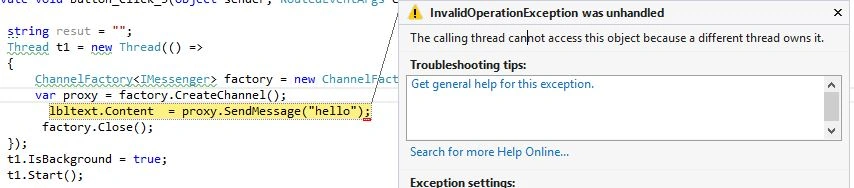
This is because the service and the client are invoked from the same thread (UI Thread). It is more of a deadlock situation because the client tries to update the label that is in the UI thread, which is already locked by the service and this would eventually lead to a timeout in the client. We had figured out that the problem is because the service and client are sharing the same UI thread. Let's try to invoke the client in a separate thread.
Add the updated code for the sendmessage button click is:
- Thread t1 = new Thread(() =>
- {
- ChannelFactory<IMessenger> factory = new ChannelFactory<IMessenger>("");
- var proxy = factory.CreateChannel();
- lbltext.Content = proxy.SendMessage("hello");
- factory.Close();
- });
- t1.IsBackground = true;
- t1.Start();
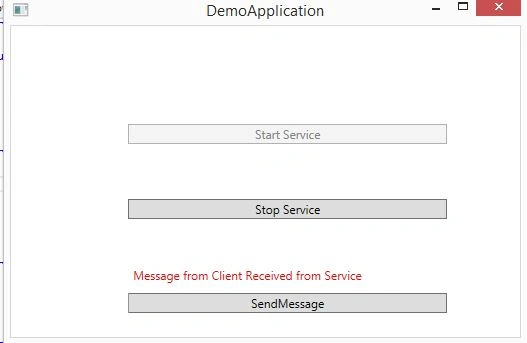
We can resolve the preceding error in various ways, but I will use the synchronizationcontext mechanism. Update the sendmessage buttonclick method as in the following:
- private void btnsendmsg_Click(object sender, RoutedEventArgs e)
- {
- Thread t1 = new Thread(() =>
- {
- ChannelFactory<IMessenger> factory = new ChannelFactory<IMessenger>("");
- var proxy = factory.CreateChannel();
- var result= proxy.SendMessage("hello");
- SetLabelContent(result);
- factory.Close();
- });
- t1.IsBackground = true;
- t1.Start();
- }
- private void SetLabelContent(string resut)
- {
- SendOrPostCallback _callback = new SendOrPostCallback((arg) =>
- {
- lbltext.Content = resut;
- });
- _context.Send(_callback,null);
- }
Akhil GargPosted Apr 9, 2015, 1:45 PM
good start
Santhakumar MunuswamyPosted Apr 6, 2015, 12:32 AM
Thanks for nice article
Gowtham RajamanickamPosted Apr 5, 2015, 11:10 PM
nice
Gowtham RajamanickamPosted Apr 5, 2015, 11:10 PM
great