
Introduction
ADO.NET class libraries are used for accessing data from a wide range of data sources. One of the best features of ADO.Net is DataSet. Even though it was an exciting feature, performance was a concern with DataSet. Changes made to DataSet in ADO.Net 2.0 are mainly from a performance perspective. There are several changes made to the DataSet class to achieve higher performance. These improvements are primarily because of the New Indexing Engine and binary serialization option. In the later part of this article, we will discuss the changes to the DataTable class, which is more independent in ADO.Net 2.0, unlike previous versions. Now DataTable supports many XML features that were only available to DataSet in the earlier versions, i.e., ReadXML, ReadXMLSchema, WriteXML, Write XMLSchema, etc. It can also be serialized independently, like a DataSet.
Performance
DataSet is slow in general; in framework 2.0, many new enhancements are done to achieve better performance. Some of these changes are the New Indexing Engine and binary serialization option. The new indexing engine performs much faster data manipulation, i.e., inserts update, etc. This ensures better performance while filling and Merge operations.
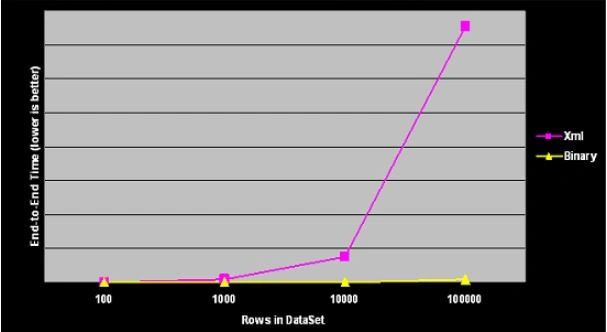
In Framework 1.1, the only remoting option available for DataSet was XML serialization which was verbose and resulted in sluggish performance. Framework 2.0 allows programmers to assign formatting options for a DataSet as well as a DataTable to binary or xml by setting the RemotingFormat property as shown below.
// Set the RemotingFormat to Binary serialization
ds.RemotingFormat = SerializationFormat.Binary;
// Set the RemotingFormat to XML serialization
ds.RemotingFormat = SerializationFormat.Xml;
By default, the RemotingFormat property is set to SerializationFormat.Xml. If you look closely at the DataSet class, it implements an ISerializable interface. This is a simple interface with just a single method, as shown below.
/// <summary>
/// Populates a SerializationInfo object with the data needed to serialize the object.
/// </summary>
/// <param name="info">The SerializationInfo to populate with data.</param>
/// <param name="context">The destination (StreamingContext) for this serialization.</param>
void GetObjectData(SerializationInfo info, StreamingContext context);
Now in Framework 2.0, while implementing the GetObjectData method, the DataSet class will use the RemotingFormat Property as well as shown below.
/// <summary>
/// Implements the ISerializable interface to populate a SerializationInfo object
/// with the data needed to serialize the object.
/// </summary>
/// <param name="info">The SerializationInfo to populate with data.</param>
/// <param name="context">The destination (StreamingContext) for this serialization.</param>
public virtual void GetObjectData(SerializationInfo info, StreamingContext context)
{
    // Get the RemotingFormat of the current object
    SerializationFormat format = this.RemotingFormat;
    // Serialize the DataSet with the specified format
    this.SerializeDataSet(info, context, format);
}
anita VijayPosted Dec 24, 2005, 2:14 AM
hi amit please provide the all the ado.net features in asp.net 2.0 Thanks and Regards Anita Vijay
Sai PrasadPosted Nov 18, 2005, 4:50 AM
Hello Sir Warm greetings to you I have one doubt regarding data grid. My doubt is how to give paging option to adatagrid in web application. After that when i select any cell in datagrid, then the corresponding rows data should be reflected on the text boxes, which are already exist in same form. Kindly send the answer. My email id is [email protected] Thank You