

This article illustrates how to use Node.js by WCF which is written in C# , and using node.js as real time communication technology, with the aid of C# code, to connect with MS Sql Server.
Introduction
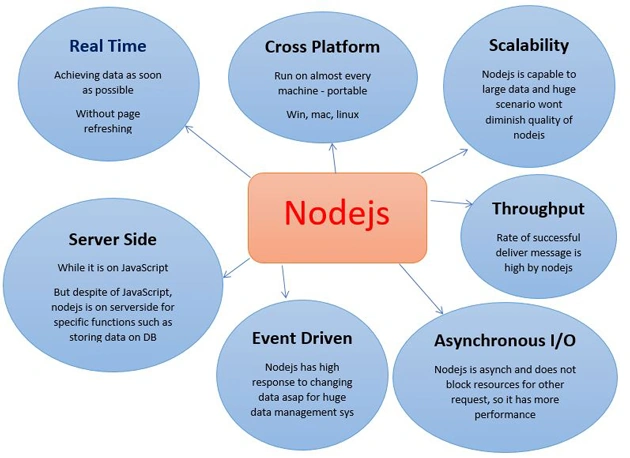
Nowadays, having real time web applications as two way connections, is necessary in all kinds of fields. JavaScript is a good solution but it just works at client side while there are some scenarios where we really need to have solutions that work on server side too, for instance, storing data on database or processing data at server side. There are two popular technologies used for this - SignalR and Node.js.
Why do we use Node.js?
First and foremost, because we need real time solutions for our web application in two ways - client to server and server to client side so that the data can be shared between both sides. Another good advantage is that Node.js is cross platform and does not need complex preparation and installation before using it. It establishes well for I/O and last, but not least, the probability of missing data is too rare.
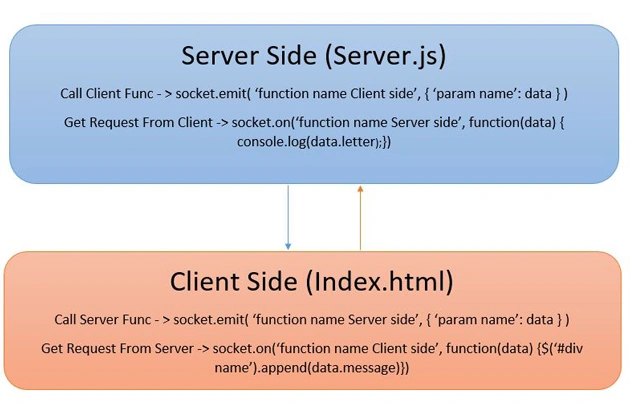
The architecture of Node.js is drawn in the following picture - flow of data can be seen between client and server. It is possible to have connection with database, by using some solutions which I have described below:
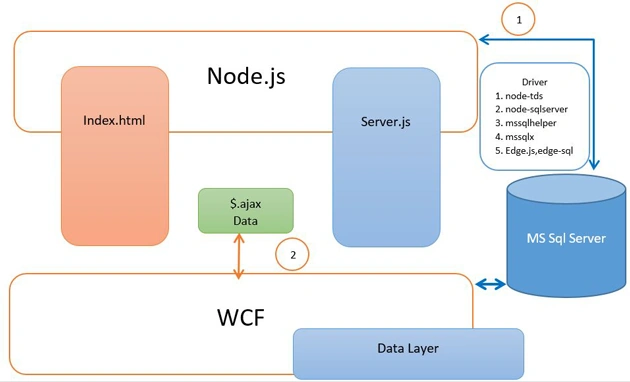
There are some situations when we need to stick to the .NET platform, and just take the benefits from node.js. In such a case, I have written this code, by the aid of WCF, to communicate with MS SQL Server instead of installing drivers, such as node-ts, node-sqlserver, mssqlhelper, mssqlx, edge.js.
Background
I strongly recommend you to read this article in order to learn how to trigger node.js on .NET platform.
Using the code
- File -> New Project -> WebApplication.
- Solution -> Right Click -> Add New Project -> Class Library -> DAL.
- Add New Item-> Class -> DataAccess.cs.
- using System;
- using System.Collections.Generic;
- using System.Linq;
- using System.Text;
- using System.Threading.Tasks;
- using System.Configuration;
- using System.Data;
- using System.Data.Common;
- namespace DAL
- {
- public abstract class DataAccess
- {
- public string ConnectionString
- {
- get
- {
- return "Data Source =DESKTOP-EVM02NE\\MAHSA; Initial Catalog = NodeByWCF; Integrated Security=true ";
- //return ConfigurationSettings.AppSettings["ConnectionString"].ToString();
- }
- }
- protected Int32 ExecuteNonQuery(DbCommand cmd)
- {
- return cmd.ExecuteNonQuery();
- }
- protected IDataReader ExecuteReader(DbCommand cmd)
- {
- return ExecuteReader(cmd, CommandBehavior.Default);
- }
- protected IDataReader ExecuteReader(DbCommand cmd, CommandBehavior behavior)
- {
- return cmd.ExecuteReader(behavior);
- }
- protected object ExecuteScalar(DbCommand cmd)
- {
- return cmd.ExecuteScalar();
- }
- }
- }
- Add New Item-> Class -> CustomerDAL.cs.
- using System;
- using System.Collections.Generic;
- using System.Data;
- using System.Data.SqlClient;
- using System.Linq;
- using System.Text;
- using System.Threading.Tasks;
- namespace DAL
- {
- public class CustomerDAL : DataAccess
- {
- public CustomerDAL()
- {
- }
- public IEnumerable<customer> Load()
- {
- SqlConnection conn = new SqlConnection(ConnectionString);
- SqlDataAdapter dAd = new SqlDataAdapter("select * from Customer", conn);
- dAd.SelectCommand.CommandType = CommandType.Text;
- DataTable dt = new DataTable();
- try
- {
- dAd.Fill(dt);
- foreach (DataRow row in dt.Rows)
- {
- yield return new Customer
- {
- ID = Convert.ToInt32(row["ID"]),
- Name = (row["Name"]).ToString()
- };
- }
- }
- finally
- {
- dAd.Dispose();
- conn.Close();
- conn.Dispose();
- }
- }
- }
- }
- </customer>
- Add New Item-> Class -> Customer.cs.
- using System;
- using System.Collections.Generic;
- using System.Linq;
- using System.Text;
- using System.Threading.Tasks;
- namespace DAL
- {
- public class Customer
- {
- public int ID { get; set; }
- public string Name { get; set; }
- }
- }
- Solution -> Right Click -> Add New Project -> Class Library -> BAL.
- Add New Item-> Class -> CustomerBAL.cs.
- using DAL;
- using System;
- using System.Collections.Generic;
- using System.Data;
- using System.Linq;
- using System.Text;
- using System.Threading.Tasks;
- namespace BAL
- {
- public class CustomerBAL
- {
- public IEnumerable<dal.customer> Load()
- {
- CustomerDAL customer = new CustomerDAL();
- try
- {
- return customer.Load();
- }
- catch
- {
- throw;
- }
- finally
- {
- customer = null;
- }
- }
- }
- }
- </dal.customer>
- Solution -> Right Click -> Add New Project -> WebApplication.
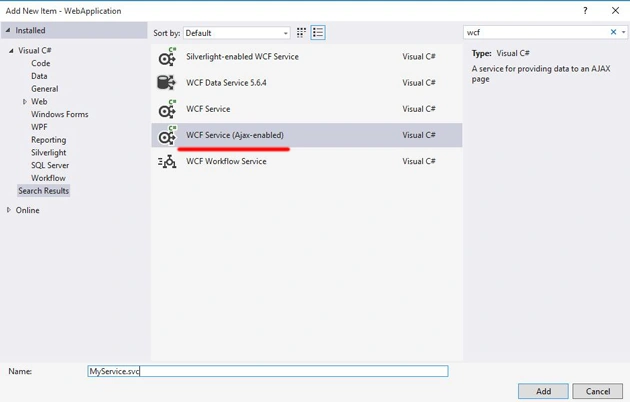
- Add New Item-> WCF Service (Ajax-enabled)-> MyService.svc.
- using System;
- using System.Collections.Generic;
- using System.Data;
- using System.Linq;
- using System.Runtime.Serialization;
- using System.ServiceModel;
- using System.ServiceModel.Activation;
- using System.ServiceModel.Web;
- using System.Text;
- using BAL;
- using DAL;
- using System.Web.Script.Serialization;
- namespace WebApplication
- {
- [ServiceContract(Namespace = "")]
- [AspNetCompatibilityRequirements(RequirementsMode = AspNetCompatibilityRequirementsMode.Allowed)]
- public class MyService
- {
- [OperationContract]
- [WebGet()]
- public string GetCustomer()
- {
- CustomerBAL _Cust = new CustomerBAL();
- try
- {
- var customers = _Cust.Load();
- string json = new JavaScriptSerializer().Serialize(customers);
- return json;
- }
- catch (Exception)
- {
- throw;
- }
- finally
- {
- }
- }
- }
- }
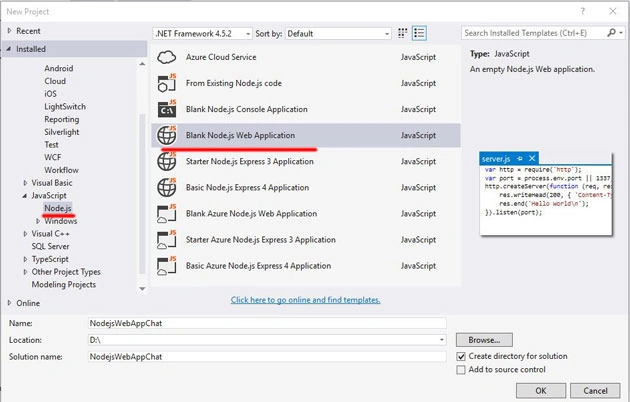
- Solution -> Right Click -> Add New Project ->Javascript -> Blank Node.js Web Application.
- Server.js,
- var http = require("http");
- var url = require('url');
- var fs = require('fs');
- var io = require('socket.io');
- var port = process.env.port || 1337;
- var server = http.createServer(function (request, response) {
- var path = url.parse(request.url).pathname;
- switch (path) {
- case '/':
- response.writeHead(200, { 'Content-Type': 'text/html' });
- response.write('hello world');
- response.end();
- break;
- case '/Index.html':
- fs.readFile(__dirname + path, function (error, data) {
- if (error) {
- response.writeHead(404);
- response.write("page doesn't exist - 404");
- response.end();
- }
- else {
- response.writeHead(200, { "Content-Type": "text/html" });
- response.write(data, "utf8");
- response.end();
- }
- });
- break;
- default:
- response.writeHead(404);
- response.write("page this doesn't exist - 404");
- response.end();
- break;
- }
- });
- server.listen(port);
- var listener = io.listen(server);
- listener.sockets.on('connection', function (socket) {
- //Send Data From Server To Client
- socket.emit('message', { 'message': 'Hello this message is from Server' });
- //Receive Data From Client
- socket.on('client_data', function (data) {
- socket.emit('message', { 'message': data.name });
- socket.broadcast.emit('message', { 'message': data.name });
- process.stdout.write(data.name);
- console.log(data.name);
- });
- });
- Index.html.
<input id="text" type="text" /><button id="send">send</button>- <script src="http://ajax.googleapis.com/ajax/libs/jquery/1.10.2/jquery.min.js"></script>
- <script src="/socket.io/socket.io.js"></script>
- <script src="https://cdn.socket.io/socket.io-1.4.5.js"></script>
- <script src="http://localhost:8080/server.js"></script>
- <script src="/server.js"></script>
- <script>
- var socket = io.connect();
- socket.on('message', function (data) {
- $('#conversation').append('</br>' + data.message);
- });
- $(document).ready(function () {
- $('#send').click(function () {
- $.ajax({
- type: "GET", //GET or POST or PUT or DELETE verb
- url: "http://localhost:28448/MyService.svc/GetCustomer", // Location of the service
- //data: Data, //Data sent to server
- contentType: "application/json; charset=utf-8", // content type sent to server
- dataType: "text", //Expected data format from server
- processdata: true, //True or False
- success: function (msg) {//On Successfull service call
- var obj = JSON.parse(msg);
- var t = obj.d.length;
- var completeMsg = "";
- for (var i = 0; i < t; i++) {
- completeMsgcompleteMsg = completeMsg + " " + obj.d[i].Name;
- }
- alert(completeMsg);
- socket.emit('client_data', { 'name': completeMsg });
- }
- });
- })
- });
- </script>
Test and Rrun
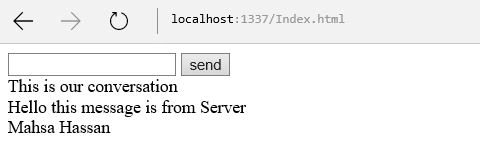
Type: Localhost:1337/Index.html
Click on "send" button. The data will start coming from DB on Node.js.
References
History
- First Version 4th July 2016
Can UrekPosted Dec 13, 2017, 3:04 AM
More details needed about topics which that article try to explain.
Man MenPosted Sep 1, 2017, 6:08 PM
For anyone who have problems with 405 OPTION Method not allowed, even WCF httpActivation is enabled, use $.get() instead of $.ajax()
farooq smdPosted Jul 25, 2016, 10:15 AM
Nice Mahsa Hassankashi
Shobana JPosted Jul 19, 2016, 2:50 AM
Nice one
Abhishek AroraPosted Jul 19, 2016, 12:48 AM
Nicely explained
kalu singh raoPosted Jul 18, 2016, 4:53 AM
Nice...