In this article, we will learn how to use OutputCache Action Filter in ASP.NET MVC Applications. In previous ASP.NET MVC tutorials of this series, we saw
- Creating First Application In ASP.NET MVC
- Pass Parameter Or Query String In Action Method In ASP.NET MVC
- Passing Data from Controller To View In ASP.NET MVC
- Strongly Typed View Vs Dynamically Typed View In ASP.NET MVC
- Working With Built-In HTML Helper Classes In ASP.NET MVC
- Inline and Custom HTML Helpers In ASP.NET MVC
- CRUD Operation In ASP.NET MVC Using AJAX And Bootstrap
- HandleError Action Filter In ASP.NET MVC
- Deploy ASP.NET MVC Application To Windows Azure
One of the best ways to improve the performance of an ASP.NET MVC Application is by caching. With the help of caching, we can reduce hosting and the database Server round trips. We can apply Outputcache Action Filter either on Action Method or on the controller. OutputCache attribute has several properties like CacheProfile, Duration, Location, VaryByParam, VaryByHeader, NoStore etc.
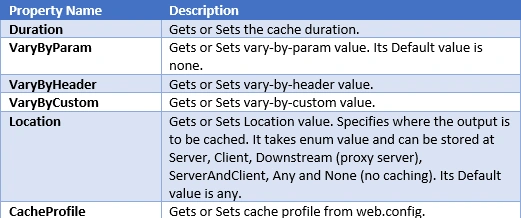
Let’s create a simple example, so that we can understand OutputCache attribute better.

Let’s create a simple example, so that we can understand OutputCache attribute better.
Let’s begin
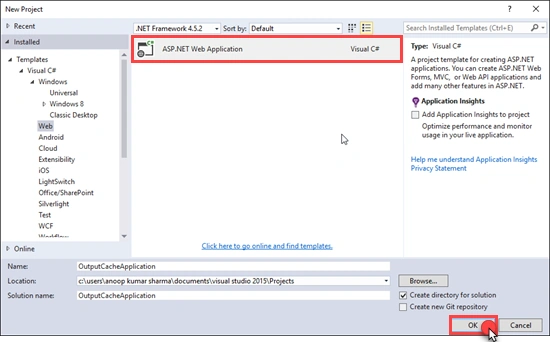
Create a new ASP.NET MVC Application.
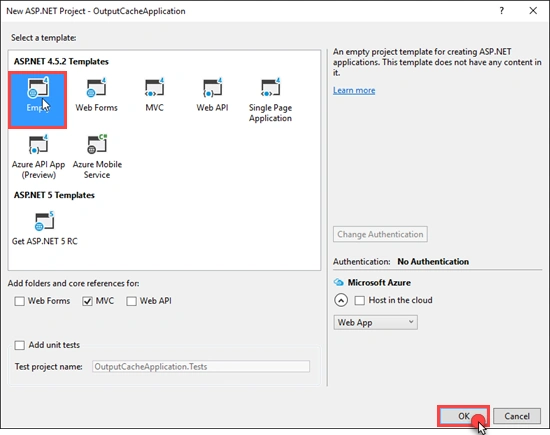
Select Empty MVC Application and click OK.
For this example, I have created a database (named as DemoDB) with a table (Employee) having schema, as shown below. (I will use Entity Framework with Database First approach. In this example, you can use any with which you feel comfortable).
Create a new ASP.NET MVC Application.
Select Empty MVC Application and click OK.

For this example, I have created a database (named as DemoDB) with a table (Employee) having schema, as shown below. (I will use Entity Framework with Database First approach. In this example, you can use any with which you feel comfortable).
- CREATE TABLE dbo.Employee
- (
- ID INT IDENTITY NOT NULL,
- Name NVARCHAR (100) NULL,
- City NVARCHAR (100) NULL,
- CONSTRAINT PK_Employee PRIMARY KEY (ID)
- )
- GO
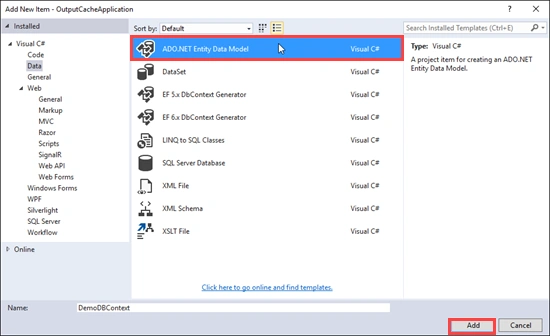
Right click on Models and then click on Add new item. Select ADO.NET Entity Data Model. Give it a meaningful name and click Add.
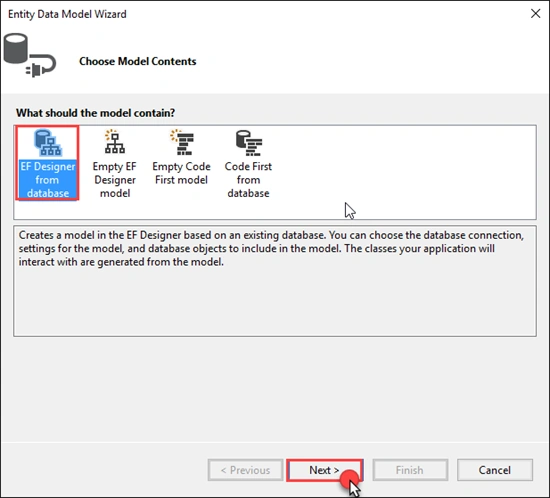
Select EF Designer from the database and click next.
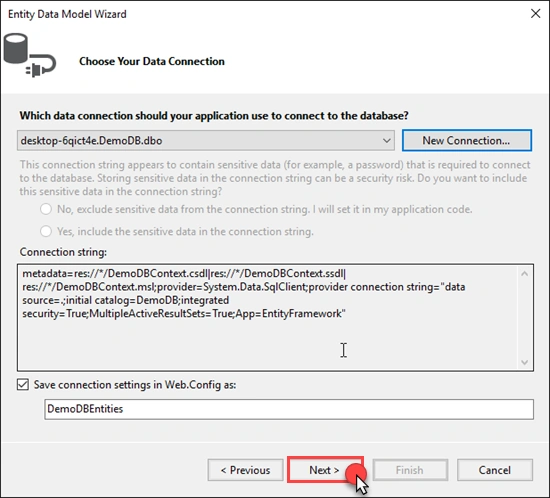
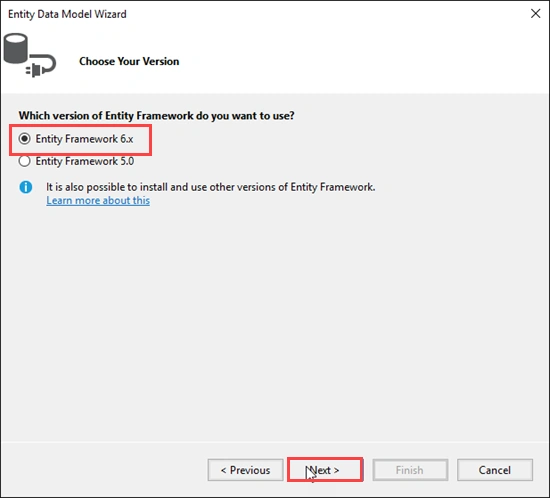
Create New Connection and select version of Entity framework, which you want to use.
Select EF Designer from the database and click next.

Create New Connection and select version of Entity framework, which you want to use.
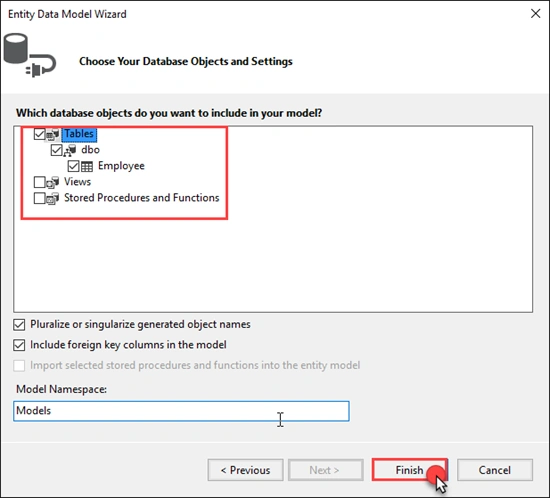
Select the database objects which you want to add in your model and click finish.
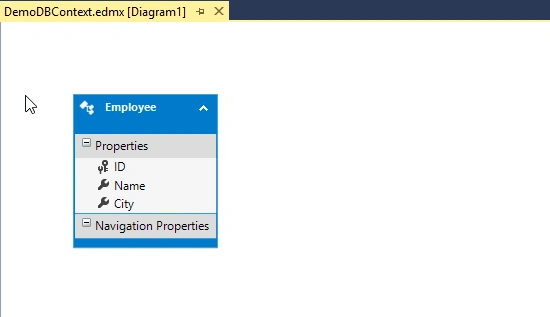
Afterwards, you will see Employee Entity in Designer.
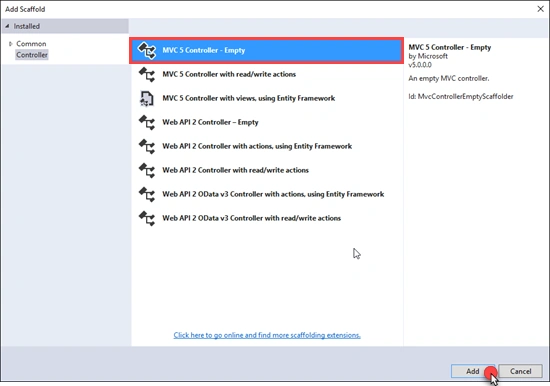
Now, right click on the controller and add Empty controller.
Bind the employee data to the view.
- public ActionResult Index()
- {
- DemoDBEntities db = new DemoDBEntities();
- var Employees = db.Employees.ToList();
- return View(Employees);
- }
- @model IEnumerable<OutputCacheApplication.Models.Employee>
- @{
- Layout = null;
- }
- <!DOCTYPE html>
- <html>
- <head>
- <meta name="viewport" content="width=device-width" />
- <title>Index</title>
- <script src="~/Scripts/jquery-1.9.1.min.js"></script>
- <script src="~/Scripts/bootstrap.min.js"></script>
- <link href="~/Content/bootstrap.min.css" rel="stylesheet" />
- </head>
- <body>
- <div class="container">
- <div class="row">
- <div>
- <div class="alert alert-info"><b>Data Collected @@ @DateTime.Now.ToString()</b></div>
- </div>
- </div>
- <div class="row">
- <div>
- <table class="table table-striped">
- @foreach (var item in Model)
- {
- <tr><td>@item.ID</td><td>@item.Name</td><td>@item.City</td></tr>
- }
- </table>
- </div>
- </div>
- </div>
- </body>
- </html>


Build and run the Application. Whenever we refresh the page, GET request is sent to the Index Action of Home Controller.
Preview


Let’s add Output cache action filter on Index action method.
- [OutputCache(Duration = 10, VaryByParam = "none")]
- public ActionResult Index()
- {
- DemoDBEntities db = new DemoDBEntities();
- var Employees = db.Employees.ToList();
- return View(Employees);
- }

Here, we set the duration to 10 sec, which means cached ActionResult/output will be expired after 10 seconds. Now, build and run the Application.
Preview

If the memory resources are lower than ASP.NET, clears the items from the cache before completing its duration/Expiry time.

If the memory resources are lower than ASP.NET, clears the items from the cache before completing its duration/Expiry time.
Example of OutputCache with Location property
By using the Location property of output cache, we can control, where the output is cached. For example, if we want to cache some personal information, then it is recommended to catch it on the client. If the output data is private/confidential, it is recommended not to store it in cache.
- [OutputCache(Duration = 10, VaryByParam = "none", Location = System.Web.UI.OutputCacheLocation.Client)]
- public ActionResult Index()
- {
- DemoDBEntities db = new DemoDBEntities();
- var Employees = db.Employees.ToList();
- return View(Employees);
- }
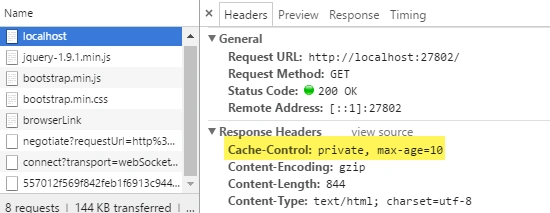
Example of OutputCache with VaryByParam attribute
VaryByParam property creates a different cache, which is based upon the parameter value and is passed through Query String or Request.Form.
- [OutputCache(Duration =20,VaryByParam ="ID")]
- public ActionResult SearchRecord(int ID)
- {
- DemoDBEntities db = new DemoDBEntities();
- var Employees = db.Employees.Where(x=>x.ID==ID).ToList();
- return View("Index", Employees);
- }
Example of OutputCache with CacheProfile
If we want to have same type of OutputCache properties on multiple Action method or multiple controller, then we can use CacheProfile property. CacheProfile has several advantages. For example, we can change OutputCache property at multiple places from one central location and will apply without recompiling our Application. Add Caching section in system.web section, which will contain OutputCacheSettngs. In OutputCacheSettngs, we have added outputCacheProfiles with the name and other properties.
- <caching>
- <outputCacheSettings>
- <outputCacheProfiles>
- <add name="CacheFor20Seconds" duration="20" varyByParam="none" location="Server"/>
- </outputCacheProfiles>
- </outputCacheSettings>
- </caching>
- [OutputCache(CacheProfile = "CacheFor20Seconds")]
- public ActionResult WorkingWithCacheProfile()
- {
- DemoDBEntities db = new DemoDBEntities();
- var Employees = db.Employees.ToList();
- return View("Index",Employees);
- }

Kirill BorunovPosted Apr 20, 2021, 5:56 PM
Why do we need VaryByParam = "none" when using Location = System.Web.UI.OutputCacheLocation.Client?
Mike SPosted Jan 25, 2019, 9:02 AM
Anoop, how do (can I) use VaryByCustom to cache content by language. My language code is saved in a cookie called lang. lang can be en, fr, de. How do i cache by lang value? Thanks.
Chetan KhulePosted Jul 29, 2018, 1:16 AM
Keep it up.. Easy to understand
Sam BPosted Oct 12, 2017, 11:20 AM
Where are you putting this setting? In Web.Config? Under which section? These articles never have all the details... <caching> <outputCacheSettings> <outputCacheProfiles> <add name="CacheFor20Seconds" duration="20" varyByParam="none" location="Server"/> </outputCacheProfiles> </outputCacheSettings> </caching>
hardik gheewalaPosted Jul 23, 2017, 11:10 AM
Gif explanation is good concept!! nice article
mohit SPosted Jun 14, 2017, 2:49 AM
Very good article explain in simple language keep it up..