View in SQL Server is a virtual table which is used to create web API. Suppose there is a company which has more than 2 departments. Client of this company would like to know the data of employee. But company management would not like to share salary details of Employee to the client, In this case back end developer we will create one view in SQL Server that will not contain salary column. For better understanding we will create two tables as EmployeeDetails and Department in database like the following,
- create table Empdetails
- (
- eid int Primary key, ename varchar(20), Designation varchar(20), Salary int
- )
- create table Department
- (
- Did int, DName varchar(20), eid int foreign key references Empdetails(eid)
- )
- Inserting values in Database
- Insert into Empdetails values
- (
- 1, ’Sandeep’, ’S / w Dev.’, 25000
- )
- Insert into Department values
- (
- 101, ’Development’, 1
- )
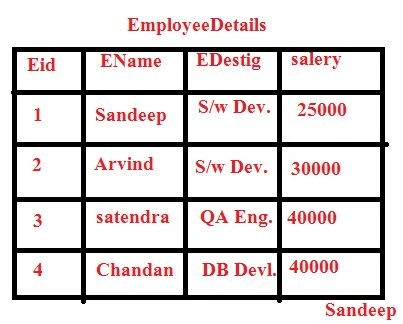 Figure:
 EmployeeDetails table
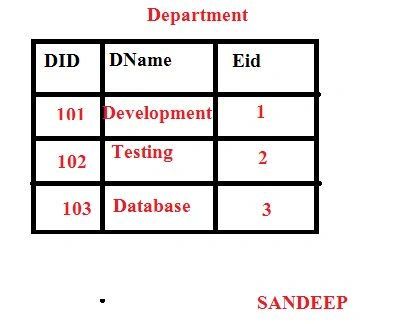 Figure:
 Department table
Now back end developer will create one web API to use view-in-sql-server. Here's the syntax or the same,
Syntax- Create view-in-sql-server view-in-sql-server_name
- As
- Select column name
- From tables name
- Where clause
- create view - in -sql - server ViewEmpdep
- as
- select e.ename, e.Designation, d.did, d.dname
- from Empdetails e, Department d
- where e.eid = d.eid
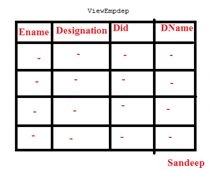 Figure:
 ViewEmpdep
Now front end developer can write the code and send the Employee details to client. Suppose front end developer is writing code in C#.NET as,
- Using System.Data;
- Using System.Data.SqlClient;
- SqlConnection con = new SqlConnection(“Integrated security = true; Initial catalog = DatabaseDetails; data source = .”);
- SqlDataAdapter Da;
- Private void Page_Load()
- {
- Con.Open();
- String s = ”select * from ViewEmpdep”
- Da = new SqlDataAdaper(s, con);
- Dataset ds = new Dataset();
- Da.Fill(ds, ”Empdet”);
- DataGridView1.DataSource = ds.Tables[0];
- DataGridView1.DataBound
- Con.Close
- }
- MessageBox.Show(“Details has displayed”);
Now company can send the Employee details without Salary details to client.
Point to Remember: View is virtual table which is used to create web API. It is used to display the data from one and more than one tables. There are two types of View and these are:
- Simple View
- Complex View
Syntax for View is
- Create viewView_Name
- As
- Select column name
- From tables
- Where clause
- Simple View: Simple view is a type of view which is used to create web API for restrictions of data in a single table.
Simple View Explanations
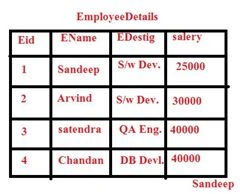
Figure: Table EmployeeDetails
There is a table EmployeeDetails which contains columns Eid, EName, Edistig and Salary. In this table we have to display EName, Edistig where Salary is greater than 20000.
Query for Simple View is:
- Create View viewSimple As
- Select Eid, EName, Edistig
- FromEmployeeDetails
- Where Salary > 20000
- Complex View: Complex view is a type of view which is used to create web API for restrictions of data by using more than 1 tables.
Complex View Explanations
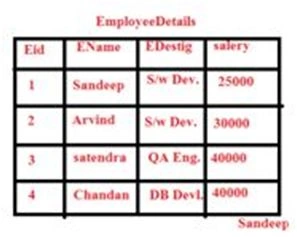
Figure: Table EmployeeDetails
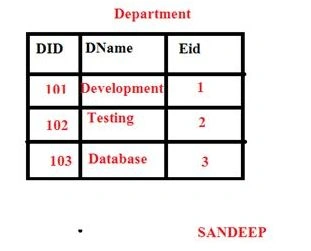
Figure: Table Department
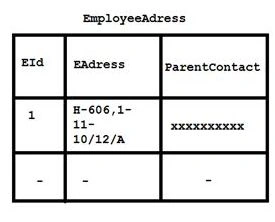
Figure: Table EmployeeAdress
There are two tables, EmployeeDetails which contains columns Eid, EName, Edestig and Salary and table Department that contains column Did, DName, EId and Table EmployeeAddress contain Column EId, EAdress and ParentContact . In these table we have to display Ename, Edestig, Salary, DId, DName, EAdress, and ParentContact .
Query for creating Complex View:
- Create View ViewComplex
- as
- selecte.ename, e.Designation, d.DId, d.DName, a.EAdress, a.ParentContact
- from EmpDetails e, Department d, EmployeeAdress a
- where e.EId = d.EId And
- e.EId = a.EId
Recap: View is a virtual table which is used to create Web API. There are 2 types of View and those are,
- Simple View and
- Complex view
Syntax
- CreateView View_Name
- As
- SelectColumns Name
- FromTables Name
- Where Clause


Ankit BansalPosted Dec 24, 2015, 7:40 AM
nice..
Sibeesh VenuPosted Dec 24, 2015, 3:43 AM
Nice Share
Raja TPosted Dec 24, 2015, 12:58 AM
Nice, Thanks for sharing
Humayun Kabir MamunPosted Dec 23, 2015, 11:58 PM
Nice...