

This article is meant for ASP.NET website and web application beginners who are struggling their way through the learning processes and want to build their own ASP.NET websites or web applications that use real-time processes and/or some basic stuff like user profiles where they would be using some code to display the age of the user of whom the profile is being viewed. I will be providing an overview of the DateTime object to be used in the ASP.NET website. (So please make up your mind, that I am not actually talking about the DateTime object itself, instead I will talk about the procedures that will be taken to create a better user-interface for your website, so you can categorize this article as a front-end developer only post. If you're interested in learning about the DateTime object, or want to learn about it and were redirected to this web page, then you'll be wasting your time reading any further, please go to this article of mine that explains the DateTime object in the .NET framework) I will be showing how to use various methods and server-side codes (I will be using C#, you can choose your own) to use the objects to provide the data for your users and to build the user-interface that makes use of date instances, like age calculator, calendar applications and so on.
Uses of the DateTime object
Since ASP.NET developers are unaware of the actual processes taking place in the back end and because of the awesome-ness of the ASP.NET framework, usually the new developers are left in the dark of what these objects and functions actually are. The major thing and the major problem in this process is the usage of the keyword “var” in the ASP.NET web applications. Although it leaves much not-required code behind (as in the second code line) but still it doesn't allow new developers to understand the concept of “variable declaration“.
- var dateTime = DateTime.Now;
- // is same as
- DateTime dateTime = DateTime.Now;
In ASP.NET, the DateTime object is used to represent various elements in HTML that require some data that would be better represented by the DateTime object, like a calendar application, although you can write a loop for 31 days, but who wants to when you've got a structure to take care of that for you?
DateTime is a struct in .NET, it is not a class. See MSDN for more specification. There is a difference between them both, one is a value-type and the other is a reference-type; class is reference-type.
Similarly, you can do various other tasks using a DateTime object, such as finding the age and all other such processes. I will be explaining the concepts of finding the age and the code required to complete the process in this article later. Until then, it is just a few scenarios that you might want to accomplish using a DateTime object. Sometimes, your user wants to edit the way he gets to see the date on your application, the default machine date would be displayed as month/day/year, but people here from Pakistan are more familiar with day/month/year, you would need to either define multiple modules for that. Or, you can easily just use the DateTime object and display the dates in the various formats that the user wants.
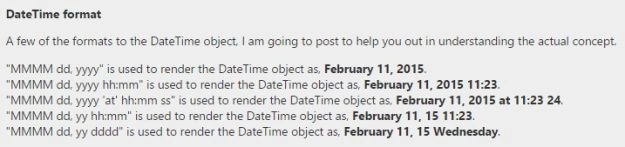
I would show how to simple string-like formats to the objects, to create their string notations. This would help you in various scenarios, such as fetching the user-friendly formats from the database or other data source and so on.
Using the DateTime in ASP.NET applications
Although ASP.NET applications are now using the .cshtml (or for VB.NET developers .vbhtml) pages that come embedded with all of the required assemblies already included into the file, for you to simply use them without having to reference them all one-by-one such as System and a bunch of other ASP.NET-required assemblies, you still can use the .NET assemblies by using them as you would in any C# application. DateTime is found in the System namespace, so no further reference is required. You can use the DateTime object directly in the web page. Let us create our first module.
Calculating the age of the user
Of course for the user's age, we're going to use a DateTime object, to get the year and then the month and date of the user. I can't say about the old days, but yes, you can possibly do that using three integer values too; one for year, month and day. But since you have the DateTime object you can easily just use this object and let the .NET framework handle the other things for you.
A user's age is the total days (in the .NET Framework I am talking about, because there are no years in .NET, just a Day member) the member has lived on the planet, that started from the day he got born, or you can add some extra precision to the instance, by adding the hours, minutes and seconds for when the person was born. To calculate the age, you would subtract that date (birthdate) from the very now instance. In the .NET Framework, you can get the current time using DateTime.Now. It is a static member, so you can get this value without having to create a new instance. Now let us write the code to calculate the age of the user. Suppose, I was a user, I would do it this way.
Did you know: A year is made up of 365.25 days and that is why there is a leap year every 4 years.
- /* -------------------------
- * Age finding code here... */
- // Create a new object
- var dateOfBirth = new DateTime(1995, 2, 2);
- // Get the today object
- var timeSpan = DateTime.Today.Subtract(dateOfBirth);
- // Now let us stylize it a bit to make sure we get enough details.
- // Divide the days by 365.25; make years
- var age = (int) (timeSpan.TotalDays / 365.25);
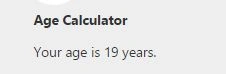
Age calculator. Provides the age of the user using a DateTime object.
I do not need to show the HTML code that was used, everyone knows this basic code to render the data in the HTML form.
Finding the total time spent
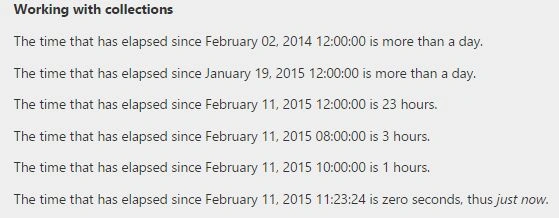
Usually, there are some scenarios in which developers want to find a time span that has ed for some other instance of time. Like, how much time has elapsed since a prior meeting, or how much time has ed since the last presentation and so on. In such conditions, the .NET Framework has introduced the class TimeSpan for displaying the actual time span between two datetime objects. We all know the difference between two objects is found by subtracting the later one from the first one, the result in the case of DateTime objects is a TimeSpan object.
Let us see another example of this case, we will take a date (no longer than a day) to test the hours and another date (no longer than a year) to test the days that have been ed since that specific date.
- /* -------------------------------------------------
- * Code for time spans for finding the elapsed time */
- // Create instances
- var preTimeHour = new DateTime(2015, 2, 10);
- var preTimeYear = new DateTime(2014, 8, 29);
- // Get the time elapsed for these times
- var elapsedHours = DateTime.Now.Subtract(preTimeHour).Hours;
- var elapsedYear = DateTime.Now.Subtract(preTimeYear).Days;

Rahul Kumar SaxenaPosted Feb 14, 2015, 1:25 PM
Hi Afzaal You are doing a fabulous job. It's doesn't matter whatever we have here in comment section. For us yours writing and sharing content is more important. Appreciate your content explanation. Thanks for sharing. Cheers bro... :)
VulpesPosted Feb 14, 2015, 1:05 PM
Mahesh, can I suggest that if the editors want to change a carefully crafted article such as this one for anything other than minor spelling and grammatical mistakes, that they refer to the author first before doing so?
VulpesPosted Feb 13, 2015, 6:27 PM
The title of the article is still wrong as DateTime is a struct, not a class, in the .NET framework. Indeed Afzaal says as much in the body of the article.
Mahesh ChandPosted Feb 13, 2015, 11:15 AM
Agree with Pranay. As an author, we should be happy to get positive critics and use them to improve our writing skills. Cheers!
Pranay RanaPosted Feb 13, 2015, 10:44 AM
Thats look good because wrong article leads to confusion to other and mostly beginer people who is learning things ....that is the only reason I comment on it... I hope dont take it on heart
Pranay RanaPosted Feb 13, 2015, 1:28 AM
I disagree with title of this post because DateTime and its formating is part of C# language its not related with Asp.Net which is front end layer on language/framework