

What is SignalR
According to Wikipedia, ASP.NET SignalR is a library for ASP.NET developers to add real-time web functionality to their applications.
SignalR is a framework for building asynchronous applications. “R” stand for “Real Time”. SignalR is a realtime communication framework built on top of the WebSoket specification.
It does fallback to classic HTTP when websockets are not supported by client or server. SignalR is stateless by design and it’s not aware of ASP.NET user session
MVC SignalR Project
To create sample applications, we need to have Visual Studio 2012 or later installed and be able to run the server on a platform that supports .NET 4.5.
Step 1:
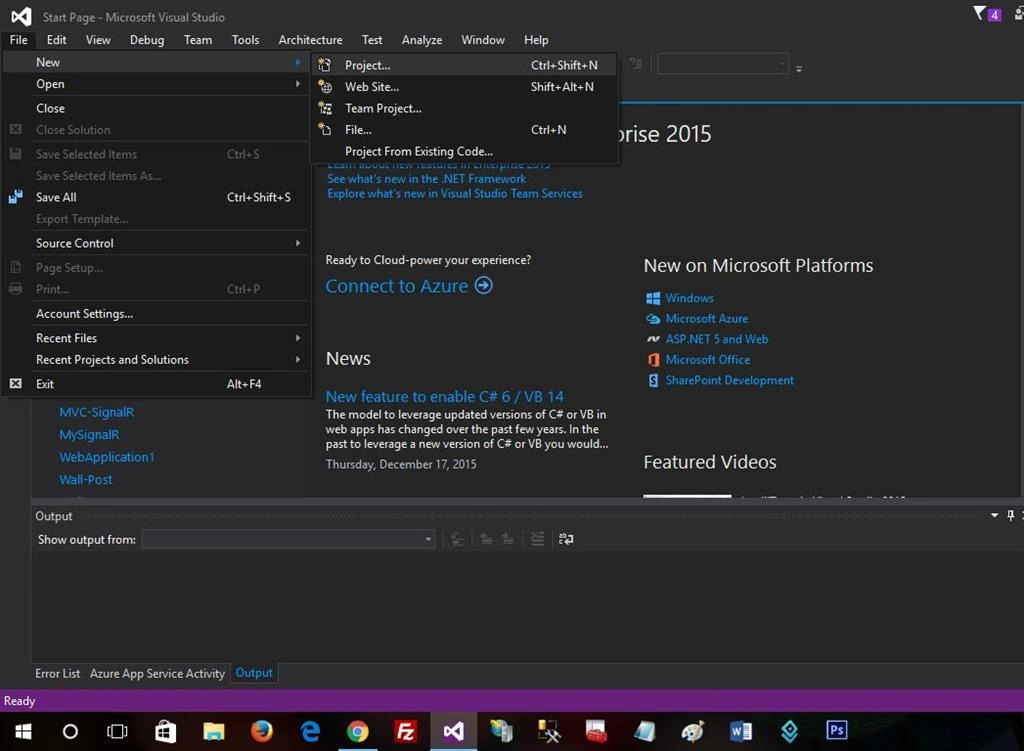
Step 2:
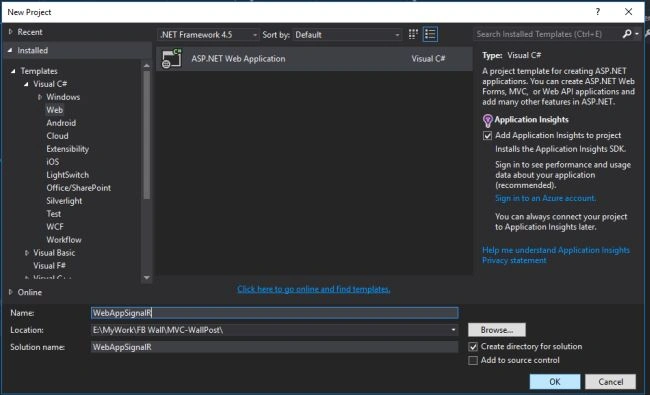
Step 3:
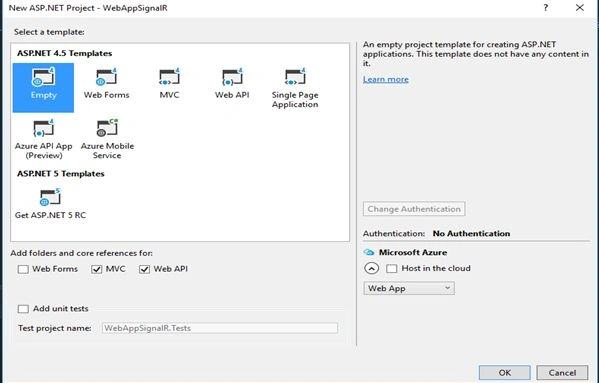
Getting Started with SignalR
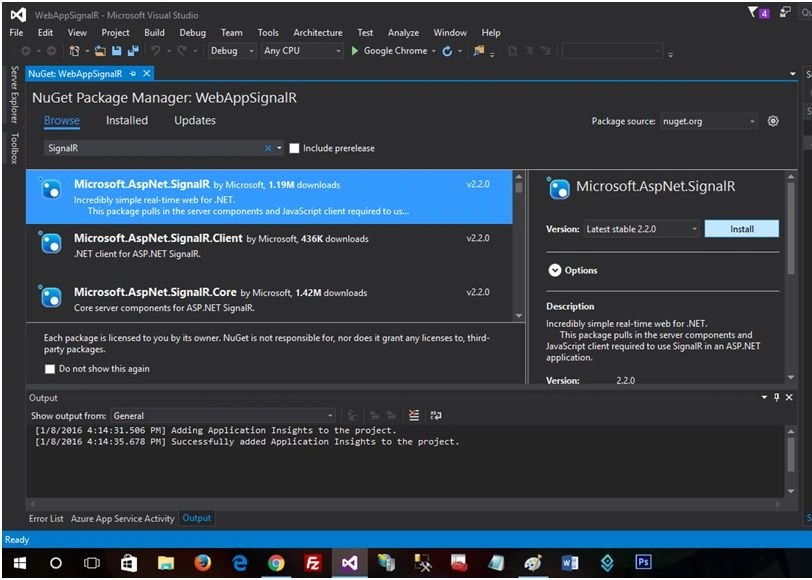
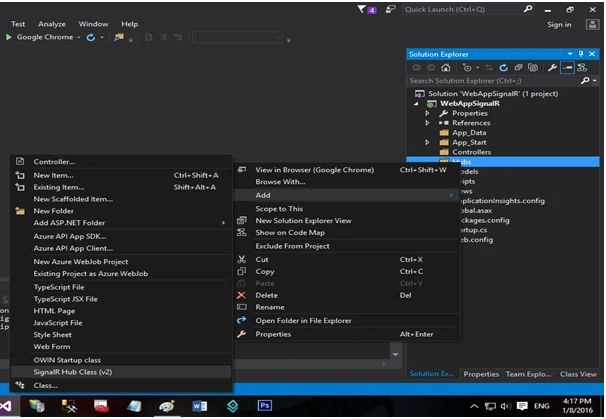
The first thing is NuGet, which is used to get the needed SignalR assemblies into our solution. Next, we focus on creating OwinStartup class.
Get it on NuGet!
Install-Package Microsoft.AspNet.SignalR
Register SignalR middleware
The following code is to define the SignalR Hubs route using an OWIN startup class. Now we will create OwinStartup Class:
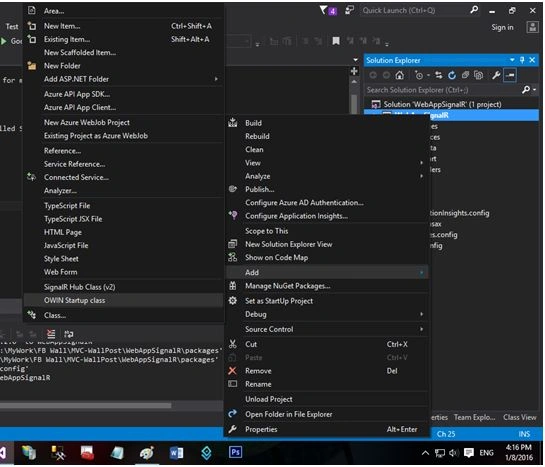
Startup.cs
To create sample applications, we need to have Visual Studio 2012 or later installed and be able to run the server on a platform that supports .NET 4.5.
Step 1:
Step 2:
Step 3:
Getting Started with SignalR
The first thing is NuGet, which is used to get the needed SignalR assemblies into our solution. Next, we focus on creating OwinStartup class.
Get it on NuGet!
Install-Package Microsoft.AspNet.SignalR
Register SignalR middleware
The following code is to define the SignalR Hubs route using an OWIN startup class. Now we will create OwinStartup Class:
Startup.cs
- using System;
- usingSystem.Threading.Tasks;
- usingMicrosoft.Owin;
- usingOwin;
- [assembly: OwinStartup(typeof (WebAppSignalR.Startup))]
- namespaceWebAppSignalR
- {
- publicclassStartup
- {
- publicvoid Configuration(IAppBuilder app)
- {
- app.MapSignalR();
- }
- }
- }
The following attribute will set the startup class to the TestStartup class in the StartupDemo namespace.
- [assembly: OwinStartup(typeof(WebAppSignalR.Startup))]
- public void Configuration(IAppBuilder app)
- {
- app.MapSignalR();
- }
Shamim UddinPosted Oct 2, 2016, 1:25 AM
Nice
Mohammed IbrahimPosted Jan 11, 2016, 3:00 AM
nice
Santhakumar MunuswamyPosted Jan 10, 2016, 11:38 AM
Thanks for nice article
Karthikeyan KPosted Jan 10, 2016, 9:44 AM
Good one..
Humayun Kabir MamunPosted Jan 10, 2016, 7:33 AM
Nice...
Manoj KallaPosted Jan 10, 2016, 6:07 AM
good one..
Nanddeep NachanPosted Jan 10, 2016, 4:44 AM
Thanks. SignalR apps are also available now which are easy to configure and use.
Ankit BansalPosted Jan 10, 2016, 2:46 AM
nice one..keep sharing..
Manas MohapatraPosted Jan 10, 2016, 12:47 AM
Nice sharing. Your article would have more value if you define it more clearly.