

Introduction
In this article we will explore the Panorama Control with scrolling capability. Panoramic experiences are a part of the native Windows Phone look and feel. Unlike standard applications that are designed to fit within the confines of the phone screen, panoramic applications offer a unique way to view controls, data, and services by using a long horizontal canvas that extends beyond the confines of the screen. These inherently dynamic views use layered animations and content so that layers smoothly pan at different speeds, similar to parallax effects.
At the base of the application is the Panorama Control that is essentially a long horizontal canvas. A secondary control called a PanoramaItem serves as a container that hosts other content and controls such as links, grids, and lists. There are multiple ways in Visual Studio to create a panorama experience in Windows Phone.
- You can use a custom template named Windows Phone Panorama Application when creating a new project. This template will come pre-populated with content and you can modify the template accordingly.
- The Panorama Control can be added to the Toolbox in Visual Studio and dropped into your project.
- You can add a Windows Phone Panorama Page to a pre-existing project to create a panoramic experience.
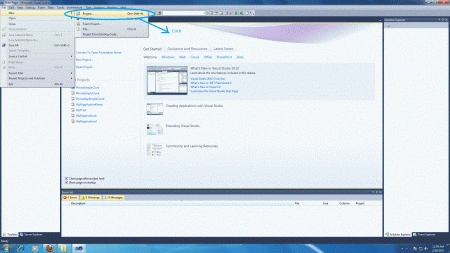
- Select new -> project
- Select your preferred language
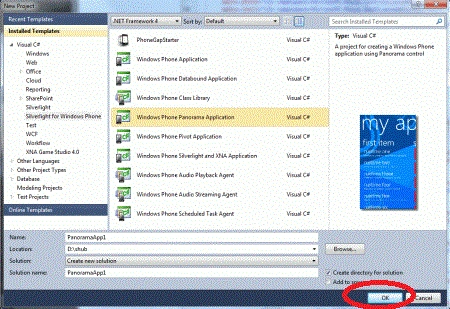
- Select Silverlight for Windows Phone Panorama application
- Name the project
- Now name of project is "PanoramaApplication1"
Step 2 : Add some required image to this project.
-
Add an image to the project to use as a background image of the Panorama Control to set the property.
-
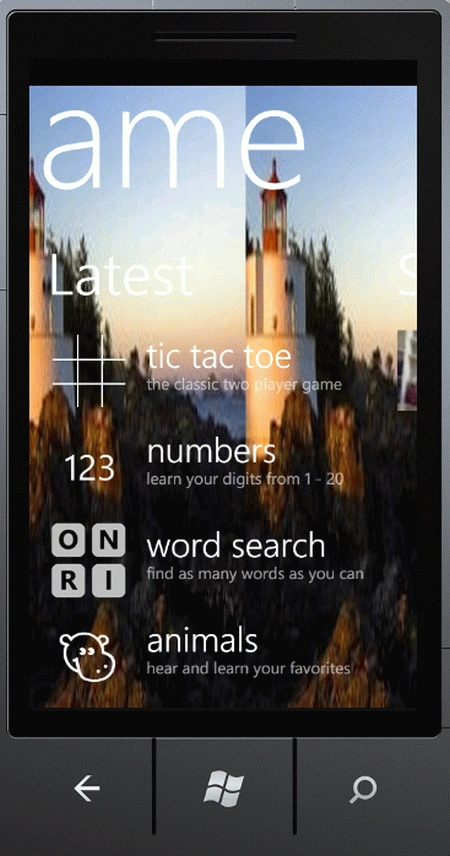
Add image icons for the games used in this project; here I added 5 image icons for games like Tic Tac Toe, Numbers, Alphabet etc.
Step 3 : The whole code of the MainPage.xaml page is:
Code
<phone:PhoneApplicationPage
x:Class="Day16_PanoramaControl.MainPage"
xmlns="http://schemas.microsoft.com/winfx/2006/xaml/presentation"
xmlns:x="http://schemas.microsoft.com/winfx/2006/xaml"
xmlns:phone="clr-namespace:Microsoft.Phone.Controls;assembly=Microsoft.Phone"
xmlns:shell="clr-namespace:Microsoft.Phone.Shell;assembly=Microsoft.Phone"
xmlns:d="http://schemas.microsoft.com/expression/blend/2008"
xmlns:mc="http://schemas.openxmlformats.org/markup-compatibility/2006"
mc:Ignorable="d" d:DesignWidth="480" d:DesignHeight="768"
FontFamily="{StaticResource PhoneFontFamilyNormal}"
FontSize="{StaticResource PhoneFontSizeNormal}"
Foreground="{StaticResource PhoneForegroundBrush}"
SupportedOrientations="Portrait" Orientation="Portrait"
shell:SystemTray.IsVisible="True" xmlns:controls="clr-namespace:Microsoft.Phone.Controls;assembly=Microsoft.Phone.Controls" Loaded="PhoneApplicationPage_Loaded">
<!--LayoutRoot is the root grid where all page content is placed-->
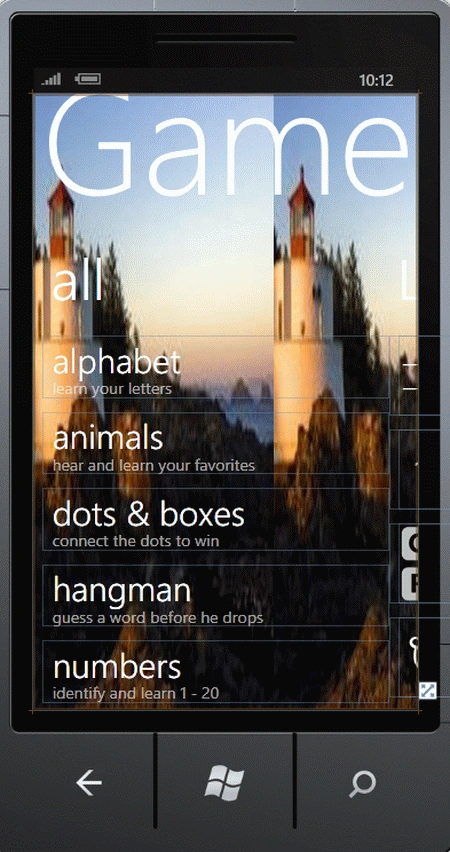
<controls:Panorama Title="Game">
<controls:PanoramaItem Header="all">
<ListBox Margin="0,0,-12,0">
<StackPanel Margin="0,0,0,17" Width="432">
<TextBlock Text="alphabet" TextWrapping="Wrap" Style="{StaticResource PhoneTextExtraLargeStyle}"/>
<TextBlock Text="learn your letters" TextWrapping="Wrap" Margin="12,-6,12,0" Style="{StaticResource PhoneTextSubtleStyle}"/>
</StackPanel>
<StackPanel Margin="0,0,0,17" Width="432">
<TextBlock Text="animals" TextWrapping="Wrap" Style="{StaticResource PhoneTextExtraLargeStyle}"/>
<TextBlock Text="hear and learn your favorites" TextWrapping="Wrap" Margin="12,-6,12,0" Style="{StaticResource PhoneTextSubtleStyle}"/>
</StackPanel>
<StackPanel Margin="0,0,0,17" Width="432">
<TextBlock Text="dots & boxes" TextWrapping="Wrap" Style="{StaticResource PhoneTextExtraLargeStyle}"/>
<TextBlock Text="connect the dots to win" TextWrapping="Wrap" Margin="12,-6,12,0" Style="{StaticResource PhoneTextSubtleStyle}"/>
</StackPanel>
<StackPanel Margin="0,0,0,17" Width="432">
<TextBlock Text="hangman" TextWrapping="Wrap" Style="{StaticResource PhoneTextExtraLargeStyle}"/>
<TextBlock Text="guess a word before he drops" TextWrapping="Wrap" Margin="12,-6,12,0" Style="{StaticResource PhoneTextSubtleStyle}"/>
</StackPanel>
<StackPanel Margin="0,0,0,17" Width="432">
<TextBlock Text="numbers" TextWrapping="Wrap" Style="{StaticResource PhoneTextExtraLargeStyle}"/>
<TextBlock Text="identify and learn 1 - 20" TextWrapping="Wrap" Margin="12,-6,12,0" Style="{StaticResource PhoneTextSubtleStyle}"/>
</StackPanel>
<StackPanel Margin="0,0,0,17" Width="432">
<TextBlock Text="tic tac toe" TextWrapping="Wrap" Style="{StaticResource PhoneTextExtraLargeStyle}"/>
<TextBlock Text="the classic two-player game" TextWrapping="Wrap" Margin="12,-6,12,0" Style="{StaticResource PhoneTextSubtleStyle}"/>
</StackPanel>
<StackPanel Margin="0,0,0,17" Width="432">
<TextBlock Text="tip calculator" TextWrapping="Wrap" Style="{StaticResource PhoneTextExtraLargeStyle}"/>
<TextBlock Text="how good was the service, anyways?" TextWrapping="Wrap" Margin="12,-6,12,0" Style="{StaticResource PhoneTextSubtleStyle}"/>
</StackPanel>
<StackPanel Margin="0,0,0,17" Width="432">
<TextBlock Text="word find" TextWrapping="Wrap" Style="{StaticResource PhoneTextExtraLargeStyle}"/>
Join the conversation! Your thoughts help the community grow.