

C# Foreach loop
Foreach loop in C# runs upon a single thread and processing takes place sequentially one by one. Foreach loop is a basic feature of C# and it is available from C# 1.0. Its execution is slower than the Parallel.Foreach in most of the cases.
C# Parallel.ForEach loop
Parallel.ForEach loop in C# runs upon multiple threads and processing takes place in a parallel way. Parallel.ForEach loop is not a basic feature of C# and it is available from C# 4.0 and above. Before C# 4.0 we cannot use it. Its execution is faster than foreach in most of the cases. To use Parallel.ForEach loop we need to import System.Threading.Tasks namespace in using directive.
But you know your application well and you can decide which one you want to use.
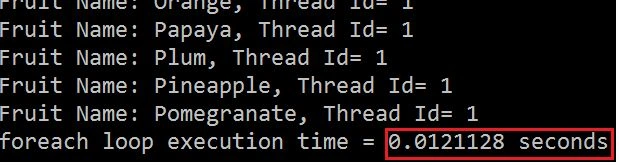
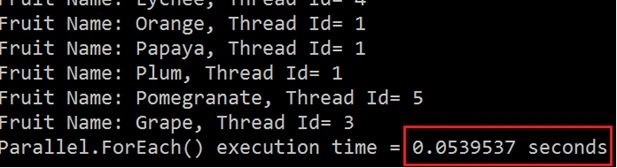
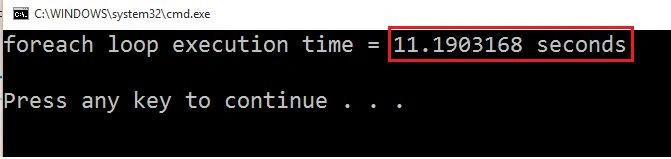
I am giving 2 examples, in the first example traditional foreach loop is faster than Parallel.foreach loop where as in second example traditional foreach loop is very slow as compared to Parallel.foreach.
Example 1: Parallel.ForEach loop is slower than Traditional Foreach loop.
List<string> fruits = new List<string>();
  fruits.Add("Apple");
  fruits.Add("Banana");
  fruits.Add("Bilberry");
  fruits.Add("Blackberry");
  fruits.Add("Blackcurrant");
  fruits.Add("Blueberry");
  fruits.Add("Cherry");
  fruits.Add("Coconut");
  fruits.Add("Cranberry");
  fruits.Add("Date");
  fruits.Add("Fig");
  fruits.Add("Grape");
  fruits.Add("Guava");
  fruits.Add("Jack-fruit");
  fruits.Add("Kiwi fruit");
  fruits.Add("Lemon");
  fruits.Add("Lime");
  fruits.Add("Lychee");
  fruits.Add("Mango");
  fruits.Add("Melon");
  fruits.Add("Olive");
  fruits.Add("Orange");
  fruits.Add("Papaya");
  fruits.Add("Plum");
  fruits.Add("Pineapple");
  fruits.Add("Pomegranate");

  Console.WriteLine("Printing list using foreach loop\n");

  var stopWatch = Stopwatch.StartNew();
  foreach (string fruit in fruits)
  {
      Console.WriteLine("Fruit Name: {0}, Thread Id= {1}", fruit, Thread.CurrentThread.ManagedThreadId);
  }
  Console.WriteLine("foreach loop execution time = {0} seconds\n", stopWatch.Elapsed.TotalSeconds);
  Console.WriteLine("Printing list using Parallel.ForEach");


  stopWatch = Stopwatch.StartNew();
  Parallel.ForEach(fruits, fruit =>
  {
      Console.WriteLine("Fruit Name: {0}, Thread Id= {1}", fruit, Thread.CurrentThread.ManagedThreadId);

  }
  );
  Console.WriteLine("Parallel.ForEach() execution time = {0} seconds", stopWatch.Elapsed.TotalSeconds);
  Console.Read();
Output
Example 2: Parallel.ForEach loop is faster than Traditional Foreach loop.
Traditional Foreach
var stopWatch = Stopwatch.StartNew();
PointF firstLocation = new PointF(10 f, 10 f);
PointF secondLocation = new PointF(10 f, 50 f);
foreach(string file in Directory.GetFiles(@ "D:\Images"))
{
    Bitmap bitmap = (Bitmap) Image.FromFile(file);
    using(Graphics graphics = Graphics.FromImage(bitmap))
    {
        using(Font arialFont = new Font("Arial", 10))
        {
            graphics.DrawString("Banketeshvar", arialFont, Brushes.Blue, firstLocation);
            graphics.DrawString("Narayan", arialFont, Brushes.Red, secondLocation);
        }
    }
    bitmap.Save(Path.GetDirectoryName(file) + "Foreachloop" + "\\" + Path.GetFileNameWithoutExtension(file) + Guid.NewGuid()
        .ToString() + ".jpg");
}
Console.WriteLine("foreach loop execution time = {0} seconds\n", stopWatch.Elapsed.TotalSeconds);
Output
Parallel.foreach
var stopWatch = Stopwatch.StartNew();
PointF firstLocation = new PointF(10 f, 10 f);
PointF secondLocation = new PointF(10 f, 50 f);
Parallel.ForEach(Directory.GetFiles(@ "D:\Images"), file =>
{
    Bitmap bitmap = (Bitmap) Image.FromFile(file);
    using(Graphics graphics = Graphics.FromImage(bitmap))
    {
        using(Font arialFont = new Font("Arial", 10))
        {
            graphics.DrawString("Banketeshvar", arialFont, Brushes.Blue, firstLocation);
            graphics.DrawString("Narayan", arialFont, Brushes.Red, secondLocation);
        }
    }
    bitmap.Save(Path.GetDirectoryName(file) + "Parallel" + "\\" + Path.GetFileNameWithoutExtension(file) + Guid.NewGuid()
        .ToString() + ".jpg");
});
Console.WriteLine("Parallel.ForEach() execution time = {0} seconds", stopWatch.Elapsed.TotalSeconds);
Console.Read();
Output

To test the performance of the above code, I have used around 150 images in both cases.
You can see that if you are doing any bulk task inside the foreach loop then parallel.foreach is very fast so you can go for parallel.foreach. But if you just iterating and doing a very little task inside loop then go for traditional for loop.
SubashPosted Jan 22, 2024, 5:19 AM
Useful and easy understanding thank you
Tyler WaynePosted Aug 13, 2021, 12:59 AM
I think the reason the parallel.forEach is slower in the first test was because console.writeline only allows on thread to write to it at a time.
John DukichPosted May 15, 2021, 10:47 PM
Thanks for article. As you said, the Parallel.ForEach or, for that matter, Tasks in general, the operations in the loop need to be slower than the time that the runtime needs to setup the tasks. The time it takes to get the enumerator Is a factor also.
behnamPosted Mar 14, 2021, 11:33 AM
Great example. Actually I've downloaded and tested the sample on a some how fast core i5 CPU with 8 gigabytes of ram with FSB of about 2.2 Ghz. Then, I commented out the foreach codes just after the Stopwatch.StartNew(); declarations. Also, I wrapped fruites.Add clause within a for loop. After running the code several times, with different upper bond numbers in the wrapping for loop, every time I encountered with the result of Parallel for equal or lower than the normal foreach loop.Maybe its worth to say that I examined the sample on .net core 3 console app.
ovis ariesPosted Jun 10, 2020, 4:10 AM
Nice example and explanation
Banketeshvar NarayanPosted Mar 19, 2020, 2:27 PM
Example 1: Parallel.ForEach loop is slower than the Traditional Foreach loop. forach Execution Time: 0.1 second Parallel.ForEach Execution Time: 0.5 second Example 2: Parallel.ForEach loop is faster than the Traditional Foreach loop. forach Execution Time: 11.2 second Parallel.ForEach Execution Time: 5.12 second
Dawid DebinskiPosted Mar 19, 2020, 7:51 AM
Example 2 Really how 0.01 execution time is worst than 0.05? Joke?
Yaduveer SainiPosted Feb 14, 2020, 4:07 AM
Nice article Banke sir
Mas MuhammadPosted Oct 23, 2018, 7:29 AM
Parallel is faster than traditional loop but parallel probably data racing and better adding mutex or lock to avoid that.
Raghava chPosted Mar 5, 2018, 6:43 AM
Nice Article sir, i got good info on Threading
Banketeshvar NarayanPosted Dec 17, 2015, 10:52 AM
Thanks Amandeep
Amandeep singhPosted Dec 17, 2015, 9:46 AM
good one
Banketeshvar NarayanPosted Dec 15, 2015, 12:15 AM
Thanks Dhrumit
Former memberPosted Dec 14, 2015, 10:57 PM
Good one sir....
Teddy OlsonPosted Dec 14, 2015, 1:31 PM
I didn't know that threading manipulation could be implemented this way, thanks for the write up!
Banketeshvar NarayanPosted Dec 1, 2015, 1:34 AM
Thanks Ankur Mistry
Ankur MistryPosted Dec 1, 2015, 12:59 AM
nice
Banketeshvar NarayanPosted Nov 30, 2015, 11:42 AM
Thanks Suman
Suman VermaPosted Nov 30, 2015, 5:48 AM
nice one
Banketeshvar NarayanPosted Nov 30, 2015, 2:27 AM
Thanks Aishwarya
Aishwarya DPosted Nov 30, 2015, 1:46 AM
Nice Share
Banketeshvar NarayanPosted Nov 28, 2015, 2:37 AM
Saillesh Pawar, you are right. If doing any operation in which one iteration is dependent upon other then please do not use Parallel.foreach
Banketeshvar NarayanPosted Nov 24, 2015, 2:33 PM
you can visit https://msdn.microsoft.com/en-us/library/dd997392%28v=vs.110%29.aspx
Former memberPosted Nov 24, 2015, 1:30 PM
One thing to keep in mind is that each parallel task may run on a different thread, so should we protect the shared state?
Former memberPosted Nov 24, 2015, 1:28 PM
A more common situation is when you want the ability to cancel a parallel loop. Thisis different than stopping the loop. How the cancelling of a parallel loop is different than stopping of a parallel loop?
Former memberPosted Nov 24, 2015, 1:27 PM
The Parallel.ForEach method allows parallel processing over a sequence of values. Asimilar solution is Parallel LINQ (PLINQ). Parallel LINQ provides much of the same capabilities with a LINQ-like syntax. What are the advantages of PLINQ over Parallel.Foreach?
Former memberPosted Nov 24, 2015, 1:24 PM
There are some situations where you’ll want to stop the loop early, such as if you encounteran invalid value. Then, how will you handle this in parallel.foreach?
Banketeshvar NarayanPosted Nov 24, 2015, 10:03 AM
Thanks Gul Md Ershad
Former memberPosted Nov 24, 2015, 8:00 AM
nice one
Manoj KulkarniPosted Nov 24, 2015, 5:12 AM
Nice article. Thank you for sharing
Mukesh KumarPosted Nov 24, 2015, 4:41 AM
Good One Banke
Banketeshvar NarayanPosted Nov 24, 2015, 3:56 AM
Thanks Akash Malhotra
Akash MalhotraPosted Nov 24, 2015, 3:40 AM
Nice one
Debasis SahaPosted Nov 24, 2015, 3:04 AM
Nice one..
Saillesh PawarPosted Nov 24, 2015, 2:27 AM
Thanks updated myself with this one. Appreciate your work
Harshad PansuriyaPosted Nov 24, 2015, 2:27 AM
Nice one
Vipul MalhotraPosted Nov 24, 2015, 2:16 AM
nice article
Banketeshvar NarayanPosted Nov 24, 2015, 2:08 AM
Thanks Yaduveer
Yaduveer SainiPosted Nov 24, 2015, 1:52 AM
Very Nice Article Banketeshvar Narayan.