

Property in TypeScript
- A property for each exported variable declaration.
- A property of a function type for each exported function declaration.
- A property of a constructor type for each exported class declaration.
- A property of an object type for each exported internal module declaration.
TypeScript has a shortcut notation to declare properties with the same name and value as the constructor parameter. For this, you can prefix a constructor parameter with either "private" or "public."
In the following example, we are creating a property for Name, Emp Id and Designation. We can access a property by the "this" keyword. Let's use the following steps and see how to access a property with this keyword.
Step 1
Open Visual Studio 2012 and click "File" -> "New" -> "Project...". A window is shown as:
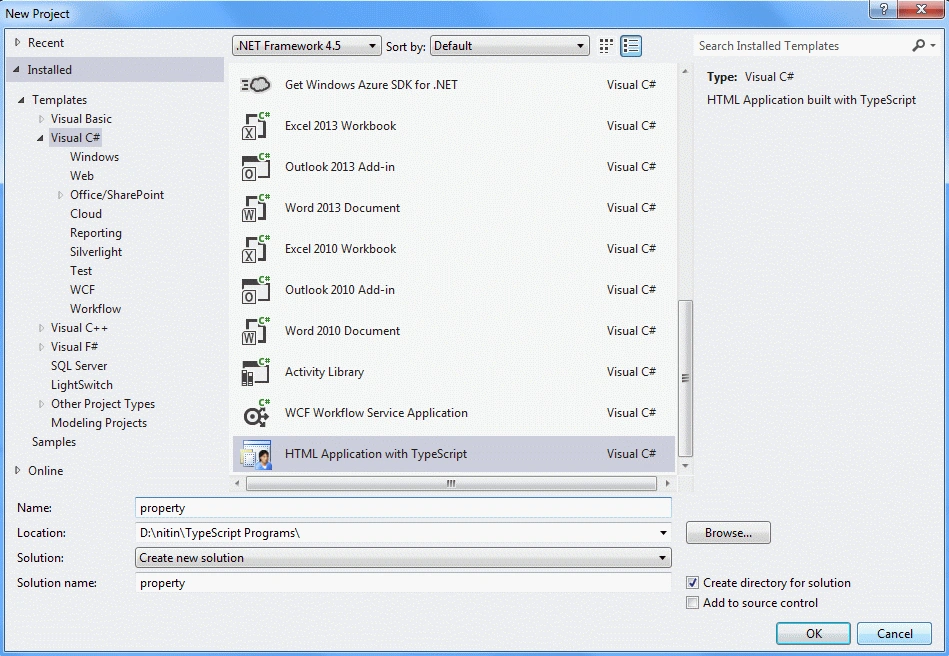
Give the name of your application as "property" and then click ok.
Step 2
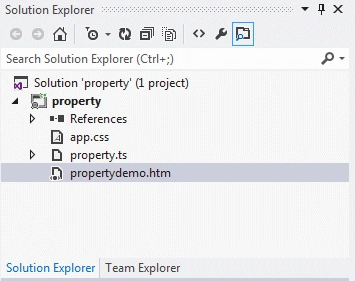
After this session, the project has been created; your new project should look like this:
Coding
property.ts
- class empinfo {
- constructor(public Emp_ID: number, public name: string, public Designation: string) {}
- sayName() {
- var span = document.createElement("span");
- span.innerText = "\nEmp ID ->" + this.Emp_ID + "\nName ->" + this.name + "\nDesignation ->" + this.Designation;
- document.body.appendChild(span);
- }
- }
- class Greeter {
- element: HTMLElement;
- span: HTMLElement;
- timerToken: number;
- constructor(element: HTMLElement) {
- this.element = element;
- this.element.innerText += "Now Time is: ";
- this.span = document.createElement('span');
- this.element.appendChild(this.span);
- this.span.innerText = new Date().toUTCString();
- }
- start() {
- this.timerToken = setInterval(() => this.span.innerText = new Date().toTimeString(), 500);
- }
- stop() {
- clearTimeout(this.timerToken);
- }
- }
- window.onload = () => {
- var a = new empinfo(1, "Rahul", "Software Developer");
- a.sayName();
- var el = document.getElementById('content');
- var greeter = new Greeter(el);
- greeter.start();
- }
propertydemo.html
- <!DOCTYPEhtml>
- <htmllanghtmllang="en"
- xmlns="http://www.w3.org/1999/xhtml">
- <head>
- <metacharsetmetacharset="utf-8"/>
- <title>Property TypeScript HTML App</title>
- <linkrellinkrel="stylesheet"href="app.css"type="text/css"/>
- <scriptsrcscriptsrc="app.js">
- </script>
- </head>
- <body>
- <h2>Parameter Property Example in TypeScript HTML App</h2>
- <dividdivid="content"/>
- </body>
- </html>
app.js
- var empinfo = (function() {
- function empinfo(Emp_ID, name, Designation) {
- this.Emp_ID = Emp_ID;
- this.name = name;
- this.Designation = Designation;
- }
- empinfo.prototype.sayName = function() {
- var span = document.createElement("span");
- span.innerText = "\nEmp ID ->" + this.Emp_ID + "\nName ->" + this.name + "\nDesignation ->" + this.Designation;
- document.body.appendChild(span);
- };
- return empinfo;
- })();
- var Greeter = (function() {
- function Greeter(element) {
- this.element = element;
- this.element.innerText += "Now Time is: ";
- this.span = document.createElement('span');
- this.element.appendChild(this.span);
- this.span.innerText = new Date().toUTCString();
- }
- Greeter.prototype.start = function() {
- var _this = this;
- this.timerToken = setInterval(function() {
- return _this.span.innerText = new Date().toTimeString();
- }, 500);
- };
- Greeter.prototype.stop = function() {
- clearTimeout(this.timerToken);
- };
- return Greeter;
- })();
- window.onload = function() {
- var a = new empinfo(1, "Rahul", "Software Developer");
- a.sayName();
- var el = document.getElementById('content');
- var greeter = new Greeter(el);
- greeter.start();
- };
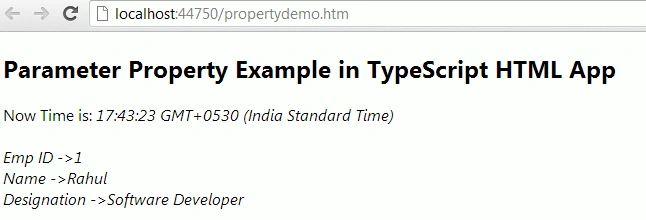
Output
Join the conversation! Your thoughts help the community grow.